

10 běžných chyb při frézování na CNC a jak se jim vyhnout
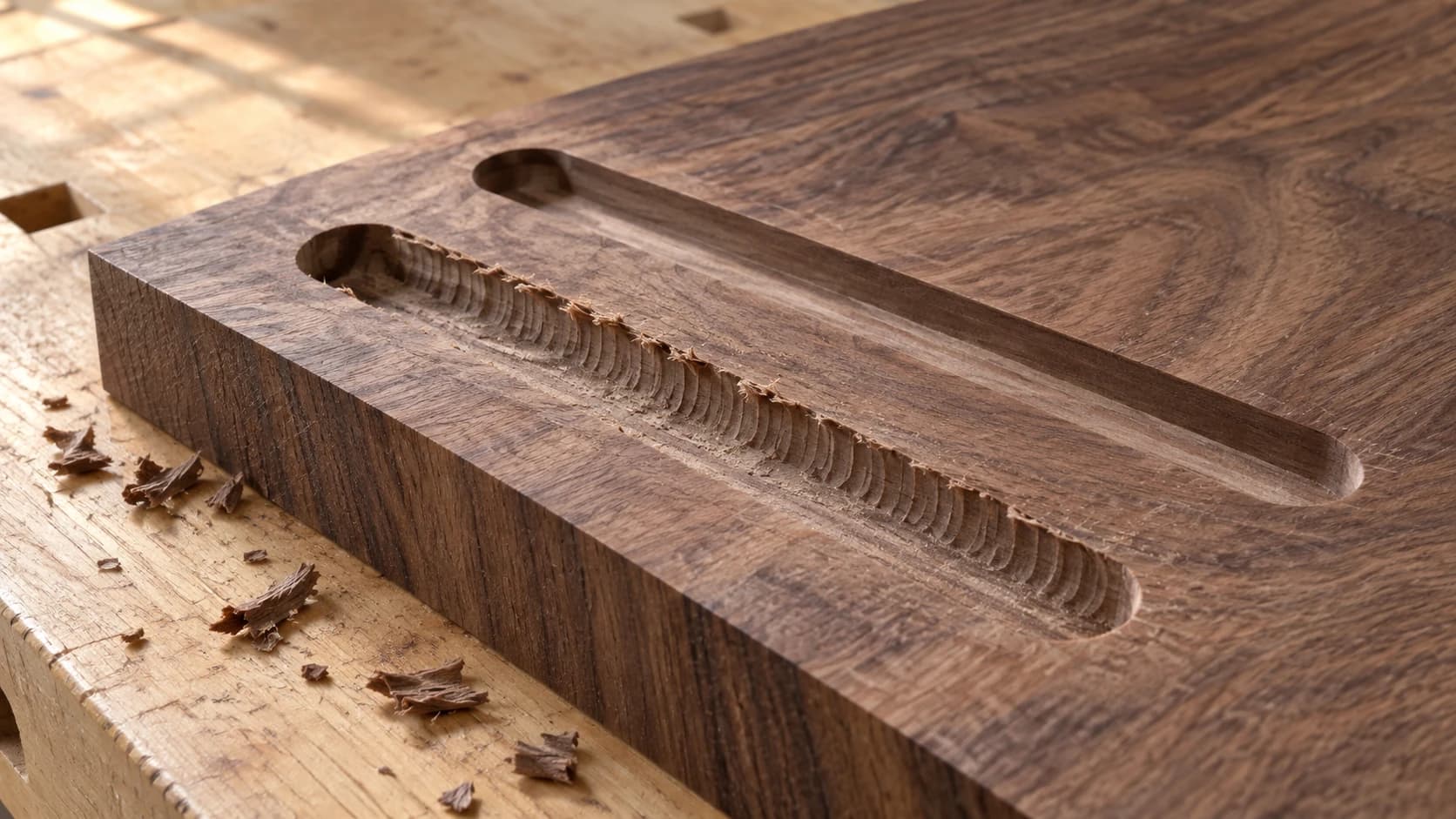
Každý majitel CNC má krabici s „prvními pokusy“. Cedule, která se třásla tak silně, že vypadá, jako by byla vyřezaná během zemětřesení. Kapsa, při jejímž vyřezávání praskla fréza za $30, protože hloubka na záběr byla, řekněme, poněkud odvážná. Dílec, který se rozletěl přes dílnu, protože jste ho zapomněli upevnit.
Pokud jste si přečetli našeho průvodce CNC pro začátečníky, máte základy zvládnuté. Tento článek je o věcech, které se stále mohou pokazit, jakmile překonáte základní úroveň. Těchto deset chyb dříve či později potká téměř každého hobby uživatele a jejich řešení bývají jednodušší, než si myslíte.
1. Nesprávná rychlost posuvu
Jak se to projevuje
Příliš rychle: Vibrace, pískání, drsné a třepivé hrany. U tvrdších materiálů se fréza vychyluje a dráhy nástroje ujíždějí mimo požadovaný směr.
Příliš pomalu: Zuhelnatělé a ztmavlé hrany ve dřevě. Fréza místo řezání třením vytváří teplo. U plastů se materiál taví a za frézou se znovu svařuje.
Proč k tomu dochází
Rychlost posuvu určuje, jak rychle se fréza pohybuje vodorovně materiálem. Při příliš vysoké rychlosti fréza nestíhá dostatečně rychle odvádět materiál. Při příliš nízké rychlosti vytváří každý břit místo čistých třísek tření. Správné nastavení závisí na velikosti frézy, materiálu, otáčkách vřetena a hloubce řezu.
Jak to napravit
Začněte s doporučenými hodnotami pro danou frézu a materiál a poté je upravujte podle zvuku. Náš průvodce posuvy a otáčkami vysvětluje výpočty, takže si můžete spočítat výchozí bod místo hádání.
Poslouchejte řezání. Čistý a rovnoměrný hukot znamená, že vše probíhá dobře. Dobré třísky vypadají jako drobné kudrlinky nebo vločky, ne jako prach ani velké úlomky. Když si nejste jistí, začněte pomaleji a zvyšujte rychlost v krocích po 10-15%.
Doporučení
Veďte si zápisník s hodnotami posuvu, které fungují na vašem konkrétním stroji a materiálech. Online kalkulačky poskytnou výchozí bod, ale skutečné ideální nastavení ovlivňuje tuhost stroje a výkon vřetena. Během několika měsíců se vaše poznámky stanou nejlepším zdrojem informací.
TISKNĚTE. ŘEŽTE. DLABEJTE.



- Více formátů (SVG, DXF, PNG)
- Návrhy testované na strojích
- Komerční licence
Sponzorováno PrintCutCarve.com
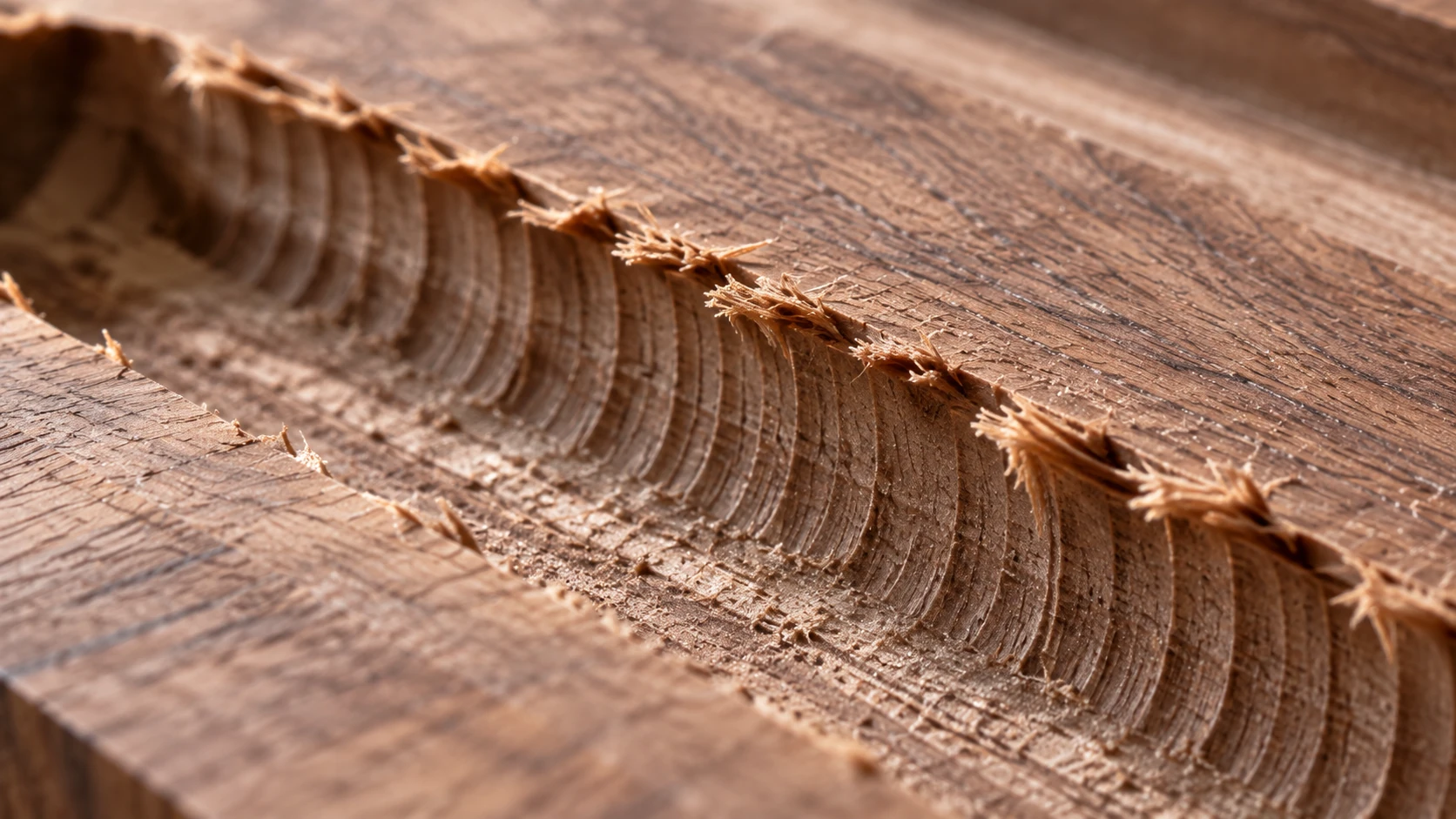
Detailní pohled na názornou hrubou drážku. Povrchové projevy mohou mít několik příčin; zkontrolujte společně nástroj, způsob upnutí a plán řezání.
2. Nesprávná fréza pro danou práci
Jak se to projevuje
Chlupaté horní hrany při řezání překližky. Vytrhávání materiálu na spodní hraně. Roztavený plast navzdory správnému nastavení. Řez je technicky dokončený, ale hrany vypadají hrozně bez ohledu na to, jak moc upravujete rychlost posuvu.
Proč k tomu dochází
Frézy pro CNC nejsou zaměnitelné. Upcut spirály odvádějí třísky nahoru, což je skvělé pro kapsování, ale vytrhávají horní povrch dřeva. Downcut spirály tlačí třísky dolů a vytvářejí čisté horní hrany, ale třísky se hromadí v řezu a způsobují nárůst teploty. Frézy s rovným břitem neodvádějí třísky příliš dobře, ale hodí se pro mělké průchody v měkkých materiálech.
Jak to napravit
Přizpůsobte frézu dané práci:
- Prořezáváte překližku skrz? Kompresní fréza (upcut dole, downcut nahoře). Čisté hrany na obou stranách.
- Kapsování? Upcut spirála pro odvod třísek. Chlupatá horní hrana v kapse nevadí.
- V-frézování nebo nápisy? V-bit odpovídající požadované úrovni detailu. 60stupňový nástroj poskytuje jemnější detail než 90stupňový.
- Řezání plastu? Jednobřitá upcut fréza s leštěnou hranou. Vícebřité frézy vytvářejí příliš mnoho tepla.
Správná fréza je často důležitější než dokonale nastavený posuv.
3. Nedostatečné upevnění obrobku
Jak se to projevuje
Obrobek se uprostřed řezání posune. Dráhy nástroje, které byly rovné, jsou nyní posunuté. V nejhorším případě se dílec uvolní a rotující fréza ho odmrští. Jde o bezpečnostní riziko, nejen o problém s kvalitou.
Proč k tomu dochází
Frézy CNC vyvíjejí značnou boční sílu a její směr se neustále mění, jak nástroj kličkuje po dráze. I nepatrný posun zničí celou práci, protože každý další průchod je nyní špatně zarovnaný.
Jak to napravit
Používejte více způsobů upevnění, ne jen jeden:
- Mechanické svěrky: Alespoň čtyři, umístěné mimo oblast dráhy nástroje a pod výškou bezpečné vzdálenosti Z.
- Šrouby skrz přídavné můstky: Přišroubujte materiál přímo k obětní desce, pokud nebude spodní strana vidět.
- Oboustranná páska: Tenký kobercový typ, nalepený v pruzích přes celou plochu, ne jen v rozích.
- Malířská páska a lepidlo CA: Pásku nalepte na obětní desku i spodní stranu obrobku a poté povrchy pásky slepte vteřinovým lepidlem. Pevně drží a čistě se uvolňuje.
Varování
Nikdy nespoléhejte na jedinou svěrku na jedné straně. Dílec, který při ručním zatlačení působí pevně, se může při dlouhodobém působení frézovacích sil stále posunout. Upevněte ho alespoň ze dvou protilehlých stran nebo použijte metodu přes celou plochu, například pásku.
4. Záměna sousměrného a nesousměrného frézování
Jak se to projevuje
Drsné, trhavé řezy v jednom směru dráhy nástroje. U lehčích strojů se fréza vtahuje do materiálu, což způsobuje hlubší než očekávané řezy nebo zastavení stroje.
Proč k tomu dochází
Při nesousměrném frézování působí rotace frézy proti směru posuvu. Je bezpečnější a odpouští více chyb, zejména u hobby strojů s pružným rámem. Při sousměrném frézování táhne fréza ve směru posuvu. Výsledkem může být lepší povrch, ale vyžaduje tuhý stroj. U hobby routeru s vůlí může fréza zabrat a zaříznout se hlouběji, než bylo zamýšleno.
Jak to napravit
U hobby CNC routerů jako výchozí nastavení používejte nesousměrné frézování. Směr řezání řídí váš CAM software. V nastavení hledejte položku „směr řezu“ nebo „sousměrné/nesousměrné“.
U tuhého stroje (ocelový rám, kuličkové šrouby, žádná vůle) se vyplatí sousměrné frézování vyzkoušet na odřezku. Při kapsování používá mnoho CAM programů obojí: nesousměrné pro hrubování a sousměrné pro dokončovací průchod.
5. Příliš rychlý zanořovací posuv
Jak se to projevuje
Hlasité lupnutí nebo prasknutí při vstupu frézy do materiálu. Fréza se začne dusit, zastaví se nebo praskne na začátku řezu. V místě vstupu vznikne malý kráter nebo důlek.
Proč k tomu dochází
Většina fréz CNC je navržena pro boční řezání, ne pro přímé zanoření. Pokud se rychlost zanoření rovná rychlosti posuvu, požadujete po fréze něco, k čemu není určena.
Jak to napravit
Nastavte rychlost zanoření na 30-50% rychlosti posuvu. Při posuvu 60 IPM zanořujte rychlostí 18 až 30 IPM. Tvrdší materiály vyžadují ještě nižší poměr.
Ještě lepší je použít v CAM softwaru nájezd po rampě nebo šroubovicový nájezd. Fréza se při nich pohybuje dolů pod úhlem a zároveň řeže do strany, což jí jde nejlépe. Pokud musíte zanořit přímo dolů (úzké drážky, malé otvory), použijte stopkovou frézu s řeznými břity ve středu.
6. Ignorování zatížení třísky
Jak se to projevuje
Stopy po spálení na hranách řezu. Prach místo správných třísek. Předčasné opotřebení frézy. Zdánlivě náhodné výsledky, kdy stejná práce pokaždé vypadá jinak.
Proč k tomu dochází
Zatížení třísky je množství materiálu, které každý břit odebere za jednu otáčku. Většina začátečníků nastavuje rychlost posuvu a otáčky vřetena nezávisle, aniž by chápala jejich vztah. Výsledkem je příliš malé zatížení třísky (tření) nebo příliš velké zatížení (přetížení frézy).
Jak to napravit
Zatížení třísky = rychlost posuvu / (RPM x počet břitů). U 1/4" dvoubřité frézy ve dřevě je typické zatížení třísky přibližně 0.005 až 0.007 palce na zub. Postupujte opačně:
- Vyhledejte zatížení třísky pro svou frézu a materiál
- Zvolte otáčky (střední rozsah pro váš router)
- Spočítejte: rychlost posuvu = zatížení třísky x RPM x počet břitů
Náš průvodce posuvy a otáčkami vás provede celým výpočtem na příkladech. Jakmile zatížení třísky pochopíte, kvalita řezání bude konzistentní místo náhodná.
7. Vynechávání hrubovacích průchodů
Jak se to projevuje
Viditelné stopy po vibracích. Vychýlení nástroje způsobuje nepřesné rozměry. U 3D řezbářských prací zanechá dokončovací průchod rýhy, které by měly být hladké.
Proč k tomu dochází
Především kvůli netrpělivosti. Vynechání hrubovacího průchodu znamená, že dokončovací fréza odvede veškerou těžkou práci. To je jako chtít po detailním nástroji, aby zvládl hrubou práci.
Jak to napravit
U 3D řezbářských prací a hlubokých kapes naprogramujte alespoň dvě operace:
Hrubování: Větší stopková fréza s rovným čelem, překrytí drah 40-60%, agresivní hloubka. Na stěnách a dně ponechte přídavek 0.5 až 1mm. Nemusí to být hezké. Musí to být rychlé.
Dokončování: Detailní fréza (kulová pro 3D, menší stopková fréza pro kapsy), překrytí drah 10-15%, plná cílová hloubka. Odstraní poslední tenkou vrstvu a vytvoří výslednou kvalitu povrchu.
Dokončovací průchod proběhne rychleji, protože téměř nic neodebírá, a celkový čas práce je často kratší než při pokusu zvládnout vše jedním těžkým průchodem.
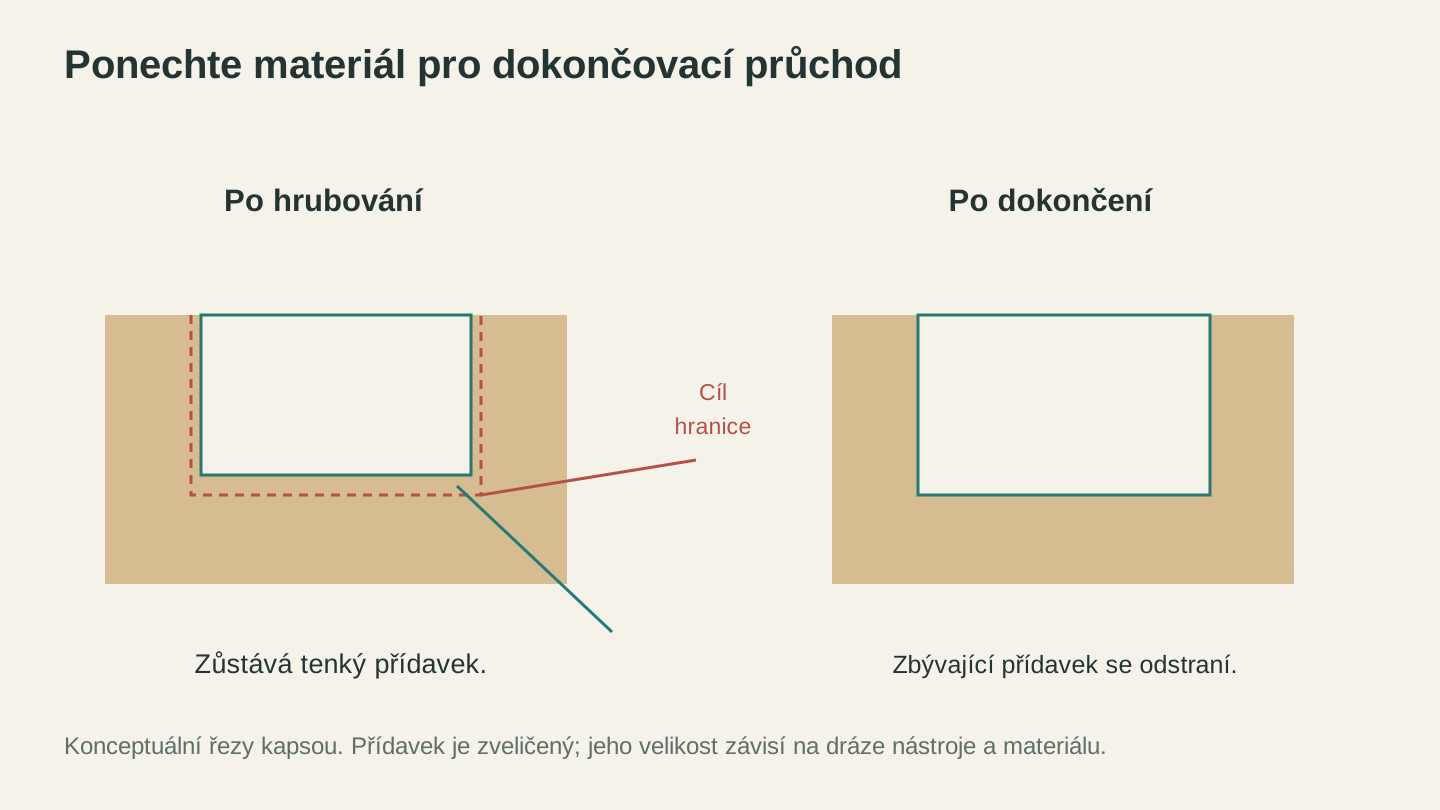
Po hrubování může na stěnách a dně zůstat malý přídavek pro pozdější dokončovací průchod. Zde je jeho velikost zveličená, aby byl vidět.
8. Nesprávná hloubka na jeden průchod
Jak se to projevuje
Při příliš agresivním nastavení se objevují vibrace, drsné povrchy a nadměrné opotřebení. Při příliš opatrném nastavení zase desítky mělkých průchodů změní 20minutovou práci v 3hodinový maraton.
Proč k tomu dochází
Hloubka na jeden průchod závisí na průměru frézy, tvrdosti materiálu a tuhosti stroje. Začátečníci buď frézují příliš hluboko a namáhají vše kolem, nebo volí absurdně malou hloubku a promrhají hodiny.
Jak to napravit
Výchozí pravidlo: hloubka na jeden průchod se u dřeva na hobby routeru rovná přibližně polovině průměru frézy. Fréza 1/4" zvládne hloubku 1/8". Fréza 1/8" zvládne 1/16".
Tvrdší materiály (tvrdé dřevo, překližka, MDF): Začněte na 1/3 průměru frézy.
Měkké materiály (borovice, pěna, HDPE): Často můžete jít až na celý průměr frézy.
Drobné frézy (1/16" nebo menší): Držte se hodnoty 1/4 až 1/3 průměru frézy. Malé frézy jsou křehké a jejich prasknutí uprostřed práce stojí více než ušetřený čas.
Poslouchejte stroj. Vibrace nebo pokles otáček znamenají, že jste příliš hluboko. Bezstarostný hukot při desítkách průchodů znamená, že můžete jít hlouběji.
9. Používání tupých fréz
Jak se to projevuje
Stopy po spálení při každém řezu. Chlupaté a potrhané hrany, které dříve bývaly čisté. Stroj zní namáhaně. Neustále upravujete rychlost ve snaze situaci kompenzovat, ale nic nepomáhá.
Proč k tomu dochází
Tupá fréza místo čistého řezání odírá, drtí a trhá. Vzniká teplo (které ji dále otupuje), povrchy jsou drsné a rostou síly, jež mohou frézu úplně zlomit. Zhoršování je postupné, takže každý projekt vypadá „o něco hůř“, až se najednou vše pokazí.
Jak to napravit
Držte frézy pod jasným světlem. Ostrá karbidová fréza má čisté a zřetelné hrany. Opotřebená fréza má zaoblené hrany, které odrážejí světlo nerovnoměrně. Jakékoli odštípnutí, vryp nebo zaoblení znamená, že je čas na výměnu.
Hrubý plán výměny:
- Karbid v tvrdém dřevě: 50 až 100 hodin řezání
- Karbid v překližce/MDF: 20 až 40 hodin (lepidlo je velmi abrazivní)
- Karbid v měkkém dřevě: 100+ hodin
- Frézy HSS: mnohem dříve. Zvažte přechod na plný karbid.
Nová fréza za $15 je vždy levnější než zničený kus ořechového dřeva za $50.
Informace
MDF a překližka otupují frézy rychleji než jakékoli přírodní dřevo. Lepidla v průmyslově vyráběném dřevě jsou extrémně abrazivní. Pokud řežete hodně překližky, počítejte s frézami jako s pravidelným nákladem.
10. Nepoužívání přidržovacích můstků
Jak se to projevuje
Finální dílec se při posledním průchodu obrysového řezu pohne. Na hranách jsou vyfrézované rýhy nebo posunuté linie, kde se fréza zařízla do uvolněného dílce. V nejhorším případě se uvolněný dílec zachytí o rotující frézu a odmrští se.
Proč k tomu dochází
Jakmile se oddělí poslední kousek materiálu, je výřez zcela volný a sedí v drážce vedle rotující frézy. Jakékoli vibrace, podtlak odsávání prachu nebo náraz frézy ho posunou z polohy.
Jak to napravit
Přidejte v CAM softwaru přidržovací můstky. Můstky jsou malé spojovací části, které drží dílec připojený k okolnímu materiálu až do dokončení práce. Poté je odlomte a výstupky zarovnejte broušením.
Pokyny pro můstky:
- Šířka: 3 až 5mm
- Výška: polovina tloušťky materiálu
- Rozestupy: jeden na každých 4 až 6 palcích obvodu, minimálně tři na dílec
- Umístění: na rovných hranách, ne v rozích nebo uvnitř křivek
Většina CAM programů přidává můstky automaticky. U velmi malých dílců, kde jsou můstky nepraktické, udrží metoda s malířskou páskou a lepidlem CA z chyby č. 3 vše pevně přichycené k obětní desce.
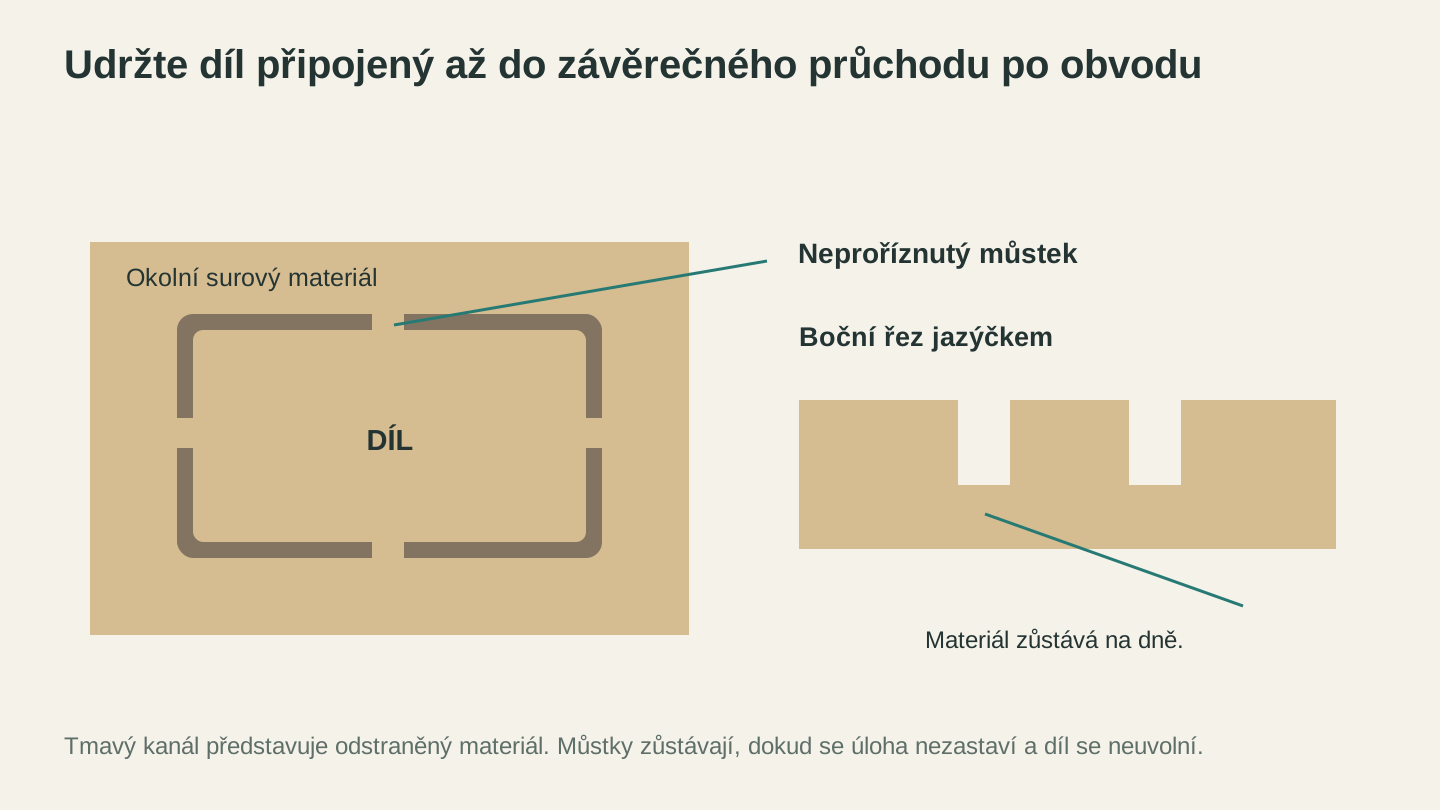
Během posledního průchodu po obrysu ponechte hotovou součást spojenou s okolním materiálem a uvolněte ji až po zastavení práce.
Kontrolní seznam před prací
Pověste si ho na zeď vedle stroje:
- Obrobek je pevně upevněný (svěrkami, šrouby, páskou nebo všemi třemi způsoby)
- Je nasazena správná fréza a kleština je řádně utažená
- Fréza je ostrá a nepoškozená
- Rychlost posuvu a hloubka na jeden průchod jsou vypočítané pro tuto frézu a materiál
- V případě potřeby jsou nastavené hrubovací a dokončovací průchody
- K obrysovým řezům jsou přidané můstky
- Dráhy nástroje jsou nasimulované v softwaru (zkontrolujte kolize)
- Nula Z je nastavená na povrchu materiálu (ne na obětní desce, pokud to není váš záměr)
Vynechejte kteroukoli položku a riskujete. Dodržte všech osm a vaše úspěšnost výrazně vzroste.
Jděte vyrábět třísky
Tyto chyby dělá každý. Krabice prvních pokusů je rituálem, kterým si musí projít každý. Teď už ale víte, na co si dát pozor, a všechna řešení lze zvládnout bez nového vybavení nebo diplomu z techniky.
Vezměte odřezek, utáhněte novou frézu, znovu zkontrolujte posuvy a otáčky, všechno pevně upevněte a něco vyrobte. Až nevyhnutelně objevíte chybu číslo jedenáct (protože vždy existuje ještě jedna), zapište si ji do zápisníku a zkuste to znovu. Tak se v tom zlepšujete.
Zasekli jste se uprostřed projektu kvůli chybě, která na tomto seznamu není? Zeptejte se v Tvořivém chatu a získejte přímou odpověď bez prohledávání vláken na fórech.
Šťastné frézování.
Chcete tyto nástroje vyzkoušet?
Zaregistrujte se zdarma, bez nutnosti platební karty. Bezplatné nástroje jsou k dispozici okamžitě.
Začít zdarma