

Laser Cutting Acrylic: Settings, Safety, and Project Ideas
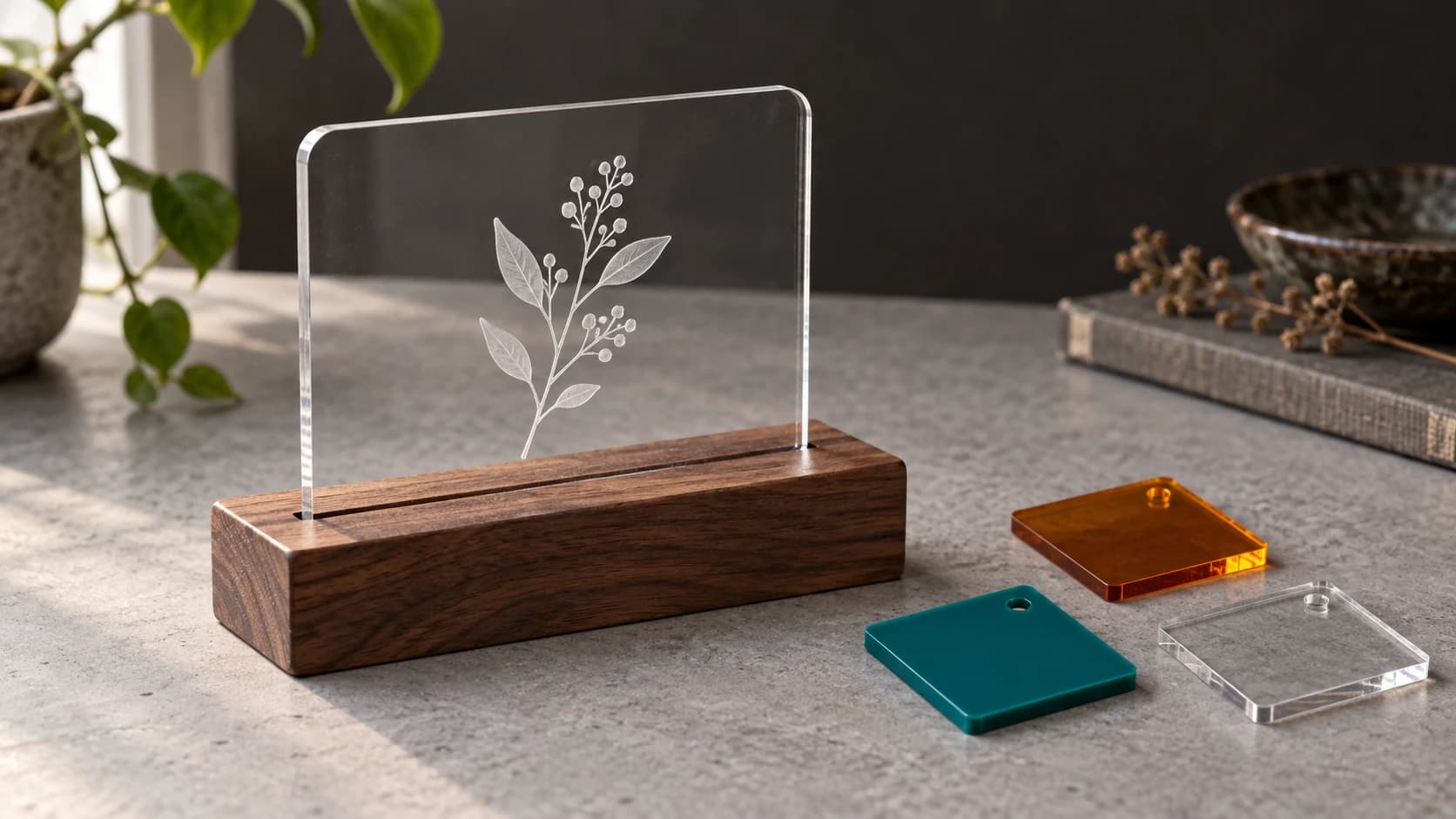
Acrylic is the second most popular material for laser projects after wood, and for good reason. It cuts cleanly with polished, flame-finished edges. It engraves with a frosted white appearance that looks professional. It comes in dozens of colors, transparencies, and finishes. And it doesn't char, smoke, or smell like wood does (though it has its own smell).
But acrylic has quirks. The wrong type of acrylic gives terrible results. The wrong laser can't cut it at all. The wrong ventilation can make you sick. This guide covers what you need to know before putting acrylic in your laser.
Cast vs Extruded Acrylic
This is the most important distinction in acrylic for laser work, and it's the one most beginners miss.
Cast Acrylic
Cast acrylic is made by pouring liquid acrylic into a mold and letting it cure. The result is a sheet with excellent optical clarity, consistent thickness, and superior laser characteristics.
Laser engraving: Produces a bright, frosted white mark. This is the frost-engraved look you see on awards, signs, and decorative pieces. The high contrast between the clear (or colored) surface and the white engraving is what makes acrylic engravings pop.
Laser cutting: Cuts cleanly with polished, almost glass-like edges. The edges are flame-polished by the laser beam itself, requiring no post-processing. This is the signature acrylic advantage: edges that look machine-polished straight off the laser bed.
Availability: More expensive than extruded. Common brand names include Plexiglas (branded cast acrylic), Acrylite, and Lucite.
Extruded Acrylic
Extruded acrylic is made by pushing melted acrylic through a die. It's cheaper to manufacture and therefore cheaper to buy. The sheet dimensions are more consistent, but the laser behavior is different.
Laser engraving: Produces a less crisp, more gummy mark. The edges of the engraving aren't as clean or as white. For detailed text or fine graphics, extruded acrylic gives noticeably worse results than cast.
Laser cutting: Cuts with a slightly rougher edge that may have small bubbles or a frosty appearance. The edges aren't flame-polished like cast acrylic. They may need light sanding or polishing for a finished look.
Availability: Cheaper and more widely available at hardware stores. Home Depot and Lowe's primarily stock extruded acrylic.
Quick Comparison
| Property | Cast Acrylic | Extruded Acrylic |
|---|---|---|
| Engraving quality | Excellent (bright white frost) | Moderate (gummy, less contrast) |
| Cut edge quality | Flame-polished, clear | Rougher, may be frosty |
| Price | Higher ($$ - $$$) | Lower ($ - $$) |
| Thickness consistency | Good | Better |
| Where to buy | Specialty suppliers, laser material shops | Hardware stores, Amazon |
| Recommended for laser | Yes | Only for cutting (not engraving) |
Tip
If you're engraving, always use cast acrylic. The quality difference is dramatic. If you're only cutting (no engraving), extruded is acceptable and saves money. Many projects involve both cutting and engraving, so cast is the default choice for most laser work.
PRINT. CUT. CARVE.
- Multiple formats (SVG, DXF, PNG)
- Machine-tested designs
- Commercial licenses
Sponsored by PrintCutCarve.com
Laser Compatibility
Not all lasers can cut acrylic. This is a common surprise for new laser owners.
CO2 Lasers
CO2 lasers cut and engrave acrylic beautifully. The 10.6 micron wavelength is absorbed by acrylic efficiently, producing clean cuts and crisp engravings. Most CO2 lasers (40W and up) can cut up to 1/4" (6mm) cast acrylic. Higher wattage (60-100W) handles thicker sheets and cuts faster.
CO2 lasers are the standard for acrylic work. If you're buying a laser specifically for acrylic projects, CO2 is the choice.
Diode Lasers
Most diode lasers cannot cut clear or light-colored acrylic at all. The wavelength of diode lasers (typically 445nm, blue light) passes right through transparent acrylic without being absorbed. The laser beam goes through the material like light through a window.
Black and very dark acrylic absorbs the diode wavelength and can be cut, though slowly and with less edge quality than CO2.
Colored acrylic varies. Deep reds, dark blues, and other heavily saturated colors may absorb enough energy to cut. Pastels and light colors generally don't work.
Opaque/matte white acrylic sometimes works with high-power diode lasers (10W+) but results vary by brand.
If you have a diode laser and want to work with acrylic, test your specific material before committing to a project. Buy a small sample sheet and try cutting a simple shape.
| Laser Type | Clear Acrylic | Black Acrylic | Colored Acrylic |
|---|---|---|---|
| CO2 (40W+) | Cuts and engraves | Cuts and engraves | Cuts and engraves |
| Diode (5-20W) | Cannot cut | Cuts (slowly) | Depends on color/opacity |
Settings Guide
Settings vary by machine, wattage, and material thickness. These are starting points. Always test on a scrap piece first.
Cutting (CO2 Laser)
| Thickness | Power (40W) | Speed | Passes |
|---|---|---|---|
| 1/16" (1.5mm) | 60-70% | 8-10 mm/s | 1 |
| 1/8" (3mm) | 80-90% | 5-7 mm/s | 1 |
| 3/16" (4.5mm) | 90-100% | 3-5 mm/s | 1-2 |
| 1/4" (6mm) | 100% | 2-3 mm/s | 2 |
For higher wattage lasers (60-100W), increase speed proportionally. A 60W laser cuts 3mm acrylic at roughly 12-15 mm/s.
Air assist is critical for acrylic cutting. The air blows flames away from the cut edge and prevents flashback. Without air assist, acrylic can ignite and burn (yes, acrylic is flammable). Always use air assist when cutting.
Engraving (CO2 Laser)
| Effect | Power | Speed |
|---|---|---|
| Light frost (subtle text) | 15-25% | 200-300 mm/s |
| Standard engrave (signs, graphics) | 30-50% | 150-250 mm/s |
| Deep engrave (tactile, textured) | 60-80% | 100-150 mm/s |
Engrave on the back. For clear or colored acrylic, engrave on the back surface through the protective masking. The engraving appears as a frosted white mark visible through the front. This gives a clean, professional look because the front surface remains smooth and glossy.
Info
Masking helps keep smoke residue off the surface while engraving, and it usually peels off cleanly afterward, but check your acrylic sheet and laser manufacturer's guidance first. Some masking materials can flame or char during processing. If the acrylic doesn't come with masking, verify that any transfer tape or painter's tape you add is laser-safe before using it.
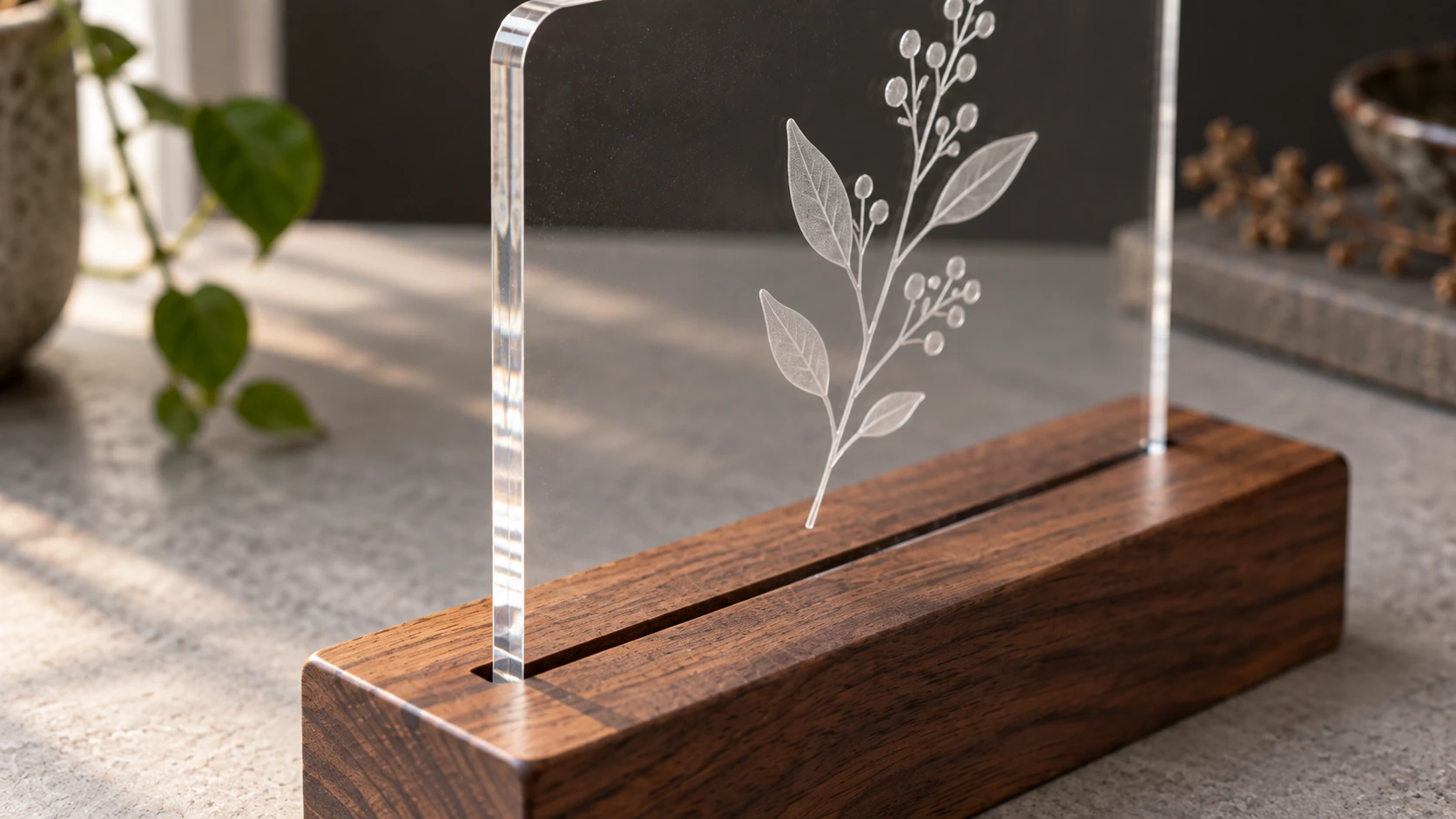
The frosted motif scatters light while the surrounding sheet stays transparent. A real slot supports the panel at its lower edge.
Safety
Acrylic laser safety is mostly about ventilation and fire prevention.
Ventilation
Acrylic produces methyl methacrylate (MMA) fumes when cut or engraved. These fumes have a sharp, sweet chemical smell. Fume output varies by material, settings, and your extraction setup, so don't assume it's automatically safe. Continuous exposure without effective ventilation can cause headaches, nausea, and respiratory irritation, so run proper extraction and check the material's safety data sheet if you're unsure.
Always exhaust fumes outside through your laser's ventilation system. If you don't have external exhaust, use a quality fume extraction system with activated carbon filters. Do not cut acrylic in an enclosed room with no ventilation.
Fire Risk
Acrylic is flammable. It can ignite if the laser dwells too long in one spot, if air assist fails, or if a cut piece tips up into the beam path.
Preventive measures:
- Always use air assist when cutting
- Never leave the laser running unattended
- Keep a fire extinguisher within arm's reach
- Ensure cut pieces can't tip up (use pins or hold-down clips)
- Check that your exhaust fan is running before starting
Materials to NEVER Laser
While we're on safety, some materials that look like acrylic are extremely dangerous to laser:
PVC (polyvinyl chloride): Releases hydrogen chloride and other hazardous emissions when lasered. Will corrode your laser's optics, rails, and electronics. Can cause serious health harm. PVC is sometimes sold as "vinyl sheets" or used in some foam boards.
Polycarbonate (Lexan): Polycarbonate doesn't cut well on common maker lasers. It tends to discolor, melt rather than cut, and produce a terrible smell. It can also release hazardous emissions when lasered, so only process it if your laser manufacturer and workspace safety guidance expressly allow it.
ABS: Produces toxic hydrogen cyanide fumes when lasered. Never cut ABS on a laser.
Warning
If you're unsure whether a plastic sheet is acrylic, check for manufacturer markings or material data sheets. When in doubt, don't cut it. The consequences of accidentally lasering PVC range from destroyed equipment to serious health hazards.
Project Ideas
Acrylic opens up project categories that wood can't touch.
LED Edge-Lit Signs
Cut a sign shape from clear acrylic with text or graphics engraved on the surface. Mount an LED strip along the bottom edge. The light enters the acrylic from the edge and is visible only where the engraving scatters it, creating a glowing sign effect. Stunning in dark environments.
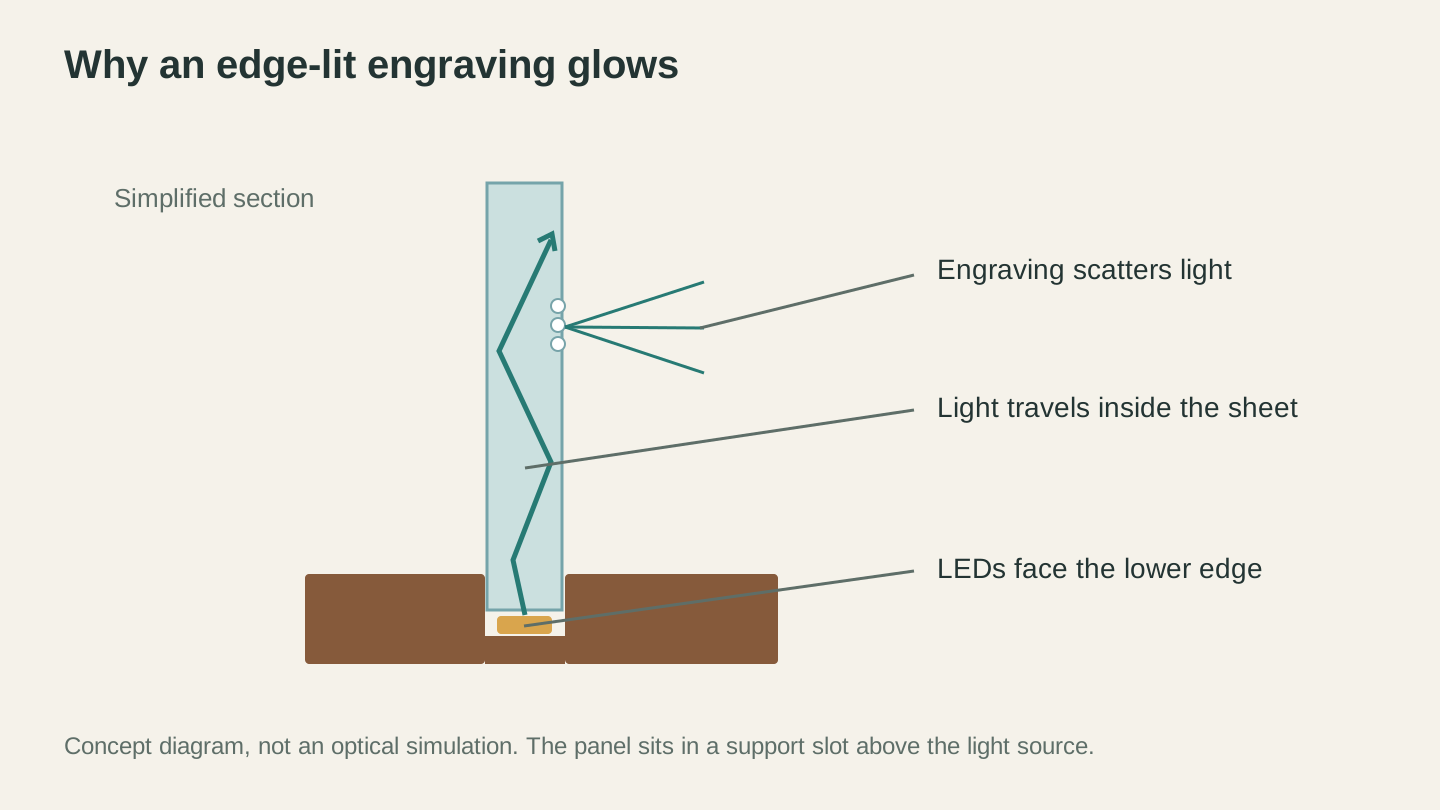
An edge-lit version puts a light source below the panel. This simplified section explains the arrangement; the photographed desk sign uses ambient light.
Stacked Layer Art
Cut multiple layers from different colored acrylic and stack them with spacers between each layer. The depth and color create a dimensional art piece. StackLab can separate an image into stackable layers automatically. See our stacked layer art guide for the full process.
Ornaments
1/8" clear or colored acrylic makes beautiful laser-cut ornaments. Engrave on the back, cut the outline, drill or cut a hole for ribbon. Clear acrylic with white engraving catches light beautifully on a Christmas tree.
Earrings and Jewelry
Thin acrylic (1/16" or 1/8") in bright colors makes lightweight, durable jewelry. Cut shapes with fine detail that would be impossible in metal without specialized equipment. Add jump rings and ear hooks.
Name Plates and Desk Signs
Professional-looking desk signs in minutes. Cut the shape from 1/4" clear or colored acrylic, engrave the text, and mount on a small stand or base. Frosted acrylic (matte finish) looks especially professional for office signage.
Stencils
Cut stencils from thin acrylic instead of cardstock or mylar. Acrylic stencils are rigid, washable, and last indefinitely. Great for repeated painting, sandblasting, or etching patterns. Vectorize your design with MonoTrace if you're starting from an image.
Keychains
Cut keychains from 1/8" colored acrylic with names, logos, or graphics engraved. Drill a hole, add a keyring. These are quick to produce and popular at craft fairs and as promotional items.
Where to Buy Laser-Grade Acrylic
Specialty laser supply shops (Trotec, Johnson Plastics Plus, Rowmark) sell cast acrylic specifically for laser cutting, often with masking already applied. Higher price but guaranteed quality.
TAP Plastics sells cast acrylic in a huge range of colors and thicknesses. They'll cut to size.
Amazon has laser-grade acrylic sheets in standard sizes. Look for "cast acrylic" in the product description. Read reviews for laser-specific feedback.
Local plastics distributors often sell cut-to-size pieces from full sheets. Bring your laser bed dimensions and they'll cut pieces to fit.
Avoid buying acrylic from hardware stores for laser work unless you verify it's cast (not extruded) and not polycarbonate mislabeled as acrylic.
Go Cut Something
Grab a sheet of cast acrylic, run a test cut on a corner to dial in your settings, and make something. The polished edges and crisp engravings will have you reaching for acrylic as often as you reach for wood.
For getting your designs onto acrylic, check out our beginner's laser guide if you're just starting out, and the common mistakes guide if you want to skip the learning-the-hard-way phase.
Ready to design something? Turn a photo into stackable acrylic layers with StackLab, or vectorize your own artwork for cutting with MonoTrace.
Happy making.
Related Tools
Ready to try these tools?
Sign up free, no credit card required. Free tools available immediately.
Start Free