Laser Engraving Glass, Tile, and Stone: A Complete Guide
You've mastered wood. You've probably tried acrylic. Maybe you've even engraved some leather. Now you're staring at a ceramic tile from the hardware store, a wine glass from the kitchen, and a piece of slate from a landscaping supply place, wondering if your laser can do anything with them.
It can. And the results are often more impressive than wood because people don't expect it. Hand someone a laser-engraved coaster made from natural slate and watch their brain try to figure out how you did it. The perceived value of glass, tile, and stone projects is significantly higher than wood, even though the materials are often cheaper.
This guide covers all three materials in depth. If you're brand new to laser engraving, start with the beginner's guide first. This assumes you know the basics and want to expand your materials repertoire.
Beyond Wood: Why Glass, Tile, and Stone?
Wood is the default material for a reason. It's cheap and you can pick it up at any hardware store, and it forgives minor mistakes that would ruin harder materials. But here's the thing: everybody with a laser is engraving wood. Your Etsy shop is competing against ten thousand other shops selling engraved wooden cutting boards.
Glass, tile, and stone products occupy a completely different market. Fewer makers work with these materials, the finished products feel premium, and customers are willing to pay more. A set of four engraved slate coasters sells for $25 to $40. The slate costs about $1 per piece. The margins are excellent.
These materials also open up project categories that wood can't touch. Bathroom signs on ceramic tile. Memorial markers on granite. Personalized wine glasses for weddings. Address plaques on natural stone. Each of these fills a niche that wooden alternatives can't serve as well.
PRINT. CUT. CARVE.
- Multiple formats (SVG, DXF, PNG)
- Machine-tested designs
- Commercial licenses
Sponsored by PrintCutCarve.com
Laser Engraving Glass
Glass is the trickiest of the three, but it's also the one that impresses people the most. A frosted design on a clear wine glass looks like it was sandblasted by a professional. In reality, it's a quick job under your laser once you've dialed in the settings, not a trip to a sandblasting cabinet.
How Glass Reacts to a Laser
Glass doesn't ablate (vaporize) cleanly the way wood or acrylic does. Instead, the laser heats tiny spots on the surface, causing micro-fractures in the glass. These fractured spots scatter light, creating a frosted, white appearance against the clear glass. That's your engraving.
The challenge is that glass fractures unpredictably. Tiny shards can chip off the surface, leaving rough spots instead of an even frost. Worse, if the glass heats unevenly, it can crack entirely. Borosilicate glass handles heat better than regular soda-lime glass, but even borosilicate isn't immune to thermal shock. Not everything sold under a "Pyrex" label is borosilicate these days, so check the product specs rather than assuming from the brand name.
The Wet Newspaper Trick
This is the single most important technique for glass engraving, and it's the difference between clean results and a chipped, uneven mess.
Before engraving, lay a single layer of wet newspaper or a wet paper towel flat against the glass surface. Smooth out all air bubbles and wrinkles so it sits flush against the glass. The water acts as a heat sink, absorbing excess thermal energy and preventing the glass from heating unevenly. It also catches any micro-shards that would otherwise fly off the surface.
The result is a dramatically smoother, more consistent frost. Without the wet layer, you get an engraving that looks rough and pitted when you run your finger across it. With it, the surface feels almost like professionally sandblasted glass.
Tip
Some makers use a thin layer of dish soap painted onto the glass instead of wet newspaper. It works on the same principle (heat absorption and debris capture) and is easier to apply to curved surfaces like wine glasses. Apply a thin, even coat and let it dry to a haze before engraving.
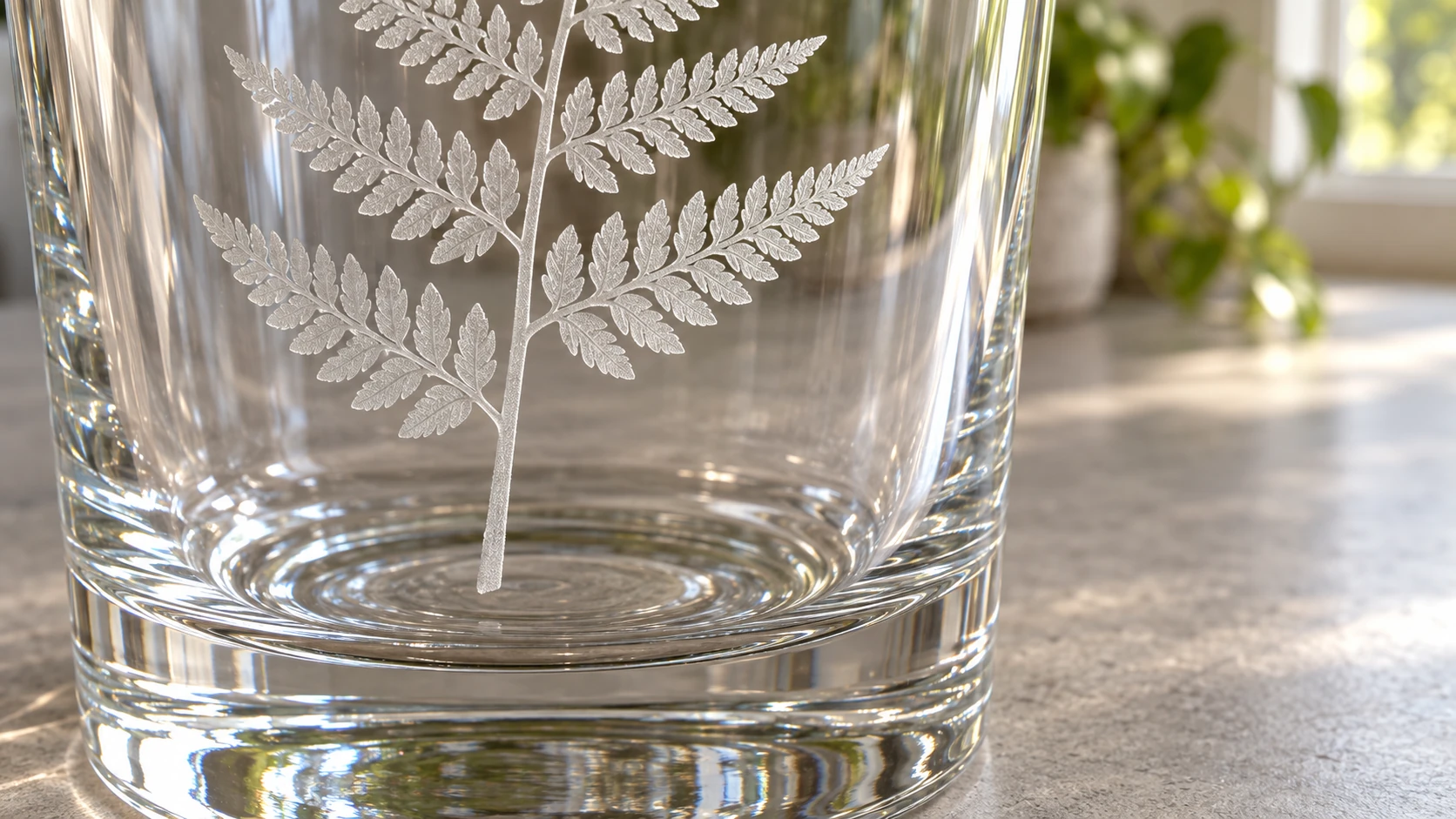
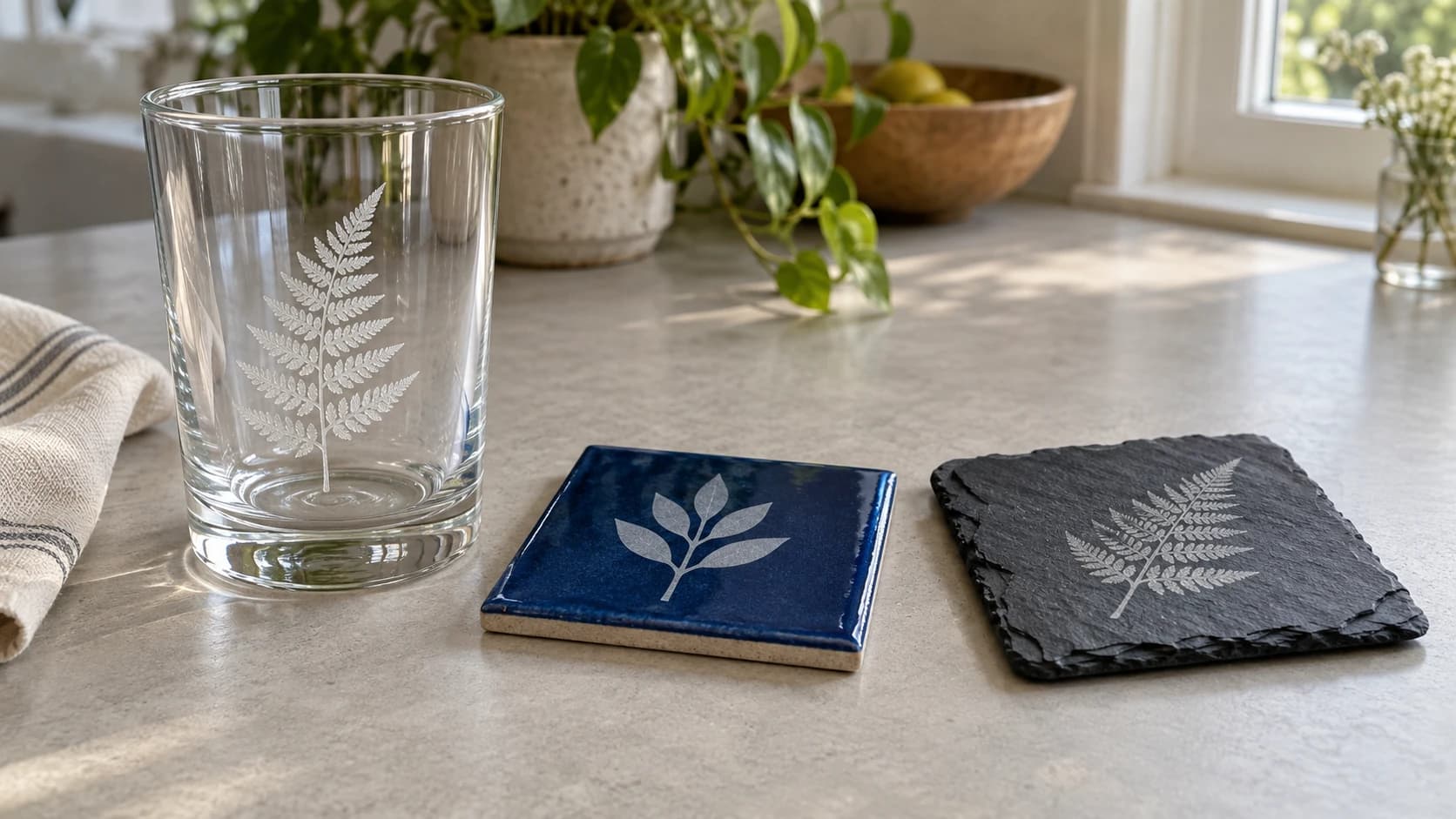
The same glass up close shows the pale frosted mark against clear glass. Lighting and the background change how readily the design can be seen.
CO2 vs Diode on Glass
CO2 lasers are the clear winner here. Glass absorbs the 10.6-micron wavelength of a CO2 laser very effectively. That's why CO2 lasers can't cut glass (the energy goes into the surface and causes fractures instead of clean cuts), but it's also why they engrave it so well. The beam energy stays at the surface where you want the frosting to happen.
Diode lasers struggle with glass. The 445nm wavelength passes right through clear glass. The beam literally goes through the material without interacting with it. You can sometimes mark glass with a diode laser by painting the surface black first (the paint absorbs the beam and transfers heat to the glass), but the results are inconsistent and the process is messy. If glass engraving is important to you and you only have a diode, this is the project that might justify a CO2 upgrade.
Clear vs Colored Glass
Clear glass produces white frosted engravings. The contrast depends on viewing angle and lighting, which can make photos hard to see. Clear glass works best for bold text, simple graphics, and line art designs.
Colored glass can produce more dramatic results. Blue, green, and amber bottles engrave with stronger visible contrast because the colored glass behind the frosted surface creates a natural backdrop. Thrift stores are a goldmine for colored glassware.
Mirrors are a popular glass project. Engrave from the back (the reflective coating side), and the laser removes the reflective layer to create a frosted design that's visible from the front. The mirror surface around the engraving stays intact. Mirror-backed bar signs and decorative pieces sell well.
Glass Settings
Treat the numbers below as a starting point, not a fixed recipe. Power percentages aren't comparable across different machines and lens setups, so run a test piece on scrap glass before committing to a finished item.
| Glass Type | Laser Type | Power | Speed | DPI | Notes |
|---|---|---|---|---|---|
| Clear glass (flat) | CO2 40-60W | 15-25% | 200-400 mm/s | 300-400 | Use wet newspaper, single pass |
| Clear glass (curved) | CO2 40-60W | 12-20% | 150-300 mm/s | 300 | Rotary attachment required |
| Colored glass | CO2 40-60W | 15-25% | 200-400 mm/s | 300-400 | Slightly more power for thick glass |
| Mirror (from back) | CO2 40-60W | 20-35% | 150-300 mm/s | 300 | Higher power to remove coating |
| Frosted glass | CO2 40-60W | 10-18% | 250-400 mm/s | 300 | Low power, already has texture |
Warning
As a general rule, glass wants lower DPI than wood. Higher DPI packs more laser passes closer together, which generates more heat and increases the risk of cracking. 300 DPI is a reasonable starting point for many glass projects, but treat it as a starting point, not a fixed rule. Follow your machine and glass manufacturer's guidance where it's available, and always run a test piece before committing to a full engraving.
Photo Engraving on Glass
If you want to engrave photographs onto glass, Jarvis dithering is your best friend. This dithering algorithm converts grayscale images into dot patterns that simulate continuous tones. On glass, Jarvis dithering produces the smoothest results because it distributes the dots in a way that minimizes the harsh contrast between engraved and non-engraved areas.
Most laser software has a Jarvis dithering option in the image processing settings. Set your DPI to 300, apply Jarvis dithering, and run at moderate power. The frosted dots blend together visually to create surprisingly detailed photographic reproductions.
For converting photos to clean line art instead of dithered rasters, Photo Converter generates pen-and-ink style artwork that engraves beautifully on glass. Line art avoids the dithering question entirely and produces bold, clean results. Read more in our photo to laser engraving guide.
Laser Engraving Ceramic Tile
If glass is the trickiest of these three materials, ceramic tile is the easiest. It's cheap, widely available, and the results are immediately impressive. You can buy a box of white ceramic tiles at any hardware store for a few dollars and start engraving within minutes.
How Tile Reacts to a Laser
Ceramic tiles have a glazed surface coating. When your laser hits this glaze, it ablates (removes) the coating, exposing the raw bisque clay underneath. On white tiles, this creates a subtle texture change. On colored or patterned tiles, the contrast between the removed glaze and the underlying clay is more visible.
The interesting part: the color of the mark depends on your settings. Lower power tends to produce lighter marks. Higher power can produce darker marks because the intense heat actually changes the chemical composition of the glaze residue and underlying clay. On white tiles, high-power passes can create marks ranging from tan to dark brown to nearly black.
White Tiles: The Secret Weapon
Plain white ceramic tiles from the hardware store are one of the most underrated laser engraving substrates. Here's why.
When you engrave a white tile with high enough power, the laser doesn't just remove the glaze. It melts and re-fuses the surface material, creating a permanent mark that's embedded in the tile surface. The color of this mark ranges from tan to chocolate brown to near-black depending on your power, speed, and the specific tile.
The result looks like a printed photograph embedded in ceramic, and because the mark is fused into the surface rather than sitting on top of it, it holds up well to daily handling, washing, and sun exposure. These tiles make incredible coasters, trivets, and decorative pieces, and they turn a cheap hardware-store blank into something worth real money as a finished product.
The Tempera Paint Fill Technique
Want even more dramatic results on white tile? Apply a coat of black Tempera paint (the washable stuff kids use) to the tile surface before engraving. Let it dry completely.
When the laser fires, the heat bonds the paint pigment to the ceramic surface permanently. After engraving, wash off the unfired paint with water. What remains is a crisp, jet-black image fused into the white tile. The contrast is stunning, far better than engraving the bare tile.
Tip
Tempera paint works because the heat from the laser fuses the pigment into the glaze. Acrylic paint does not work the same way. The acrylic binder burns off and takes the pigment with it. Stick to Tempera paint (also called poster paint) for this technique. The cheap bottles from the craft store work perfectly.
This technique is perfect for photographic reproductions. Convert your photo using Photo Converter for line art, or use Jarvis dithering in your laser software for halftone-style images. The black-on-white contrast makes every detail pop.
Colored and Patterned Tiles
Colored glazed tiles engrave differently. The laser removes the colored glaze to reveal the lighter clay body underneath. This creates a light-on-dark effect, which is the opposite of the Tempera technique on white tile. Both look great, just different aesthetics.
Patterned tiles (the decorative ones with printed designs) can produce interesting results too, but the outcome is less predictable since you're interacting with a printed layer rather than a solid glaze.
Porcelain tiles are denser and harder than standard ceramic. They engrave, but require more power. The results are often crisper because porcelain has a finer grain structure.
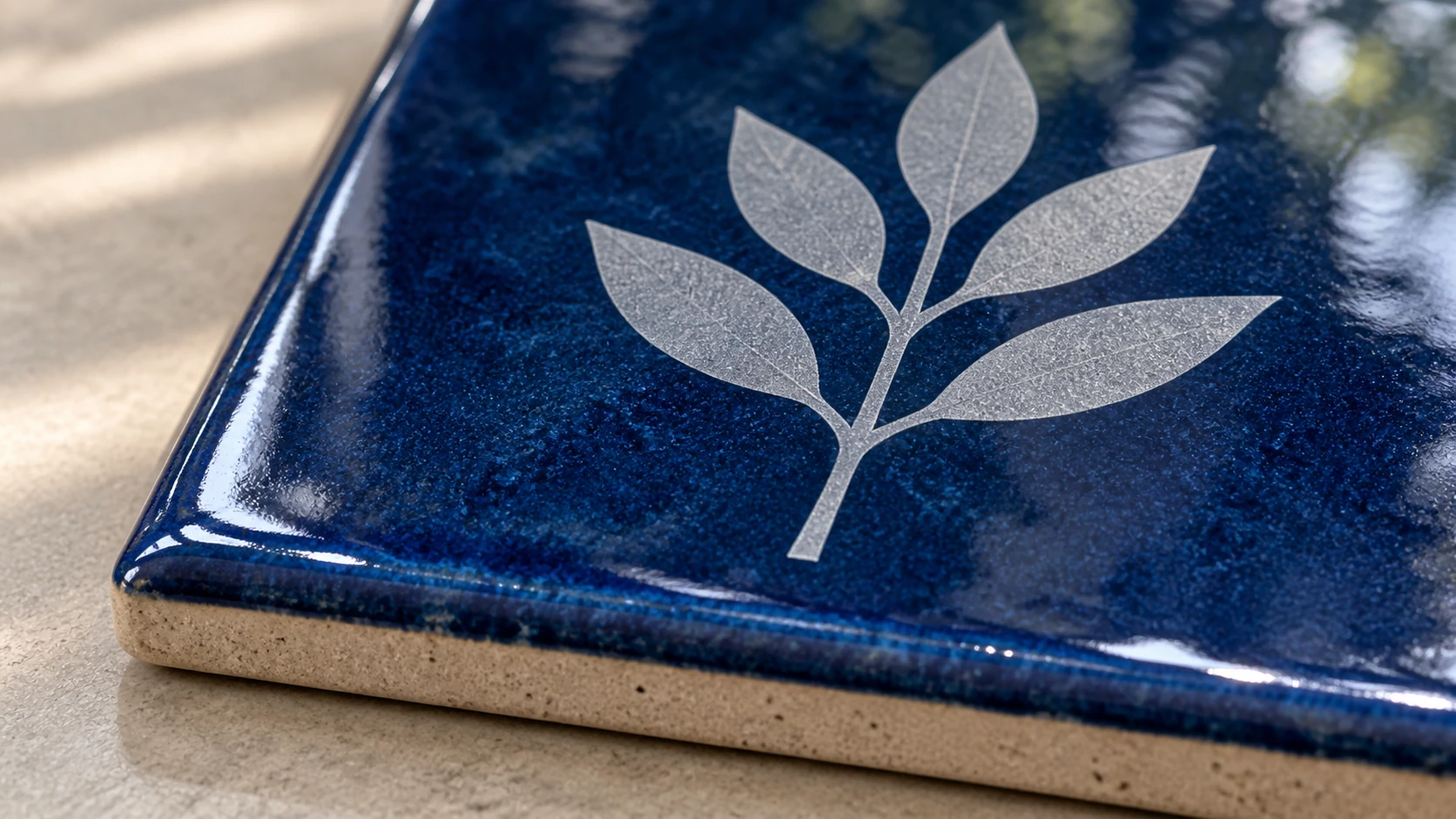
The blue tile combines a glossy surround with a matte pale mark. Glaze and body composition vary, so this example does not establish settings for another tile.
Tile Settings
As with glass, these numbers are a starting point for testing, not a universal recipe. Glaze thickness and composition vary by manufacturer and even by batch, so run a test tile before committing to a production run.
| Tile Type | Laser Type | Power | Speed | DPI | Notes |
|---|---|---|---|---|---|
| White ceramic (direct) | CO2 40-60W | 70-100% | 100-200 mm/s | 300-400 | High power for dark marks |
| White ceramic (Tempera) | CO2 40-60W | 50-80% | 150-300 mm/s | 300-400 | Medium-high power, paint absorbs energy |
| Colored ceramic | CO2 40-60W | 40-70% | 150-300 mm/s | 300 | Adjust per glaze thickness |
| Porcelain | CO2 40-60W | 80-100% | 80-150 mm/s | 300 | Needs more power than standard ceramic |
| White ceramic (direct) | Diode 10W | 100% | 200-600 mm/min | 300 | Works but slower, test results |
| White ceramic (Tempera) | Diode 10W | 80-100% | 300-800 mm/min | 300 | Paint helps diode absorption |
Diode lasers can engrave ceramic tile, especially with the Tempera paint technique. The paint absorbs the 445nm wavelength much better than the glazed surface alone. Results are generally lighter than CO2 but still usable.
Laser Engraving Stone
Stone engraving produces results that feel ancient and permanent. There's something deeply satisfying about marking a piece of rock that's been around for millions of years with your design. Different stones react very differently to lasers, so choosing the right one matters.
Slate: The Easiest Stone
Slate is the single best stone for laser engraving. If you're new to stone work, start here and don't bother with anything else until you've mastered it.
Slate engraves with excellent contrast. The laser creates a light gray or whitish mark on the dark surface. The mark is visible, durable, and looks fantastic. Slate is also relatively soft (compared to granite or marble), so it requires less power.
Pre-cut slate coasters are available cheaply online. They come with cork or felt backing already applied, ready to engrave. A pack of 12 runs about $10 to $15. At selling prices of $6 to $10 per coaster (or $25 to $40 for a set of four), the margins are outstanding.
Tip
Look for slate coasters with a smooth, flat surface rather than a rough, natural cleft finish. Smooth slate produces more consistent, detailed engravings. Rough surfaces create uneven marks because the laser can't maintain consistent focus across the variations in height.
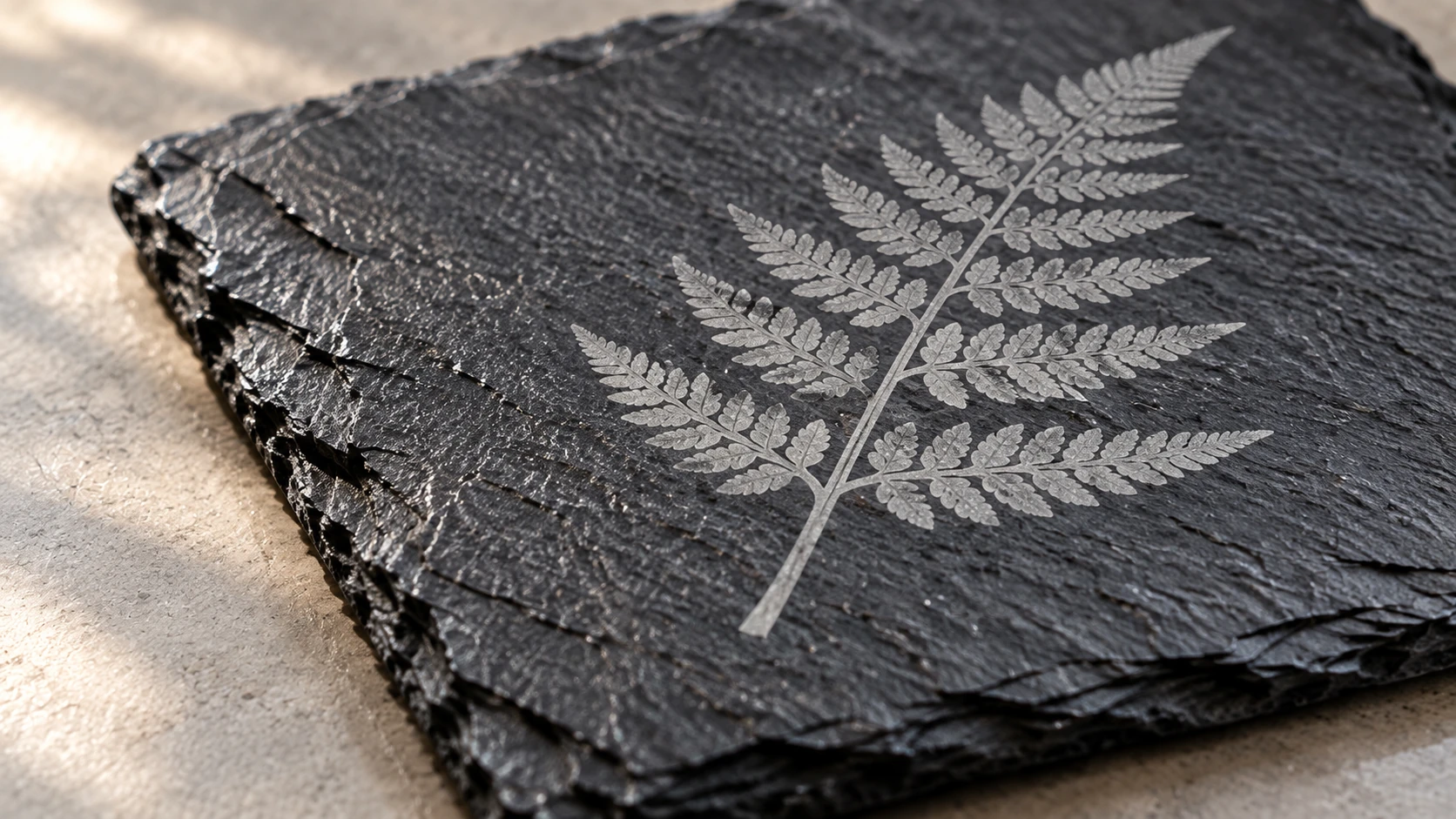
On the same slate coaster, the light mark follows the natural stone texture. It does not need a deep carved recess to create contrast.
Marble
Marble is beautiful but unpredictable. Here's why.
White marble can engrave with good contrast (the laser creates a slightly darker mark or removes the polished surface to reveal a rougher texture). Black marble creates light marks similar to slate. But marble's crystalline structure means the laser interacts differently with each piece depending on its specific mineral composition. Two slabs from the same quarry can produce different results.
Polished marble engraves more consistently than honed (matte) marble because the laser is primarily affecting the polished surface layer. The contrast between the polished surround and the frosted engraved area is usually good.
Small marble tiles are available at home improvement stores and make great test pieces. Try a few different ones before committing to a batch of products.
Granite
Granite works, but the contrast is lower than slate or marble. On dark granite, the laser produces a lighter mark. On light granite, the mark may be barely visible. The best results come from black or very dark granite where the whitish laser mark stands out.
Granite is also extremely hard, so you need higher power settings compared to slate. A 40W CO2 laser can engrave granite, but 60W+ produces noticeably better results with more consistent marks.
Granite's redeeming quality: it's incredibly durable. A laser-engraved granite piece will outlast nearly anything else you make. Memorial plaques, pet markers, and outdoor address stones are all practical granite applications where the permanence justifies the extra effort.
River Rocks
Smooth river rocks are a fun niche product. Each one is unique, which makes them perfect for personalized gifts, garden markers, and memorial stones. The challenge is securing them for engraving (they're round and want to roll) and maintaining consistent focus across the curved surface.
Darker river rocks engrave best. Light-colored ones produce low-contrast marks that are hard to see. Select rocks that are as flat as possible on at least one side, and use putty or a custom jig to hold them steady on the laser bed.
Sandstone
Sandstone is soft and engraves easily, but the marks tend to be shallow and low-contrast. It's a workable material but not ideal. If you want a lighter-colored stone, marble tiles are generally a better choice than sandstone for laser engraving.
Stone Settings
Stone varies more piece to piece than glass or tile, especially natural stone like marble, granite, and river rocks. Use these figures as a starting point and test each new batch of material before running a full job.
| Stone Type | Laser Type | Power | Speed | DPI | Notes |
|---|---|---|---|---|---|
| Slate (smooth) | CO2 40-60W | 60-90% | 100-250 mm/s | 300 | High power for crisp white marks |
| Slate (smooth) | Diode 10W | 100% | 200-600 mm/min | 300 | Works, slower than CO2 |
| Marble (polished) | CO2 40-60W | 50-80% | 100-200 mm/s | 300 | Test each piece, results vary |
| Granite (dark) | CO2 40-60W | 80-100% | 80-200 mm/s | 300 | High power needed, hard material |
| River rocks | CO2 40-60W | 70-100% | 100-200 mm/s | 300 | Secure firmly, watch focus |
Tip
Diode lasers can mark some stones (especially dark slate), but CO2 lasers produce significantly better results on stone in general. The infrared wavelength interacts with the mineral surface more effectively. If stone is going to be a major part of your product line, a CO2 laser is the right tool.
Surface Prep and Best Practices
Prep work makes the difference between amateur and professional results on all three materials.
Cleaning
Glass, tile, and stone all need to be clean before engraving. Oils from your fingers, dust, and residue all affect how the laser interacts with the surface. Wipe everything down with isopropyl alcohol before putting it in the machine. For glass, use glass cleaner and a lint-free cloth.
Securing Round Objects
Wine glasses, pint glasses, and bottles need a rotary attachment. The rotary spins the glass along its axis while the laser engraves, effectively "unrolling" the curved surface into a flat engraving plane. Most laser engravers have rotary attachments available as accessories.
Without a rotary, you can engrave flat glass items (mirrors, panels, picture frames) directly on the laser bed. But anything cylindrical needs the rotary to get even, undistorted results.
Flatness Matters
Focus is critical on hard materials. On wood, being slightly out of focus reduces quality but still produces a visible mark. On glass and stone, being out of focus can mean no visible mark at all, or worse, cracking from uneven heat distribution.
Use a flat, level surface. For tiles and flat stone pieces, place them directly on the honeycomb bed or a flat support. For pieces with uneven backs, use shims or putty to keep the engraving surface perfectly level and at the correct focus height.
Protecting Surrounding Surfaces
When engraving glass, debris from micro-fractures can land on the glass surface and scratch it. The wet newspaper technique mentioned earlier catches most of this. For tile and stone, masking tape over the surface can catch dust and debris, keeping non-engraved areas clean.
Exhaust and Dust
Stone and ceramic tile can produce fine mineral dust when engraved, and some stone and tile products contain crystalline silica, which is a serious respiratory hazard with repeated exposure. Don't treat this as a simple "run the fan" problem.
Warning
Check the safety data sheet (SDS) for the specific stone or tile you're using before you start production runs. Use enclosed, effective local exhaust ventilation, not just a fan on high, and add secondary filtration for production volumes. Never dry-sweep or blow off dust with compressed air; wet-wipe or vacuum with a HEPA filter instead. If your exhaust and filtration can't keep dust exposure low, follow applicable exposure-control guidance and wear respiratory protection rated for silica dust. This matters more the more of this material you cut, not less.
Clean your laser's lens and mirrors more frequently when working with these materials, since the same dust that's hard on your lungs is hard on your optics.
Project Ideas
These three materials open up product categories that wood can't fill. Here are proven sellers and gift ideas.
Slate coasters. The single most popular stone laser project. Buy pre-cut coasters in bulk, engrave custom designs, and sell as sets of four. Monograms, family names, and funny quotes all work well. Use our Monogram Generator for quick personalized designs.
Ceramic tile trivets. White tiles with Tempera paint photo transfers make stunning trivets. Engrave family photos, pet portraits, or landscape images. They're heat-resistant by nature, so they're actually functional.
Custom wine glasses. Personalized wine glasses for weddings, anniversaries, and corporate gifts. Engrave names, dates, logos, or short messages. Pair them in sets of two with a gift box for a high-value product.
Custom pint glasses. Same concept as wine glasses but for a different audience. Brewery logos, groomsmen gifts, fantasy football trophies.
Address tiles. Engrave house numbers and street names on ceramic tiles for exterior address plaques. Fired ceramic is weather-resistant and lasts for decades.
Memorial plaques. Granite or slate memorial markers for pets, gardens, or memorial benches. This is a sensitive product category, but it fills a genuine need. Keep your designs respectful and your craftsmanship impeccable.
Wedding favors. Small engraved items for guests: slate coasters with the couple's names and date, miniature glass ornaments, or small ceramic tiles. The per-unit cost is low enough for large quantities.
Garden markers. Engraved slate or stone markers for herb gardens and flower beds. Simple text on slate stakes is functional and looks great outdoors.
Bathroom and kitchen signs. Ceramic tile signs with room labels, humorous quotes, or directional arrows. The tile material fits naturally in these rooms.
For personalized gift ideas, these materials pair especially well with occasions where durability matters. Nobody wants a paper anniversary gift on a 25th anniversary. Stone lasts.
Preparing Images for Non-Wood Materials
Image preparation is even more important on glass, tile, and stone than on wood. Wood is forgiving because the grain adds visual texture that hides minor imperfections. Glass and tile show every flaw in your source artwork.
For photographs, convert them to clean line art before engraving. Photo Converter handles this in one step, turning any photo into pen-and-ink style artwork optimized for laser engraving. The line art style works beautifully across all three materials. Check out our full guide to photo laser engraving for tips on getting the best results.
For logos and vector graphics, make sure your source files are clean SVG or high-resolution PNG. MonoTrace is a free vectorizer that converts raster images (PNG, JPG) into clean SVG outlines ready for laser work. It's especially useful for cleaning up logos or artwork that only exists as a bitmap.
For text and monograms, use bold, clean fonts. Thin fonts and fine serifs can disappear on textured stone surfaces. On glass, thin lines may not produce enough micro-fracturing to be visible. When in doubt, go bolder than you think you need.
Avoid common preparation mistakes that lead to wasted materials. Our laser engraving mistakes guide covers the errors that trip people up most often, many of which are amplified on hard materials where you can't just flip the workpiece over and try again.
Getting Started
Pick one material and master it before moving on. Slate coasters are the easiest entry point: the material is cheap, pre-cut blanks are readily available, and the results are immediately sellable. Buy a pack, run some test engravings at different power and speed settings, and find the sweet spot for your specific laser.
Ceramic tile is the next logical step. Grab a handful of white tiles from the hardware store (they cost less than a dollar each) and experiment with both direct engraving and the Tempera paint technique. You'll know within a few tiles which approach you prefer.
Glass comes last because it's the most temperamental. Start with flat glass pieces (mirrors, picture frames) before attempting curved items that need a rotary attachment. Practice the wet newspaper technique on cheap thrift store glasses before engraving the nice crystal.
Each of these materials adds a new dimension to your product line and puts you in a market segment that most hobby laser owners never explore. The makers who work with glass, tile, and stone face less competition than the wood-cutting-board crowd.
Ready to prep your first design? Turn a photo into clean line art with Photo Converter, or build a personalized monogram for your next coaster or tile with the Monogram Generator.
Related Tools
Ready to try these tools?
Sign up free, no credit card required. Free tools available immediately.
Start Free