

What Can You Actually Make With a CNC Router?
The question shows up twice. Once before you buy, when you're staring at the price and wondering if you'll actually use the thing. And once after it arrives, when the test carve is done and you're sitting in front of a machine that can theoretically make anything, with no idea what to make second.
Both versions deserve a real answer, not a mood board. So here it is: a field guide to the actual categories of things a CNC router makes, and what each one quietly demands from you in skill, tooling, and time.
Tip
Short answer: a CNC router excels at anything flat or carvable that fits its bed: signs, trays, cutting boards, inlays, 3D relief carvings, furniture parts, flat-pack designs, jigs, and molds. The categories differ enormously in difficulty. Signs and jigs are day-one work. Inlays and two-sided carving are not.
The Map Before the Territory
Every category below is real work people sell, gift, or use daily. What separates them is not what the machine can do. It's what the project demands from the person running it.
| What you're making | First-piece difficulty | Core bits | Machine time per piece |
|---|---|---|---|
| Signs and plaques | Easy | V-bit, endmill | Under an hour |
| Trays and coasters | Easy | Endmill, bowl bit | 1 to 2 hours |
| Cutting boards | Easy to moderate | Surfacing bit, endmill | Under an hour of routing |
| Jigs and shop fixtures | Easy | Endmill | Minutes to an hour |
| Flat-pack and panel work | Moderate | Compression or endmill | 1 to 3 hours |
| Inlays | Moderate to hard | Two matched V-bits | 2 hours plus glue-up |
| 3D reliefs | Moderate, but slow | Endmill, tapered ballnose | 2 to 10+ hours |
| Furniture parts | Hard | Several | Varies wildly |
| Molds and forms | Hard | Ballnose, endmill | Hours |
The machine times are rough ballparks for typical hobby-sized pieces. Your material, bit choice, feeds, and level of detail will swing them widely in both directions.
Two patterns worth noticing. First, machine time is not hands-on time: a six-hour relief carve needs your hands for maybe twenty minutes of it, though you still stay with the machine, because a running router is never something to leave unsupervised. Second, the difficulty column tracks setup and design skill, not artistic talent. The machine supplies the steady hands.
PRINT. CUT. CARVE.
- Multiple formats (SVG, DXF, PNG)
- Machine-tested designs
- Commercial licenses
Sponsored by PrintCutCarve.com
Signs and Plaques: The Gateway Drug
Nearly everyone's first real project, and for good reason. A V-carved sign teaches the whole workflow (design, toolpath, workholding, finish) on a project that's forgiving of small mistakes and done in an afternoon.
The V-bit is what makes this category special. V-carving cuts letters and line art with variable depth, so strokes get naturally wider where the design is bolder and taper to nothing at the tips. It's the closest thing to hand carving the machine does out of the box, and it works on the cheapest bit in your drawer.
What it demands: basic vector design and the patience to sand between finish coats. That's about it. If you want the full walkthrough, we've documented building a custom CNC sign from scratch, from artwork to final oil.
The design side is often the real bottleneck here, because a sign is only as good as its artwork. Vector Studio generates machine-ready SVG from a text description for 1 credit, which turns "I want a pine tree border but I can't draw" from a dead end into a five-minute step.
Trays, Coasters, and Kitchen Things
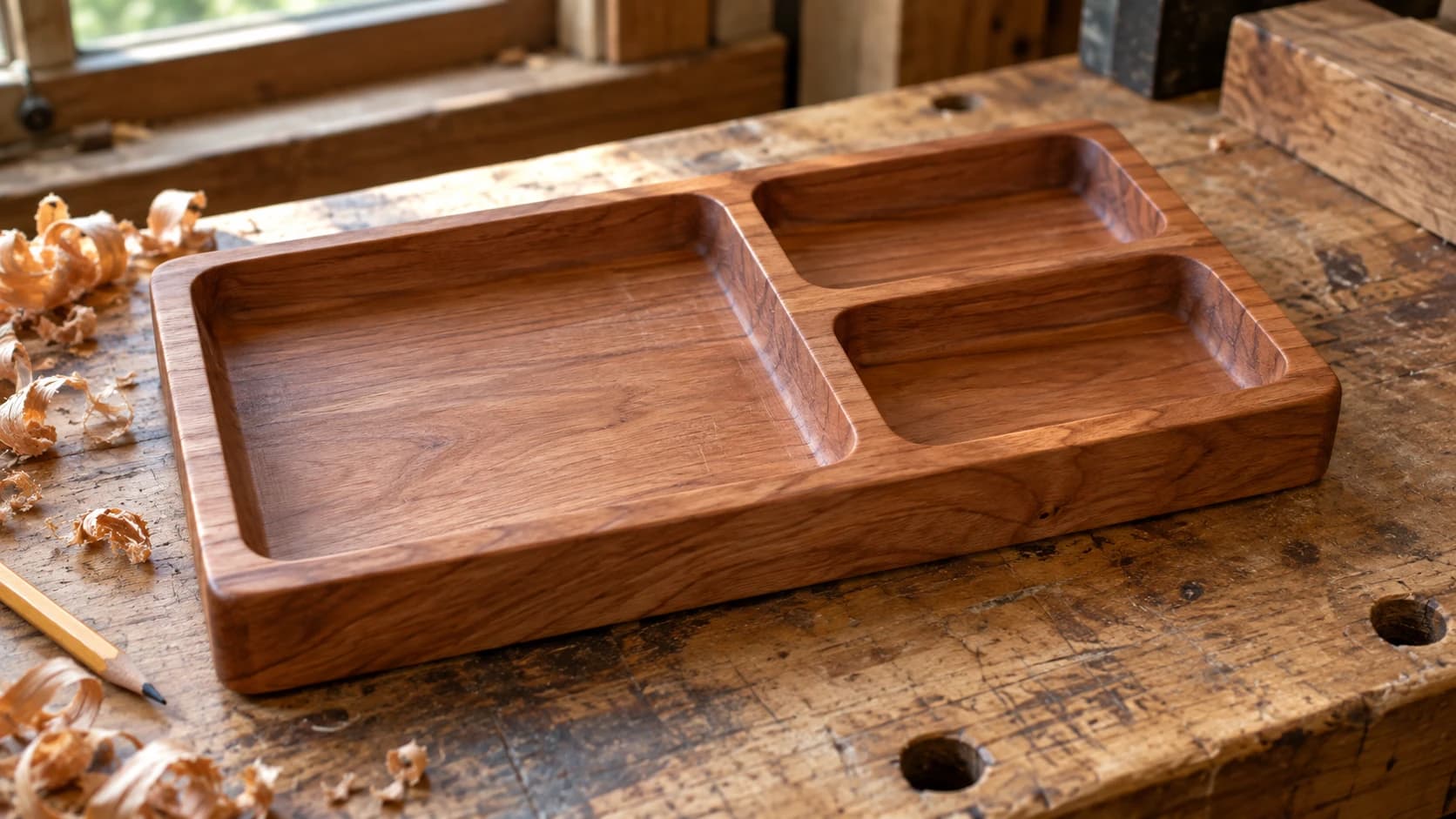
Pocketing projects: the machine hogs out a recessed area and leaves walls behind. Valet trays, catch-alls, coaster sets, serving boards with a well, spoon rests, tea boxes. This is the category people underestimate and then never leave, because everything in it sells.
A dedicated bowl bit (rounded corner where the wall meets the floor) instantly upgrades the result from "routed pocket" to "looks store-bought." Beyond that, it's endmill work.
What it demands: decent workholding, because pocketing removes a lot of material and a piece that shifts mid-cut is scrap. And for anything touching food, a finish choice you've actually verified is food safe once cured, not just one a forum post shrugged at.
Warning
Deep pockets in one greedy pass is the classic new-owner mistake in this category. Multiple shallow passes are slower on paper and faster in reality, because they don't snap bits or burn walls.
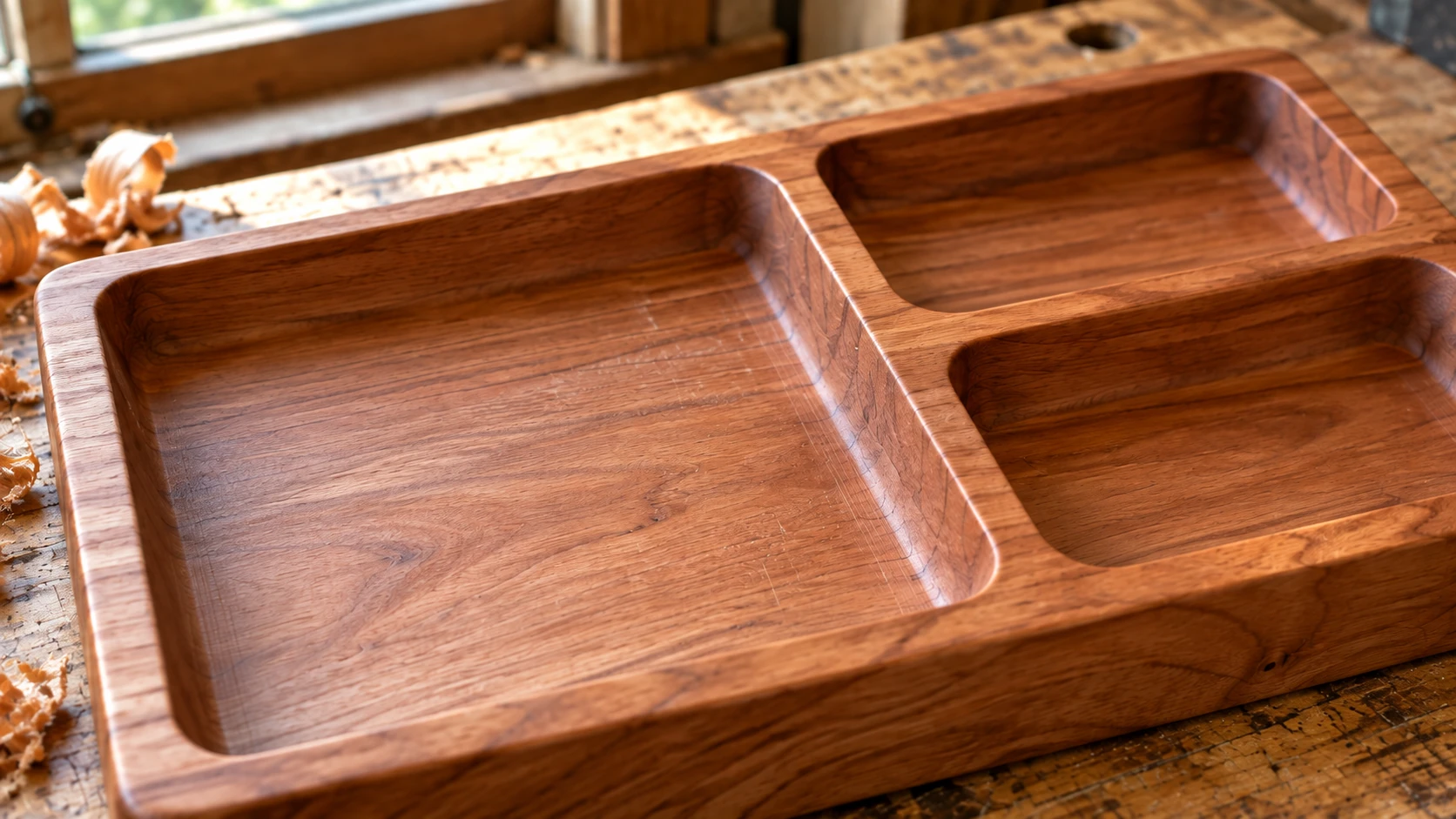
Rounded internal corners and smooth wall-to-floor transitions are part of the pocket geometry. The remaining ribs divide the tray while staying connected to its base.
Jigs, Fixtures, and Shop Upgrades
The least glamorous category and possibly the best argument for owning the machine. Router sled rails, drill guides, circle-cutting jigs, tool wall inserts, clamp racks, perfectly spaced shelf-pin templates, a fence with T-track slots exactly where you want them.
Everything here is cut from MDF or plywood scrap, needs one endmill, and tolerates sloppy design because nobody sees your jigs. But the compounding effect is real: every jig makes some future project faster or more accurate, and every one of them gives you a fresh reason to walk back to the machine. That habit is worth more than any single project on this list.
What it demands: almost nothing. This is day-one work, and it's the perfect place to burn through cheap material while you learn feeds and speeds.
Flat-Pack and Panel Work
Through-cutting: the bit goes all the way through sheet material and parts fall out (well, stay held by tabs, then fall out). Lamps that slot together, laptop stands, wall organizers, decorative screens, mandala wall art, layered topographic maps, toys, ornaments by the hundred.
This is where the CNC starts overlapping with what a laser does, and the trade-offs are real: the laser wins on fine detail and speed in thin stock, the router wins on thickness, material range, and edges that aren't charred.
What it demands: understanding tabs (so parts don't launch), dog-bone corners (a round bit cannot cut a square inside corner, so slots need relief cuts), and kerf-aware sizing if parts must slot together snugly. None of it is hard. All of it must be learned once, usually via one lamp that doesn't quite assemble.
Inlays: The Party Trick
One piece of wood set into a recess in another, seams so tight they look painted on. The V-carve inlay technique is the common modern approach: carve the pocket with a V-bit, carve the plug mirrored with the same V-bit, and the two wedge together into a glue line that, done well, all but disappears.
This is the category that makes non-makers pick up the piece and turn it over. Contrasting species (walnut into maple, padauk into ash) do most of the visual work for you.
What it demands: precision everywhere. Matched bit angles, correct start depths, flat stock, and a design with no features finer than the geometry can support. It's not day-one work, but it's absolutely month-three work if you follow a proven recipe. Ours is written up step by step in the CNC inlay guide.
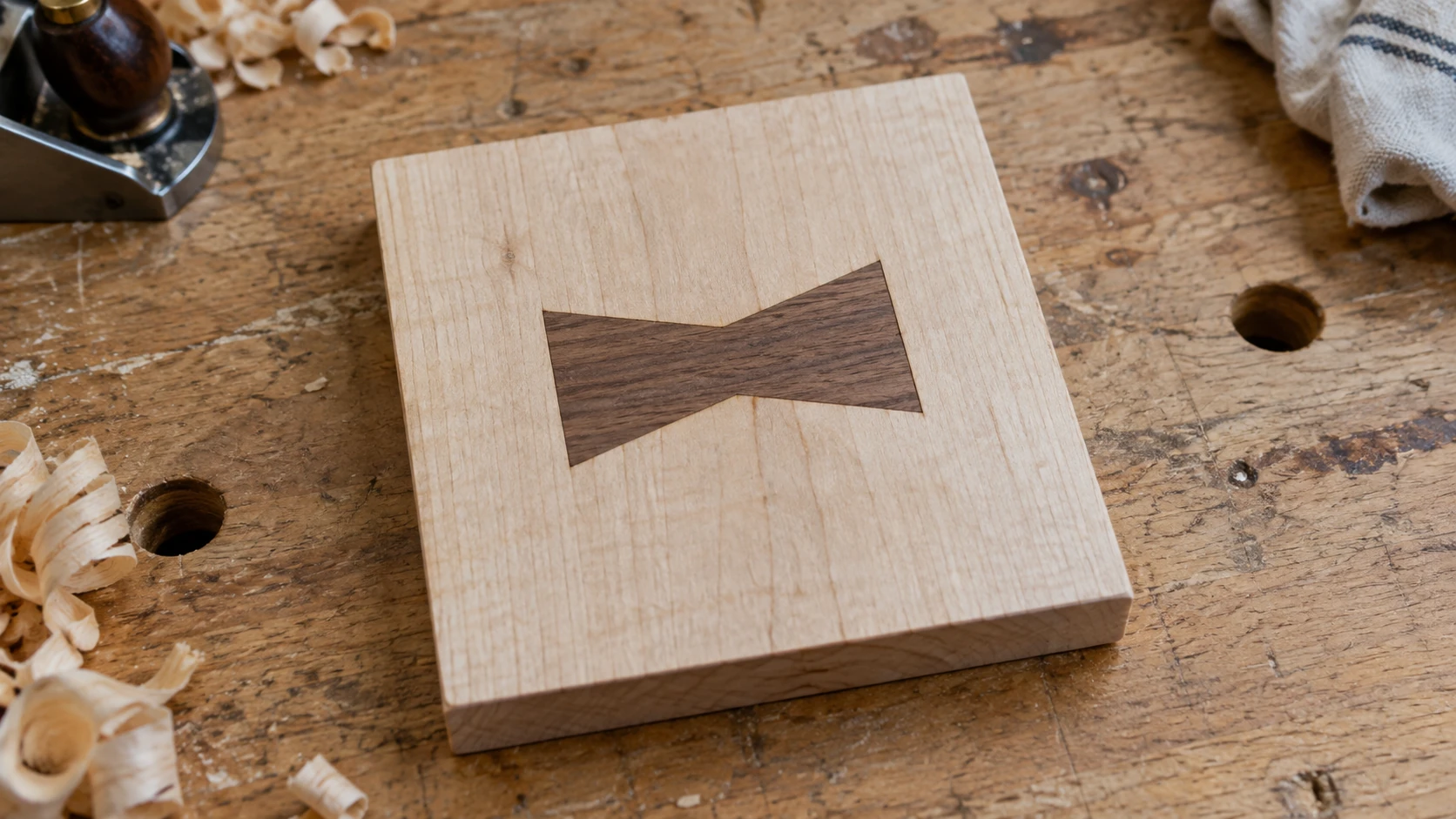
A separate inlay example adds a second species inside a matching pocket. The walnut and maple finish at the same level.
3D Reliefs: Sculpture on Rails
Depth-mapped carving: the machine reads a grayscale image as terrain, then a ballnose bit traces it in hundreds of fine parallel passes. The results (portrait carvings, floral panels, wildlife scenes, topographic maps, ornate frame moldings) look like they took a carver a week.
The honest cost is time. A detailed relief runs for hours, sometimes most of a day, and the finishing pass is what eats it: finer stepover means longer runtime means less sanding. You will learn your machine's rhythm by sound long before the finishing pass ends.
What it demands: patience more than skill. The toolpaths are standard roughing-then-finishing, and the machine does the artistry. The genuinely hard part used to be getting a good depth map at all, which is exactly what ReliefMaker solves: it converts a photo into a depth map and 3D relief model, free in local mode or 1 credit for the higher-quality AI engine. The full photo-to-carving workflow is in our photo to 3D relief guide.
Info
Reliefs are also where material choice matters most. Fine detail crumbles in soft, splintery stock. Tight-grained hardwoods like maple and cherry hold detail that pine simply drops on the floor.
Furniture Parts and Real Joinery
The deep end. Chair templates, table bases, waterfall-edge consoles, mortise-and-tenon joints cut by machine, curved laminating forms, cabinet parts with system holes drilled in one setup.
A CNC router doesn't replace furniture-making skill; it replaces the template-making and repetitive-accuracy parts of it. Where it shines is repeatability: the fourth chair leg is identical to the first, every time, which is the thing hand tools make you sweat for.
What it demands: real woodworking knowledge (grain direction, wood movement, joinery design), plus CNC-specific skills like two-sided machining with registration pins. This is where the machine stops being the project and becomes a tool inside a bigger one.
Molds, Forms, and the Weird Stuff
Once you trust the machine, it starts making things that make other things. Molds for concrete planters and resin castings. Vacuum-forming bucks. Foam plugs for fiberglass. Press forms for leather. Guitar bodies and neck blanks. Machinable wax for casting metal. Soft aluminum, cut slowly and carefully, on machines rigid enough for it.
What it demands: everything above, plus material-specific knowledge that goes past this post. It's listed here mostly so you know the ceiling is much higher than coasters. People run entire product businesses out of this category.
So Is It Worth It?
Here's the honest framing. A CNC router rewards two kinds of people: those who want to make many of a thing (products, gifts, batches), and those who want to make things beyond their hand skills (inlays, reliefs, perfect curves). If neither describes you, the machine becomes furniture. If either does, it becomes the most-used tool in the shop.
If you're just starting, work down the table from the top. Signs teach the workflow. Jigs teach the machine. Everything below them is waiting once those feel boring.
And when the design step is what's blocking you rather than the machine: Vector Studio turns a written description into a cut-ready SVG for 1 credit, and ReliefMaker turns a photo into a carvable 3D relief, free in local mode. Sign in, feed the machine, and go find out which category is yours.
Related Tools
Ready to try these tools?
Sign up free, no credit card required. Free tools available immediately.
Start Free