
How to Make Paper and Cardstock Projects with a Cutting Machine
Vinyl gets all the attention. Every cutting machine tutorial starts with vinyl decals, moves to HTV t-shirts, and then kind of stops there. Meanwhile, paper and cardstock are sitting in the corner like the friend who's actually really interesting but never gets invited to speak first.
Paper projects are some of the most impressive things you can make with a cutting machine. A layered shadow box looks like something you'd buy from an art gallery. A rolled 3D paper flower centerpiece gets people asking "you made that?" And a pack of 50 cardstock sheets runs about $8, enough for dozens of projects.
If you're new to cutting machines, start with our cutting machine beginner's guide first. If you've already made a vinyl decal or two, you've got the skills. The difference is in what you build after the cut.
Why Paper Projects Deserve More Attention
Three reasons paper crafting doesn't get the love it deserves, and why that's about to change for you.
The material is dirt cheap. A sheet of premium cardstock costs $0.15 to $0.30. Compare that to specialty vinyl at $1 to $3 per sheet, HTV at $2+ per sheet, or faux leather at $1.50 per piece. You can experiment freely, mess up, and try again without wincing at the waste.
The results look expensive. A well-executed shadow box or layered paper art piece has genuine "how much was that?" energy. The dimensional effect of stacked cardstock layers separated by foam adhesive is striking. Frame it properly and it passes for professional art.
Paper projects make incredible gifts. Wedding invitations, baby shower decor, anniversary shadow boxes, custom greeting cards, holiday ornaments. Paper is the material of occasions. People keep paper gifts in ways they don't keep vinyl decals.
PRINT. CUT. CARVE.
- Multiple formats (SVG, DXF, PNG)
- Machine-tested designs
- Commercial licenses
Sponsored by PrintCutCarve.com
Understanding Paper Weights
Paper weight is the most important thing to understand before you start cutting. The U.S. uses pounds (lb), the rest of the world uses grams per square meter (GSM), and the U.S. has two different pound scales ("text weight" and "cover weight") that use different numbers for the same paper. Here's what actually matters:
| Weight | GSM | Feel | Best For |
|---|---|---|---|
| 20 lb text (copy paper) | 75 gsm | Flimsy, folds easily | Stencils, practice cuts, templates |
| 65 lb cover | 176 gsm | Sturdy but flexible | Multi-layer projects, intricate cuts, scrapbooking |
| 80 lb cover | 216 gsm | Stiff, holds shape | 3D flowers, cake toppers, shadow boxes |
| 100 lb cover | 270 gsm | Very stiff, hard to fold | Thick bases, structural elements |
| 110 lb cover | 300 gsm | Near-cardboard | Deep-cut blade territory, box structures |
The sweet spot for most projects is 65 lb to 80 lb cover weight (176 to 216 gsm). This range cuts cleanly with a standard fine-point blade, holds its shape when standing upright, and folds along score lines without cracking.
Tip
When shopping online, ignore the "text weight" number and look for "cover weight" or just the GSM. A "65 lb cover" card is thick and sturdy. A "65 lb text" paper is basically fancy copy paper. Same number, completely different material. GSM never lies, so when in doubt, go by GSM.
Blade Settings and Pressure
The fine-point blade that came with your machine handles everything up to about 80 lb cover weight. For most paper projects, you'll never need anything else.
Recommended settings by weight:
| Material | Pressure | Speed | Passes |
|---|---|---|---|
| Copy paper (20 lb text) | Low | Fast | 1 |
| Light cardstock (65 lb) | Medium | Medium | 1 |
| Medium cardstock (80 lb) | Medium-High | Medium | 1 |
| Heavy cardstock (100 lb) | High | Slow | 1 to 2 |
| Glitter cardstock | High | Slow | 2 |
For anything over 100 lb cover, switch to a deep-cut blade. The most common mistake is using too much pressure on thin paper. Maximum pressure on 65 lb cardstock scores through the mat and dulls the blade. Start with your software's default cardstock preset and adjust from there.
For heavy or specialty stock (glitter, chipboard), use two passes at moderate pressure rather than one pass at maximum. The first pass scores the path, and the second cuts through cleanly.
Scoring vs Cutting
Scoring is paper crafting's secret weapon. A score line presses a crease into the cardstock without cutting through it, creating a clean fold line. Without scoring, 80 lb cardstock folds unevenly and cracks along the surface. With scoring, it bends cleanly and stays folded. Any project involving folds needs score lines: boxes, pop-up cards, paper flowers, envelopes, and ornaments.
Cricut offers a scoring stylus and a scoring wheel (the wheel is better for 80 lb and heavier). Silhouette users can use the embossing tool or set the blade to a very shallow depth. In your cutting software, assign score and cut as separate operations on different layers. The machine processes score lines first, then switches to the blade automatically.
Tip
When designing your own templates, make score lines a different color than cut lines in your SVG file. This makes it easy to assign different operations in your cutting software. Red for cut, blue for score is a common convention.
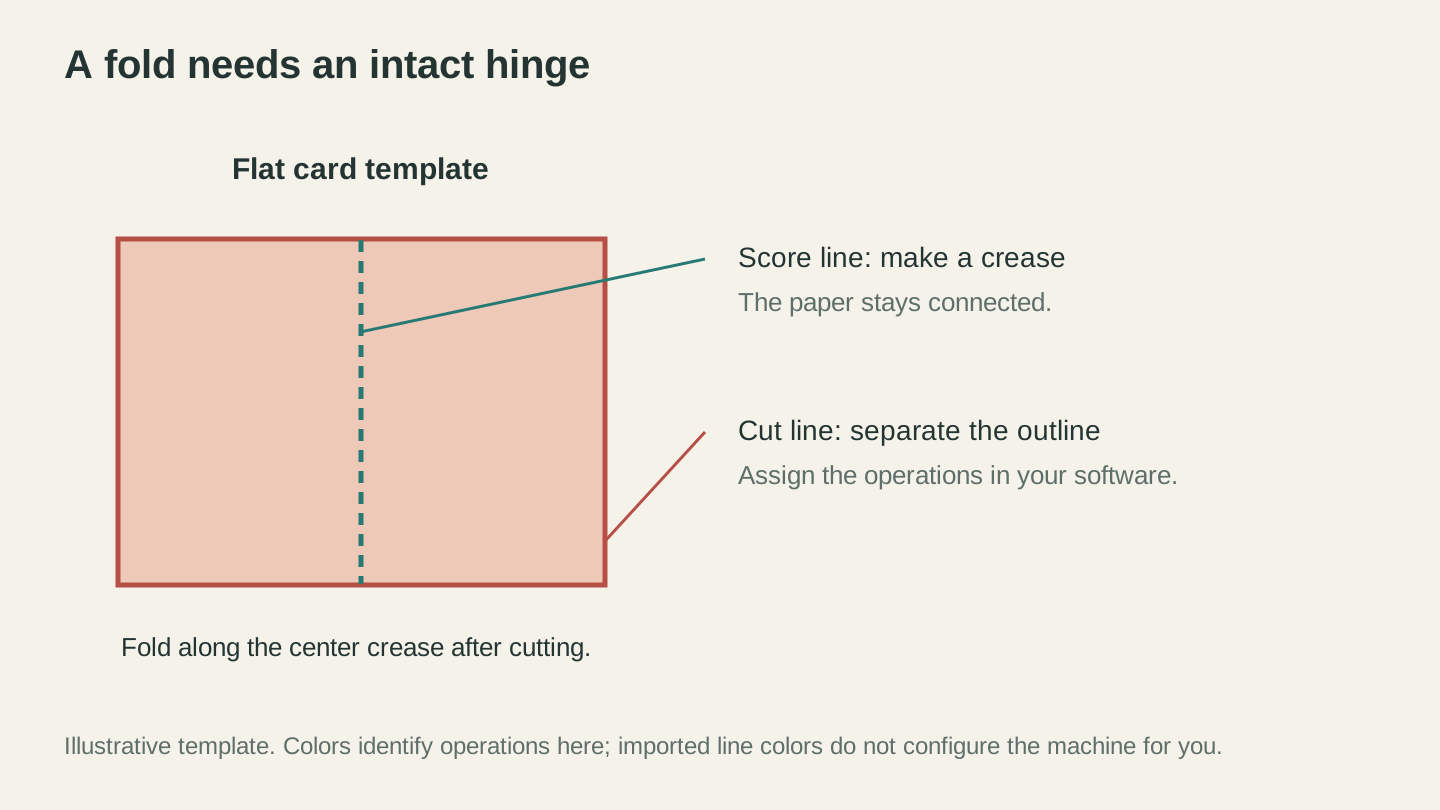
Cut the outside shape and score the fold. The crease leaves the paper connected so the card can hinge.
Material Guide: Beyond Basic Cardstock
Standard smooth cardstock is the workhorse, but specialty papers expand your options considerably.
Textured cardstock (linen weave, canvas, woodgrain) catches light differently on each layer, adding visual interest to shadow boxes. Cuts the same as smooth stock.
Glitter cardstock looks amazing but chews through blades. Use more pressure, slower speed, and expect to replace your blade sooner. Worth it for accent layers and holiday projects.
Metallic and foil cardstock in gold, silver, rose gold, and copper is beautiful for wedding invitations and accent layers. Some foil cards are thinner than standard, so reduce pressure slightly.
Vellum is translucent and delicate. Use a light-grip mat (standard-grip mats tear vellum on removal). Low pressure, fast speed. Perfect for frosted overlay effects.
Kraft cardstock gives you that natural brown paper bag look for rustic and farmhouse aesthetics. Cuts like standard stock.
For a full rundown of every material your cutting machine can handle (not just paper), check out our guide to materials for Cricut and Silhouette.
Project Types
Here's where things get fun. These are the paper projects that make people's jaws drop.
Shadow Boxes
Shadow boxes are the crown jewel of paper cutting. Multiple layers of cardstock are stacked inside a deep frame, with spacers between each layer creating depth and dimension. When light hits the piece, the layers cast real shadows on each other. The effect is stunning.
How they work:
Each layer is a different "depth" of the scene. The back layer might be a solid sky. The next layer forward has mountains. Then trees. Then a foreground with grass and flowers. Each successive layer has more cut away, revealing the layers behind it.
Assembly approach:
- Cut each layer from a different color of cardstock
- Stack them from back to front with spacers (foam tape, foam board strips, or cardboard squares) between each layer
- Mount the assembled stack in a shadow box frame (8x10 or 11x14 are the most common sizes)
Use foam adhesive dots for quick 3 to 5 layer designs, foam board strips for even spacing on larger pieces, or cardboard spacers for consistent gaps. The typical shadow box has 4 to 8 layers. Start with 4 to learn the process before going deeper.
3D Paper Flowers
Paper flowers are the project that converts skeptics into paper crafters. A well-made paper rose or peony looks surprisingly realistic, lasts forever, and costs about $0.30 in materials.
Two main techniques:
Rolled flowers: Cut a spiral shape from cardstock. Roll the spiral tightly from the outside in, then release slightly to let the coils relax into a flower shape. Glue the center circle to the bottom. A smooth spiral makes a rose, a scalloped spiral makes a peony, and a pointed spiral makes a dahlia.
Layered petal flowers: Cut 3 to 5 copies of the same petal template at different sizes. Curl the tips with a pencil, stack from largest to smallest, and glue at the center. The curled petals create natural-looking dimension.
Tip
For rolled flowers, 65 lb cardstock rolls more smoothly. For layered petal flowers, 80 lb holds its shape better. Use a hot glue gun for fast assembly, but switch to tacky glue if you need repositioning time. Hot glue sets in seconds, which is great for speed but unforgiving if you place a petal wrong.
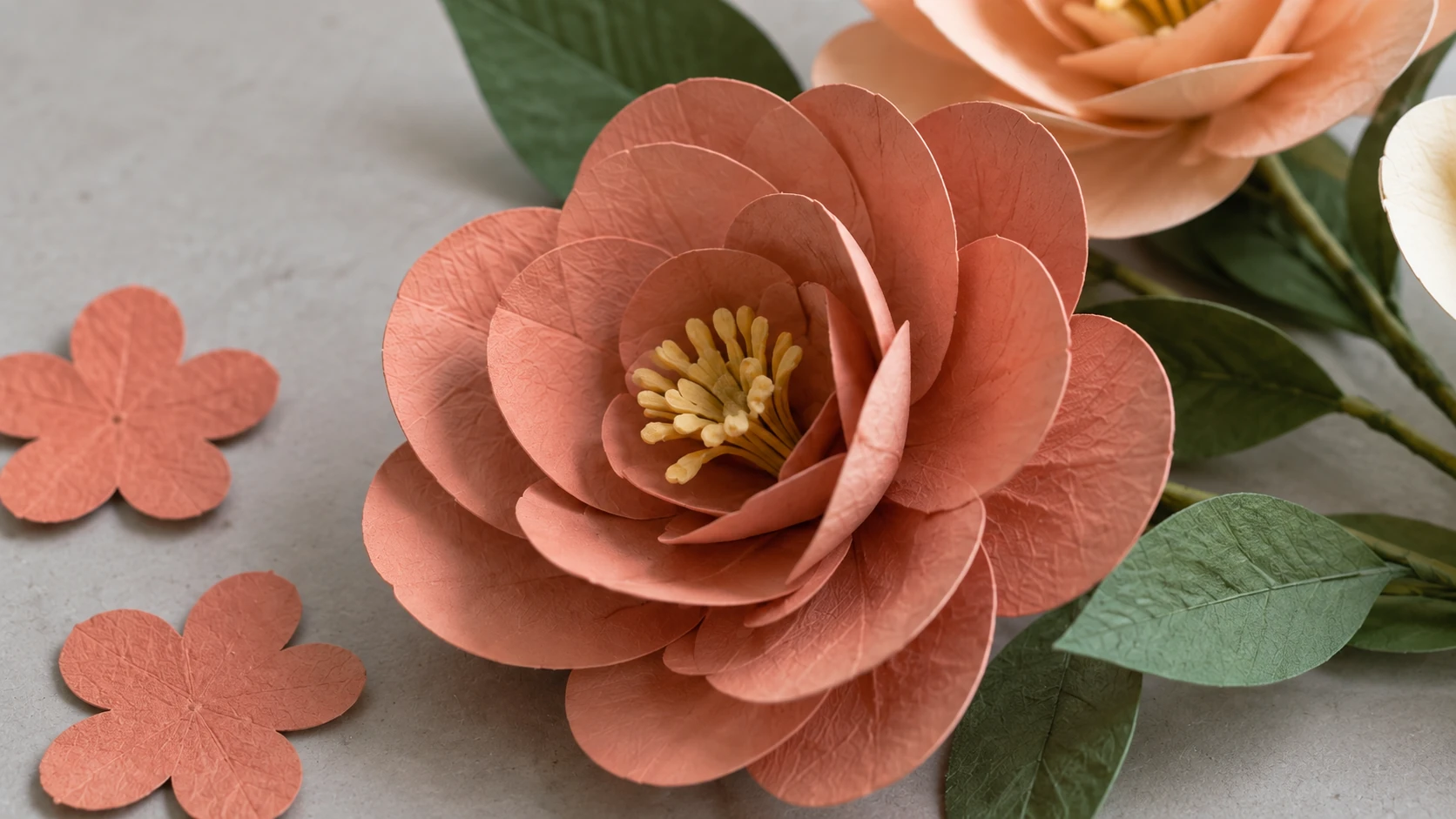
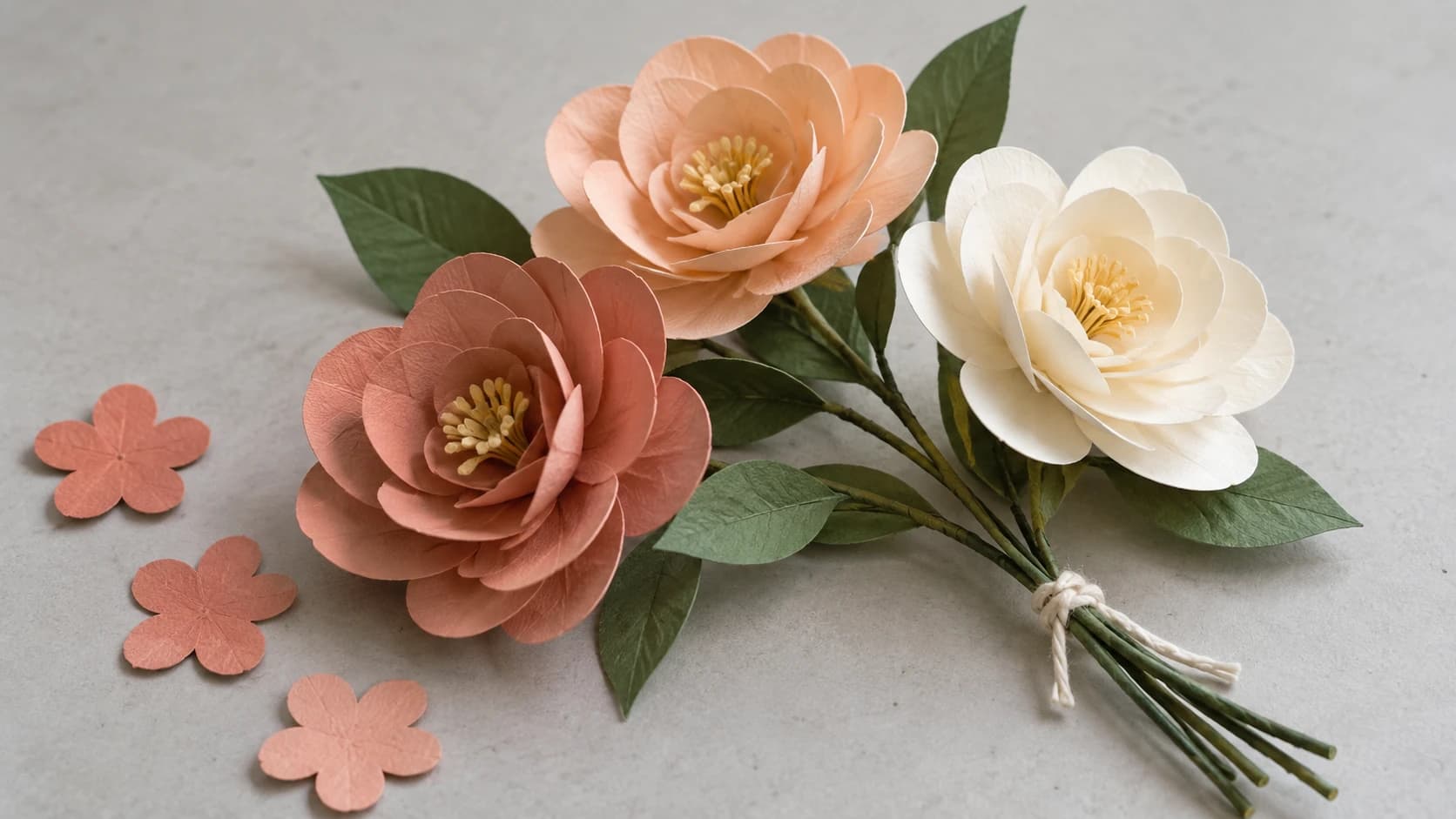
The same coral flower up close: gently curled petals overlap around a shared center, while the flat cutouts show their starting shape.
Layered Greeting Cards
A step up from flat printed cards. Cut a decorative front layer from colored cardstock and mount it on a folded card base. Add a second accent layer for depth. The result is a card that stands out from everything else in the mailbox.
Wedding invitations are the big-ticket item here. A laser-cut-look invitation with intricate lace patterns, cut from pearlescent cardstock and mounted on a contrasting base, looks like it costs $5 per unit. Your actual cost is about $0.50 per invitation. For a 200-person wedding, that's $100 in materials versus $1,000+ from a professional printer.
Cake Toppers
Cut your design from 80 lb or heavier cardstock, then glue or tape it to a wooden skewer, lollipop stick, or bamboo dowel. Names, ages, "Happy Birthday," monograms, silhouettes. Simple to make, big visual impact on the cake.
Double-sided toppers look better. Cut two copies of the design, glue them back-to-back with the stick sandwiched between them. This way the topper looks finished from every angle, not just the front.
For custom monogram-style toppers, our Monogram Generator creates personalized designs that work perfectly when cut from cardstock.
Paper Ornaments and Gift Tags
Cut several identical shapes (stars, trees), fold each in half, and glue them back-to-back in sequence for 3D ornaments. For gift tags, cut from coordinating cardstock and thread twine through a punched hole. Custom gift boxes use score lines for fold paths and cut lines for the shape, assembling in minutes.
Multi-Layer Assembly Tips
Multi-layer projects live or die on assembly quality. A beautifully cut design assembled sloppily looks worse than a simple design done cleanly.
Add small registration marks (tiny crosses or dots) at the corners of each layer for alignment, then remove them in the final piece. Always work from back to front, building each layer on the one below. A light pad or window held behind your layers reveals misalignment before the glue dries.
Glue Types
The wrong adhesive ruins paper projects. Here's what works:
| Glue Type | Best For | Watch Out For |
|---|---|---|
| Hot glue | Flowers, fast assembly | Burns fingers, visible blobs |
| Tacky glue (Aleene's) | Cards, delicate layers | Can wrinkle thin paper |
| Double-sided tape | Flat layers, clean assembly | Not as strong as glue |
| Foam adhesive tape | Shadow box layers, dimension | Adds 1 to 2mm per layer |
Foam adhesive tape is the magic ingredient in shadow boxes. It comes in 1mm, 2mm, and 3mm thicknesses and creates real physical depth between layers. A 5-layer shadow box with 2mm foam tape between each layer has 8mm of spacing, plus the thickness of the cardstock, enough for real shadows to form.
Warning
Liquid glues (school glue, Mod Podge, thin craft glue) will wrinkle and warp cardstock. If you must use liquid glue, apply it in thin lines or dots rather than spreading it across the entire surface. For flat, wrinkle-free results, stick with double-sided tape or adhesive runners for flat layers and hot glue for 3D assemblies.
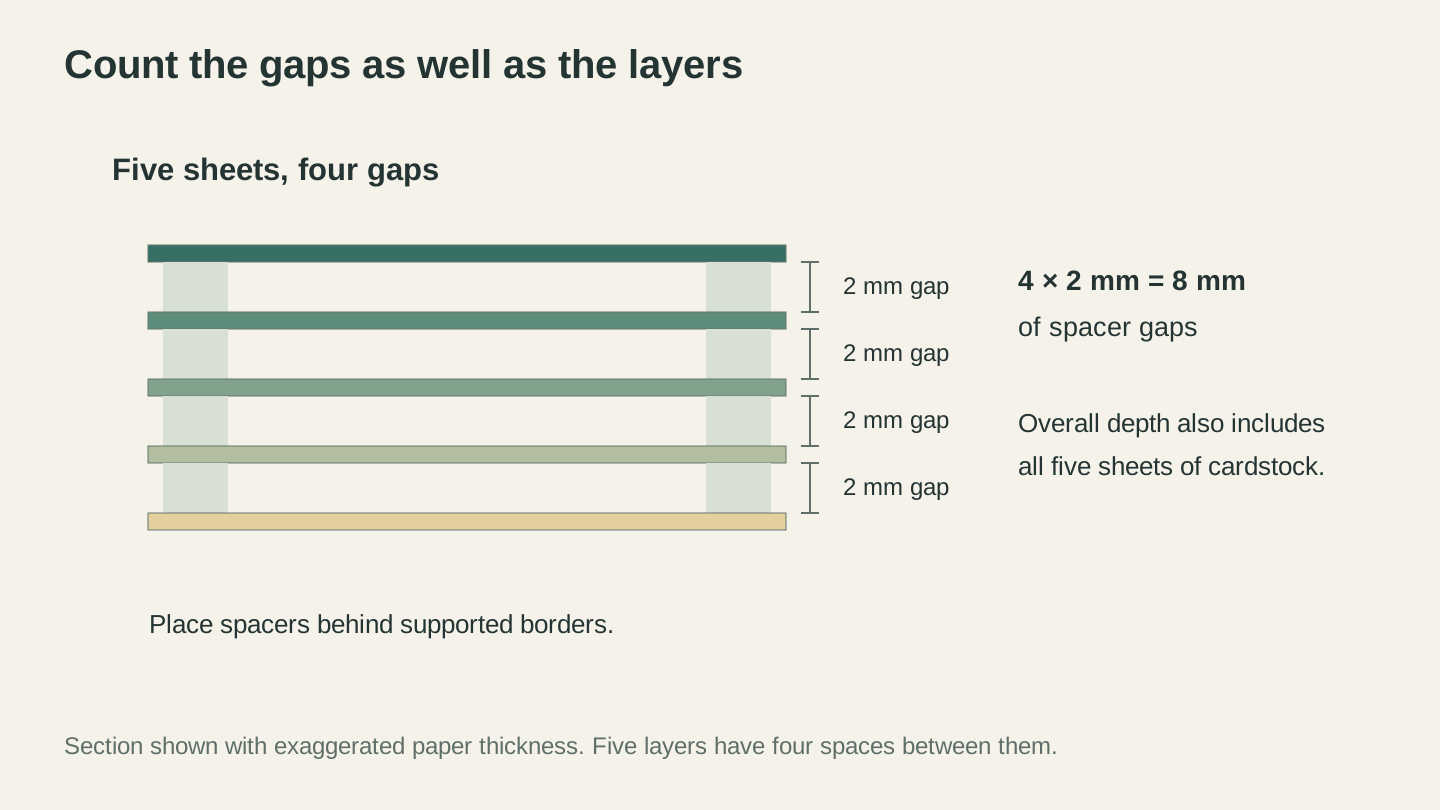
Five layers have four gaps. At 2 mm per gap, the spacing adds 8 mm; the cardstock itself adds more depth.
Curling and Shaping
Flat cardstock is just the starting point. Wrap petals around a pencil for gentle curves. Run a bone folder edge along petal tips for natural curls. For flower centers and leaves, press cut shapes on a foam pad with a rounded stylus to create gentle domes and contours. These small details are the difference between "nice paper cutout" and "wait, that's not a real flower?"
Design Tools for Paper Projects
Free SVG sites are the most common source. Search for "free shadow box SVG" or "paper flower SVG template" and you'll find hundreds of pre-separated designs with score lines already marked.
Vector Studio generates custom designs from text descriptions. Describe your shadow box scene and get a machine-ready SVG for one credit. Check out our AI SVG generator guide for prompt tips.
MonoTrace converts hand-drawn templates and images into clean SVG vectors for free. Sketch a flower petal shape, snap a photo, upload it, and download the vector. Our PNG to SVG guide covers the full process.
File Converter handles format translation. Downloaded a DXF template? Convert it to SVG for your cutting machine's software without using tool credits in seconds. Downloading the converted file requires an active paid plan.
Tip
When downloading free SVG files for shadow boxes, check that the layers are properly separated into individual groups or paths. Some files look great in the preview but are actually a single flat image, not cut-ready layers. Open the SVG in your cutting software before starting.
When creating your own multi-layer designs, give every layer (except the back) an outer border for structural support. And always test with copy paper first. A test assembly costs one cent and ten minutes. Discovering a design problem after cutting five layers of premium cardstock costs much more.
Troubleshooting Common Issues
Paper tearing on the mat. Your mat is too sticky. Use a light-grip (blue) mat for anything under 65 lb. For cardstock on a standard-grip mat, reduce the tack by pressing it against your clothes a few times before loading.
Incomplete cuts. Increase pressure one notch and try again. Check that the paper is flat against the mat and that your blade isn't dull. Paper dulls blades faster than vinyl.
Rough or ragged edges. Usually a dull blade, excessive pressure, or too-fast speed. A fresh blade with moderate pressure at medium speed gives the cleanest results.
Layers not aligning. Use registration marks, work on a flat surface, and let adhesive set before adding the next layer. Rushing assembly is the top cause of misaligned projects.
Start Simple, Then Stack
Your first paper project doesn't need to be a ten-layer shadow box. Start with a single-layer cake topper or a set of gift tags. Get comfortable with your cardstock settings, practice clean removal from the mat, and learn how your machine handles curves and fine details in paper.
Then try a rolled flower. Then a three-layer card. Then a shadow box. Each project teaches you something about assembly, adhesive selection, and how to turn flat sheets into dimensional art.
The materials cost almost nothing. The learning curve is gentle. And the finished products look like they cost ten times what you put into them. That's a pretty good deal.
Need a design to start from? Sketch your shape and turn it into a cut file for free with MonoTrace, or describe what you want and let Vector Studio generate it for you.
Happy making.
Related Tools
MonoTrace
Turn photos and artwork into SVG outlines for free, with an optional sketch mode.
File Converter
Convert supported combinations of vector, document, raster-image, and 3D-mesh formats.
Plan required for downloads
Vector Studio
Generate SVG artwork from a written prompt and selected style.
Monogram Generator
Create split or classic monograms with font and frame choices.
Ready to try these tools?
Sign up free, no credit card required. Free tools available immediately.
Start Free