

How to Build Recurring Income with Digital Downloads (SVG, DXF, STL Files)

You've been making things with your laser cutter, CNC router, or 3D printer. You've got folders full of design files on your computer. You've spent hours tweaking SVGs, cleaning up DXFs, and dialing in STL files for perfect prints.
Here's the thing: those files are worth money. Not to you (you already have them), but to the thousands of makers who need exactly the design you already created and don't have the skills, time, or software to make it themselves.
Digital downloads remove the materials, packing, and shipping work attached to each physical order, so a tested file can be sold more than once. They are not truly passive: design, testing, listing, marketing, customer support, compatibility updates, bookkeeping, taxes, platform changes, intellectual-property checks, refunds, and disputes still take time and money.
There is an active market for SVG bundles, CNC project files, 3D-printing models, and cutting-machine designs, but sales and earnings vary enormously. Treat each file and platform as a business experiment: understand the customer, create a quality product, calculate every cost, and measure actual results before expanding.
This guide covers the full picture: what types of files sell, where to sell them, how to create files that get five-star reviews, pricing strategies, SEO, licensing, and the common mistakes that kill digital download shops before they gain traction.
Why Digital Downloads Can Produce Recurring Income
Physical products have a hard ceiling. You can only laser engrave so many cutting boards in a day. You can only ship so many packages. Your income is directly tied to your time at the machine.
Digital downloads reduce the amount of production work required for an additional sale. A file may sell repeatedly through automated delivery, but demand, support, maintenance, fees, and platform access still limit the result. Some makers add downloads as a second revenue stream after validating that buyers want their files.
PRINT. CUT. CARVE.
- Multiple formats (SVG, DXF, PNG)
- Machine-tested designs
- Commercial licenses
Sponsored by PrintCutCarve.com
The Math That Makes It Work
Physical product example: suppose an ornament sells for $12, uses $2 in materials and $4 in packaging and shipping, and takes 15 minutes of labor. Before taxes and shared overhead, that leaves $6 per unit. Capacity is still limited by production time.
Digital download example: suppose a 12-design SVG bundle sells for $4.99. Subtract the platform, payment, advertising, currency, tax, refund, software, support, and other costs that actually apply. The remaining contribution per sale can be multiplied by a tested sales volume, but the volume is an assumption, not a promise.
Model several demand scenarios, including zero sales, before multiplying the result across a larger catalog.
The overhead structure is different too. Physical products require materials, workspace, equipment maintenance, packaging supplies, and shipping logistics. Digital downloads still require hardware, software, internet access, design and testing time, support, marketing, compliance, and platform or payment fees. Calculate your own margin rather than assuming a universal percentage.
Physical Products vs. Digital Downloads
| Factor | Physical Products | Digital Downloads |
|---|---|---|
| Revenue per sale | Depends on product and market | Depends on file and market |
| Cost per sale | Materials, labor, shipping, fees, returns, and overhead | Fees, support, refunds, taxes, software, advertising, and overhead |
| Profit margin | Must be calculated | Must be calculated |
| Time per sale | Usually includes production and fulfillment | Delivery can be automated; support and maintenance remain |
| Daily capacity | Limited by production and fulfillment | Not production-limited, but demand and platforms still limit sales |
| Sales outside working hours | Possible through online ordering | Possible through automated delivery |
| Startup costs | Equipment + materials | Computer + software |
| Inventory risk | Unsold physical stock | No physical stock; platform, compatibility, and IP risk remain |
| Returns/disputes | Product- and channel-dependent | Product-, law-, and channel-dependent |
Some makers do both. Physical products and digital downloads can reach different customers, but each channel adds operational work. Add the second model only when the expected contribution justifies that work.
Types of Digital Files That Sell
Not all file types sell equally well in every market. Use the categories below as research prompts, then verify current demand, competition, platform rules, and intellectual-property risk for your niche.
SVG Files for Laser Cutters and Cutting Machines
SVGs are a common category of maker downloads because many cutting-machine and laser workflows accept vector files.
SVG categories to research:
- Holiday ornament packs (Christmas, Halloween, Easter, Valentine's Day). Demand can be seasonal, but timing and sales vary by niche, originality, competition, and promotion.
- Earring and jewelry templates. Geometric, floral, boho, and seasonal designs are commonly offered in bundles; research demand, originality, and safe material dimensions for your audience.
- Sign designs. Farmhouse, modern, rustic, motivational quotes, kitchen signs, bathroom signs. Buyers search for specific phrases ("but first coffee," "home sweet home") and specific styles.
- Cake and cupcake toppers. Birthday numbers, wedding cake toppers ("Mr & Mrs"), baby shower themes. These sell consistently because people need them for specific events.
- Monogram frames and split letters. Alphabets with decorative frames, split monogram designs for personalizing. Bundles of full A-Z alphabets command premium prices ($8-15).
- Tumbler wraps. Full-wrap designs for Starbucks-style cold cups. This niche exploded and remains strong.
- Layered 3D mandala designs. Multi-layer paper or wood art that creates depth and can be tested as a home-decor project category.
Tip
If you test seasonal files, prepare them far enough ahead to photograph, document, publish, and measure before the event. Use your own sales data and the platform's current guidance instead of assuming a fixed lead time or guaranteed seasonal spike.
DXF Files for CNC Routers
CNC users work primarily with DXF files, and this market is less saturated than SVGs for cutting machines. The buyers tend to be more experienced makers who are willing to pay more per file.
Popular DXF categories:
- CNC project plans. Complete projects with cut files, material lists, and assembly instructions. Cribbage boards, serving trays, jewelry boxes, wall clocks, desktop organizers.
- Relief carving patterns. 3D relief designs for V-carving and 3D carving operations. Wildlife, landscapes, portraits, signs.
- Jigs and fixtures. Templates for common workshop tasks. Router table fence plans, drill press jigs, clamp holders.
- Inlay patterns. Designs meant for multi-material inlay work (epoxy, contrasting wood, metal). Celtic knots, geometric patterns, logos.
- Decorative panels and room dividers. Large-format geometric or organic patterns meant to be cut from sheet goods.
DXF project files may support different pricing than simple SVGs when they include technical precision, documentation, and testing. Research current comparable offers and price from the value and support you provide.
For converting your SVG designs to DXF format, File Converter handles the conversion without using tool credits. If you want to understand the technical differences between formats, our file format guide covers everything, and the SVG to DXF conversion guide walks through the process step by step. Downloading the converted file requires an active paid plan.
STL Files for 3D Printers
The 3D-printing community has established marketplaces. Research current demand, competition, safety, and support expectations for each model category.
STL categories to research:
- Functional prints. Cable organizers, phone stands, storage containers, tool holders, and drawer organizers may appeal when they solve a specific problem safely and fit the user's hardware.
- Miniatures and figurines. Gaming miniatures, display figurines, and collectibles serve a distinct market with its own licenses, originality requirements, competition, and quality expectations.
- Lithophane templates. Pre-configured lithophane holders and frames that customers can use with their own photos.
- Replacement parts. Knobs, handles, brackets, clips for common appliances and furniture. People search for these when something breaks and OEM parts are discontinued or overpriced.
- Workshop accessories. Tool holders, bit organizers, measuring tool mounts, dust collection adapters. Makers buy prints for their own workshops.
- Seasonal decor. Holiday-themed prints: ornaments, decorations, gift toppers.
Pricing for 3D-printing files varies by marketplace, license, complexity, documentation, and support. Compare current offers and make sure the price covers your design, testing, update, and customer-service time.
Info
STL files can create support questions about print settings, materials, and troubleshooting. A tested README with clearly labeled machine- and material-specific starting points can reduce confusion, but do not promise universal settings or review outcomes.
Design Templates and Patterns
Beyond individual cut files, templates and patterns represent a growing category.
- Sublimation templates. Mug wraps, tumbler templates, shirt mockups sized for specific blank products.
- Jig templates. Printable or cuttable templates for aligning work on specific machines.
- Font bundles. Hand-drawn or custom fonts packaged for use with cutting machines and laser software.
- Design element packs. Borders, flourishes, decorative elements, corner pieces that buyers combine into their own designs.
- Project plans with documentation. Complete build guides with cut files, material lists, instructions, and photos may support a higher price when they save planning time and have been thoroughly tested.
Where to Sell Your Digital Downloads
Your sales platform matters. Each marketplace has a different audience, fee structure, policy, tax treatment, and discovery mechanism. Adding platforms can diversify risk but also multiplies listing, support, accounting, and compliance work.
Etsy
Etsy is one marketplace where buyers search for SVG files, CNC patterns, and craft supplies. Whether it is the right starting point depends on your location, product, fees, policies, and target customer.
Pros: Existing marketplace traffic, search and discovery features, digital delivery, reviews, payments, and optional advertising tools.
Cons: Listing, transaction, payment-processing, advertising, currency, regulatory, and other fees may apply and can change. Competition is intense, policies and search systems evolve, and you do not control the platform.
Before setting a price, use Etsy's current official fee pages for your country and account. Model the exact order value, listing renewal, payment processing, advertising, currency conversion, taxes, refunds, and any other services you use; do not rely on a static percentage from a blog post.
Current-practice checklist for Etsy digital downloads:
- Follow Etsy's current search-visibility and tagging guidance.
- Write a clear, buyer-friendly title that identifies the product and its important objective traits.
- Include mockup images showing the file in use (not just flat vector previews).
- Configure the platform's digital-delivery workflow correctly and test the customer package.
For a complete guide to selling on Etsy, including listing optimization, photography, and pricing, see our Etsy seller's guide.
Creative Market
Creative Market targets design assets for customers such as graphic designers, web developers, and small businesses. Verify its current application process, product requirements, fees, and license terms before listing.
Pros: Design-focused audience and marketplace discovery for eligible products.
Cons: Acceptance, commission, payout, product, and license rules can change; read the current seller agreement and fee schedule.
Best for: High-quality design assets, font bundles, template packs, and illustration collections. Less suited for basic SVG cut files.
Gumroad
Gumroad is a creator-focused sales platform. Review its current discovery features, fees, tax handling, branding controls, and product policies before deciding how it fits your business.
Pros: Direct product pages and tools that may support one-time products, subscriptions, or memberships, subject to the current plan and policies.
Cons: No built-in marketplace traffic. You need your own audience (social media, email list, blog) to drive sales. Less trust with first-time buyers compared to Etsy.
Best for: Sellers who already have an audience from social media, YouTube, or a blog. Works well as a supplement to Etsy.
Your Own Website
Selling from your own site (for example, with a hosted shop or self-managed commerce system) gives you more control, but not cost-free sales. Budget for hosting, software, payment processing, taxes, fraud, chargebacks, accessibility, privacy, security, email, delivery, support, and customer acquisition.
Pros: More brand, storefront, customer-relationship, and analytics control.
Cons: You build all your own traffic. No marketplace discovery. Requires more technical setup. Lower trust for first-time visitors.
Best for: Established sellers who want to reduce platform dependency. Usually added after building an audience on Etsy or social media.
Platform Comparison
| Platform | Commission/Fees | Traffic | Best For |
|---|---|---|---|
| Etsy | See current official fee schedule | Marketplace discovery | Craft and maker downloads, subject to policy |
| Creative Market | See current seller agreement | Design marketplace | Eligible design assets, fonts, templates |
| Gumroad | See current pricing and tax terms | Platform- and seller-driven | Creator products and audiences |
| Own website | Hosting, software, payments, compliance, and acquisition | Seller-driven | Greater control with greater responsibility |
| Other storefronts | See each current agreement | Varies | Compare features, customers, fees, and policy |
Tip
Choose one channel that fits your customer and test it before multiplying operational work. Before cross-listing, review every platform's current seller, exclusivity, licensing, pricing, customer-data, and digital-product terms; those terms can change.

A close sample view can explain the material thickness, edge construction and hanging attachment. Use photographs of your tested files when preparing an actual listing.
Creating Quality Files That Get Five-Star Reviews
The single biggest differentiator between digital download shops that succeed and shops that flounder is file quality. Bad files get bad reviews. Bad reviews kill visibility. It's a death spiral.
Here's what "quality" actually means for digital download files.
Clean Vector Paths
Buyers are importing your files into their laser software, CNC controller, or cutting machine software. If your paths are messy, their experience will be frustrating.
What clean paths look like:
- No overlapping duplicate paths
- No stray nodes or micro-segments
- Closed paths where they should be closed (especially for cut lines)
- Logical grouping of elements (each piece as its own group)
- Proper winding direction for cut/engrave operations
- No unnecessary anchor points that create jagged curves
Common path problems:
- Auto-traced images with thousands of tiny segments instead of smooth curves
- Open paths that should be closed (machines interpret these differently)
- Overlapping paths that cause the machine to cut the same line twice
- Paths too small for the buyer's machine to cut accurately
If you're working from hand-drawn sketches or raster images, MonoTrace converts them to clean SVG vector outlines for free. The output is ready for laser cutting, CNC routing, or use with cutting machines. Upload your sketch, hit Vectorize, and download a clean SVG.
For creating a starting point without drawing software, Vector Studio generates SVG files from text descriptions. Describe the design, choose a style, then inspect, edit, and test the result. Before selling any AI-assisted output, check current Craftgineer and marketplace terms, confirm that your inputs and output do not infringe others' rights, and understand that copyright protection for AI-generated material varies by jurisdiction and the human authorship involved. Each generation currently costs 1 credit.
Multiple Formats Included
Buyers use different machines with different software. The more formats you include, the wider your potential customer base.
Standard format bundle for cutting machine files:
- SVG (universal vector format)
- DXF (for CNC and some laser software)
- PNG (transparent background, for print-then-cut)
- PDF (for reference or printing)
- EPS (for some vector editors)
For 3D printing files:
- STL (universal 3D printing format)
- OBJ (alternative format, some slicers prefer it)
- 3MF (newer format with better metadata support)
Include only formats you can inspect and test. Conversion can change scale, paths, layers, text, or geometry, and every extra format adds compatibility and support obligations. State the included formats accurately and explain any important differences.
If you need to convert between formats, File Converter handles vector, image, and 3D model conversions without using tool credits. Downloading the converted file requires an active paid plan.
Good Documentation and Instructions
This is where most digital download sellers fall short. They upload a zip file full of SVGs and call it done. Then they're surprised when buyers leave confused reviews.
What to include in your download package:
-
A README file (PDF or text) with:
- File list and what each file contains
- Recommended materials and thicknesses
- Suggested machine settings (if applicable)
- Assembly instructions for multi-part designs
- Scale/size information
- Contact info for support questions
-
Preview images showing the finished product made from your files. Buyers want to see what the result looks like, not just the vector lines on screen.
-
Clear file naming. Instead of "design_final_v3_REAL_final.svg," name files descriptively: "ornament-snowflake-3inch.svg" or "cribbage-board-top-plate.dxf."
Test Cuts Before Listing
This should be obvious, but many sellers skip it. Cut or engrave every design on your own machine before listing it for sale. Designs that look perfect on screen sometimes don't work in practice.
Testing checklist:
- Do all pieces fit together correctly? (For assembly designs)
- Are there pieces too small or fragile to survive cutting?
- Do the engrave areas look good at the intended size?
- Does the design work at different scales? (If you're advertising resizability)
- Are cut lines actually cutting through the material?
- Do the paths import correctly into multiple software programs?
Document your test results and include photos of the completed project in your listing images. Real photos of real projects build enormous trust with buyers.
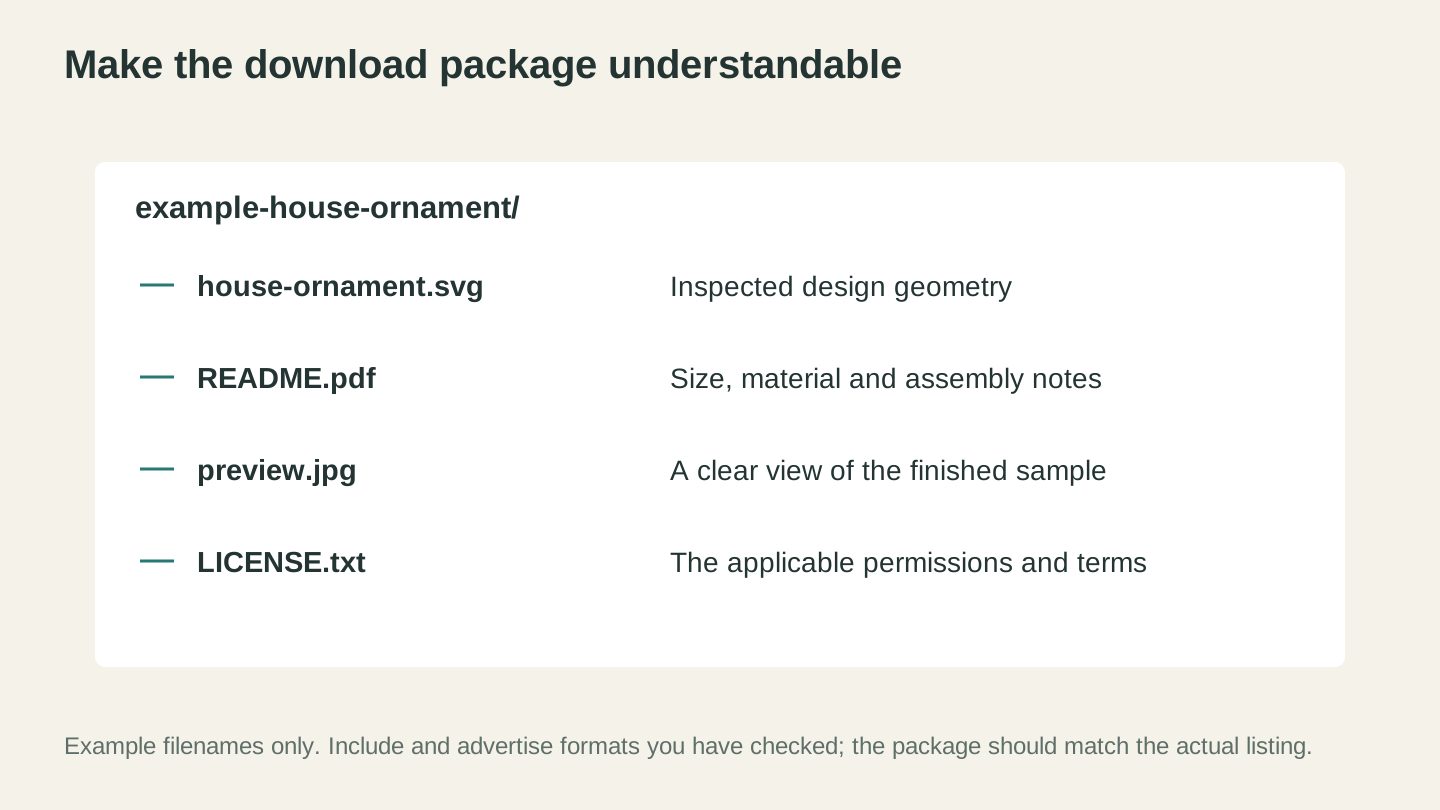
Make the package easy to understand. These are example filenames; include the actual designs, documentation and terms that your listing promises.
Pricing Digital Downloads
Pricing digital files is different from pricing physical products, but the cost is not zero. Include research, creation, testing, documentation, updates, support, software, platform and payment fees, advertising, refunds, taxes, and overhead alongside customer value and current market evidence.
The Volume Game
Price ranges vary by niche, platform, license, quality, documentation, and date. Research current comparable products, then test whether customers will pay a price that covers all costs and leaves an acceptable profit.
Volume is only one possible strategy, and more listings do not guarantee sales. Model contribution per sale, conversion rate, refunds, support load, and customer-acquisition cost under conservative demand scenarios, including zero sales.
Pricing Strategy by Product Type
| Product Type | Illustrative Price | Units per Bundle | Notes |
|---|---|---|---|
| Single SVG file | $1.50-3.99 | 1 | Low price, high volume |
| SVG bundle (themed) | $4.99-9.99 | 8-20 files | Best value perception |
| Mega bundle | $12.99-24.99 | 30-100+ files | Seasonal or category packs |
| CNC project plan | $8.99-29.99 | Files + instructions | Higher perceived value |
| STL model (simple) | $1.50-4.99 | 1-3 files | Competitive market |
| STL model (complex) | $5.99-14.99 | Multi-part design | Less competition |
| Font/design element pack | $6.99-19.99 | Full set | Niche audience |
Pricing Tips
Do not price by guesswork. A low price can fail to cover support and other costs, while a high price can suppress demand. Calculate a floor from your own costs and test customer response; there is no universal minimum for a bundle.
Research comparable offers. Compare scope, quality, documentation, license, support, and price without copying another seller's protected work or assuming a badge proves profitability.
Test bundles deliberately. Bundles can increase order value and reduce listing management, but they can also obscure which files customers value. Compare bundle and individual performance with your own data.
Measure seasonal pricing. If your data shows seasonal demand, test changes carefully and follow marketplace pricing and promotion rules. Do not assume buyers are less price-sensitive.
Consider a commercial-use license only for rights you control. Define the permissions and restrictions with qualified legal help, price the added rights and support deliberately, and never describe the revenue as pure profit.
Creating Designs with Craftgineer Tools
You don't need expensive design software to create sellable digital files. Craftgineer offers tools specifically built for makers that can jumpstart your design workflow.
Vector Studio: AI-Powered Design Generation
Vector Studio generates machine-ready SVG files from text descriptions. Describe what you want ("a geometric fox silhouette for laser cutting" or "a floral border frame for a welcome sign"), choose a style, and get a clean vector file.
How to use it for digital downloads:
- Describe your design concept
- Select a style that matches your target market
- Download the generated SVG
- Open it in your vector editor for refinements
- Export in multiple formats (SVG, DXF, PNG, PDF)
- Test cut on your machine
- List for sale
Each generation currently costs 1 credit. If a design needs work, refine the description or edit the result. Before selling, add meaningful human creative work where appropriate, test the file, check for confusing similarity or infringement, and review the current terms of every tool and marketplace involved.
Vector Studio can provide a starting point for refinement and testing. Generation speed does not determine originality, copyrightability, non-infringement, quality, or market demand. For a deeper look at AI-generated vectors, see our AI SVG generator guide.
MonoTrace: Free Sketch-to-Vector Conversion
MonoTrace converts raster images (photos, sketches, hand-drawn art) into clean SVG vector files. It's free to use.
Use cases for digital download creation:
- Convert hand-drawn designs to vectors. Sketch on paper, photograph it, upload to MonoTrace, download an SVG.
- Clean up rough vector traces from other tools.
- Convert silhouette images or clip art to machine-ready cut files.
- Vectorize textures and patterns for use as design elements.
The combination of Vector Studio for AI-generated concepts and MonoTrace for hand-drawn conversions covers most of the design creation pipeline without requiring a paid vector editor.
For the full process of converting images to clean vectors, our PNG to SVG conversion guide covers the workflow in detail.
SEO for Digital Downloads on Etsy
Etsy search visibility affects discovery, but its systems and guidance change and results are not guaranteed. Use Etsy's current official search-visibility guidance, write accurate buyer-friendly listings, and measure results in your own Shop Stats.
How Etsy Search Works
Etsy's published guidance currently describes several kinds of listing and shop information that may affect discovery, including:
- Relevance (how well your listing matches the search query)
- Listing quality score (based on conversion rate: views to favorites to purchases)
- Recency (newer listings get a temporary boost)
- Customer experience (reviews, shipping on time, response rate)
You control the accuracy and quality of your listing, not the ranking outcome. Recheck Etsy's current guidance before changing titles, tags, attributes, descriptions, images, or policies.
Titles
Follow the current title field limits, but do not fill space for its own sake. Etsy's 2026 guidance favors clear, easy-to-scan titles that state the item and its most important objective traits without repetitive keyword stuffing.
Good title example: "Christmas Ornament SVG Bundle, 20 Laser Cut Ornament Files, Glowforge SVG, Cricut Christmas SVG, Holiday Ornament DXF, Xmas Decoration"
Bad title example: "Pretty Christmas Ornaments"
The good title includes: the product (Christmas ornament), the format (SVG), the quantity (20), the use case (laser cut), compatible machines (Glowforge, Cricut), additional formats (DXF), and seasonal keywords (holiday, Xmas).
Tags
At the time of writing, Etsy recommends using all 13 available tags and allows multi-word phrases within the current character limit. Verify these details in Etsy's current help before publishing.
Effective tag strategy:
- Mix broad and specific terms
- Include machine names (Glowforge, Cricut, Silhouette)
- Include file format names (SVG, DXF, PNG)
- Include use cases (laser cut, vinyl decal, paper craft)
- Include style/theme descriptors (farmhouse, boho, minimalist)
- Mirror the long-tail phrases buyers actually type
Example tags for a holiday ornament SVG bundle:
- christmas ornament svg
- laser cut ornament
- glowforge christmas
- cricut christmas svg
- holiday ornament dxf
- ornament svg bundle
- christmas svg files
- xmas tree ornament
- wood ornament svg
- laser christmas file
- silhouette ornament
- holiday svg bundle
- christmas decoration
Listing Images
For digital downloads, listing images must explain a product buyers cannot inspect physically. Accurate, clear images may improve buyer understanding and conversion, but no image strategy guarantees a search-ranking result.
Image strategy for digital downloads:
-
Main image (thumbnail): A mockup showing the design on a finished product. An ornament SVG shown hanging on a tree. A sign design shown on a barn wood background. This is what appears in search results.
-
Multiple product mockups: Show the design in different contexts and materials. The same SVG cut from wood, acrylic, and paper. Different colors. Different sizes.
-
Flat vector preview: Show the actual file contents (the clean vector lines) so buyers know exactly what they're downloading.
-
Format list image: A simple graphic showing all included formats (SVG, DXF, PNG, PDF, EPS) with checkmarks.
-
Scale/size reference: Show the design at its recommended dimensions with a ruler or common object for reference.
-
Instructions preview: A screenshot of the included README or instructions file, showing buyers that you provide documentation.
Long-Tail Keywords
Generic terms can be competitive, but no keyword strategy guarantees or prevents ranking. Test accurate, specific phrases that describe the product and match your customer research.
Generic (hard to rank for): "SVG file," "laser cut file," "Cricut SVG"
Long-tail (achievable to rank for): "farmhouse welcome sign SVG for Glowforge," "butterfly earring SVG for Cricut," "cribbage board CNC DXF file"
Autocomplete can suggest wording to research, but it does not prove purchase intent, sales volume, or suitability for your listing. Combine it with Shop Stats, customer language, current platform guidance, and accurate product descriptions.
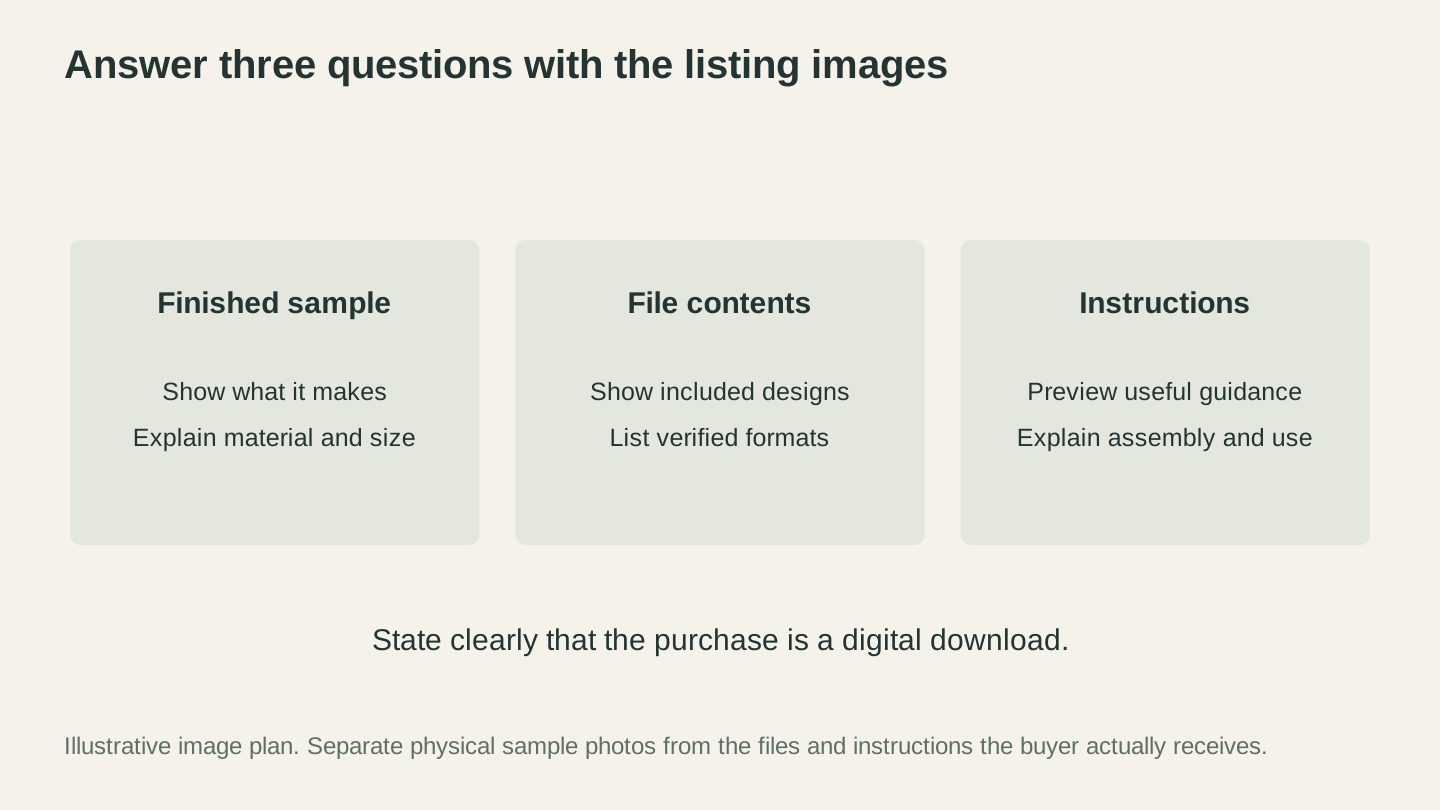
Help buyers distinguish what the design makes from what the download contains. State clearly that the purchase is a digital file.
Licensing and Terms of Use
Licensing defines permissions between you and a buyer, but it only works for rights you actually control. Laws and platform rules vary, so use the examples below as issues to discuss with a qualified lawyer, not as ready-to-publish legal terms.
Personal Use vs. Commercial Use
One possible structure separates personal and commercial permissions:
Personal-use license: Define the permitted personal projects, copies, modifications, and sharing rules in clear language that fits local law and the rights you own.
Commercial-use license: Define which products, quantities, channels, modifications, subcontractors, print-on-demand services, and transfers are allowed. A commercial license does not give you rights in third-party material that you did not own or have permission to sublicense.
Hypothetical pricing structure to model, not a recommendation:
- Personal use: $4.99
- Small business commercial license (up to 500 units): $12.99
- Extended commercial license (unlimited units): $24.99
Writing Your License Terms
Present the governing terms where the buyer can review and accept them before purchase, and include a copy in the download package. Ask a qualified lawyer how contract formation, consumer rights, and required disclosures work in your jurisdiction and sales channel.
Key points your license should cover:
- The rights you own or are authorized to license
- What the buyer may do, including copies, modifications, physical products, channels, and quantities
- What the buyer may not do, subject to applicable law
- Commercial-use, attribution, transfer, support, update, and termination terms
- The refund and cancellation policy required by applicable consumer law and the sales platform
Warning
Be clear about any sharing restrictions, but do not assume a sentence automatically creates enforceable rights or standing. Only send a copyright takedown notice when you are the rightsholder or authorized agent, have a good-faith basis, and can make every required statement accurately. False or materially misleading notices can create liability.
Protecting Your Work
Digital piracy is a reality of selling digital files. Here's how to minimize it:
- Watermark your preview images. Don't use watermarks that obscure the design (buyers hate that), but subtle branding in the corner of mockup images.
- Don't include high-resolution previews in your listing images. Some buyers screenshot listing images instead of purchasing. Keep your listing images at web resolution.
- Monitor for unauthorized copies. If you find one, preserve evidence and use the applicable platform or legal process only after confirming your rights, authorization, exceptions, and good-faith basis.
- Choose a proportionate response. Unauthorized copying can occur, but its effect and the best response vary. Balance monitoring and enforcement costs against evidence of harm, qualified legal advice, and service to paying customers.
Scaling Your Digital Download Business
Automated delivery reduces fulfillment work per sale, but scaling can increase support, maintenance, refunds, compliance, advertising, and catalog-management work. Grow only when the measured economics justify it.
The Catalog Size Effect
More relevant, high-quality listings can create more opportunities for discovery, but income is not proportional to catalog size and duplicate or weak listings can add cost without demand.
Hypothetical planning scenarios:
| Active Listings | Estimated Monthly Revenue | Notes |
|---|---|---|
| 10-25 | Model from your conversion and contribution data | Learning and validating designs |
| 25-75 | Model from your conversion and contribution data | Measuring whether expansion helps |
| 75-150 | Model from your conversion and contribution data | Managing quality and support at scale |
| 150-300 | Model from your conversion and contribution data | Confirming that added listings remain profitable |
| 300+ | Model from your conversion and contribution data | Treating catalog maintenance as an operating cost |
Use actual impressions, conversion rate, selling price, fees, refunds, support time, acquisition cost, and repeat-purchase data to build these scenarios. Include a downside case with no revenue growth.
Building Catalog Efficiently
Creating 300 listings from scratch sounds overwhelming. But you don't have to design 300 unique concepts. You build catalog through variations, bundles, and systematic expansion.
Variation strategy: If a design validates a customer need, test genuinely useful and original variations rather than flooding the catalog with near-duplicates. Check intellectual-property rights and measure whether each listing adds profitable demand.
Bundle strategy: Combine individual files into themed bundles. You have 12 individual holiday ornament SVGs? Bundle them as "Holiday Ornament SVG Bundle, 12 Designs." Now you have 13 listings from the same 12 files.
Seasonal expansion: Whatever categories work for you, extend them across seasons. If your farmhouse signs sell in the general category, create farmhouse Christmas signs, farmhouse Valentine's signs, farmhouse spring signs.
Format expansion: Add another format only after validating the conversion, scale, geometry, documentation, and target workflow. Research whether a separate listing is useful and permitted instead of assuming it reaches a new audience.
The "Create, Maintain, and Revalidate" Mindset
A file can remain available for repeated sales, but revenue may stop at any time. Software compatibility, links, customer expectations, platform rules, licenses, competition, trends, and intellectual-property issues can all require updates or removal.
Track all creation, testing, listing, advertising, support, update, refund, and administration time when calculating effective hourly return. Repeated sales can improve the result, but the return does not increase automatically or continuously.
Physical-product revenue generally requires additional materials, production, inspection, or fulfillment, though batching can reduce some repeated work.
Email Lists and Repeat Customers
Build a direct relationship only in ways permitted by the platform, privacy notices, and applicable marketing laws. Do not move marketplace customer data into a marketing list without a valid basis. Give subscribers required disclosures and a clear way to opt out, secure the data, and honor requests promptly.
Repeat customers can improve launch demand, but neither immediate revenue nor a search-ranking effect is guaranteed.
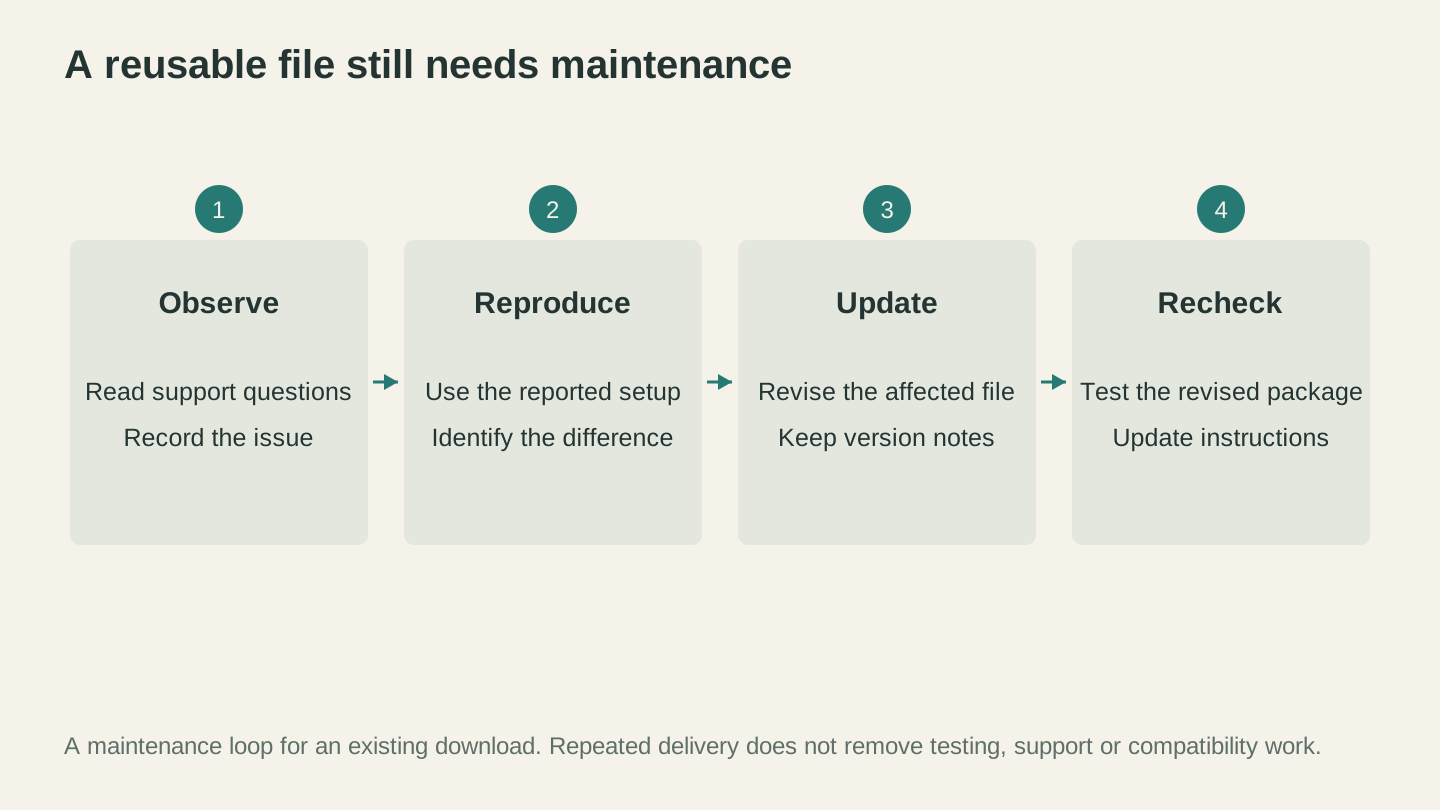
Keep a reusable file current. Customer questions, software changes and revised instructions can all require another compatibility check.
Common Mistakes That Kill Digital Download Shops
Learning from other sellers' failures saves you time and money.
1. Poor File Quality
A common cause of complaints is a file with broken paths, missing pieces, unclosed shapes, or messy node structures. Test every file and advertised workflow before listing, using representative machines or qualified testers where you do not own the hardware.
2. No Instructions or Documentation
Buyers are not all experienced makers. Some are using a Cricut for the first time. A zip file full of SVGs with no README, no size guide, and no material recommendations generates confused support requests and mediocre reviews.
3. Wrong or Missing Formats
If the listing promises formats that the package does not contain, buyers are likely to lose trust or request support or refunds. Double-check every package before publishing and describe the contents accurately.
4. Terrible Mockup Images
A flat vector preview on a white background doesn't sell. Buyers need to see what the finished product looks like. Use mockup templates (many are available free or cheap online) to show your SVG on wood, acrylic, fabric, or whatever material it's designed for.
5. Ignoring SEO
Beautiful designs with titles like "Ornament Design v3" get zero visibility. Invest time in keyword research. Use all 13 tags. Write descriptive titles. This isn't optional, it's the mechanism by which buyers find your files.
6. Pricing Too Low
An extremely low price may fail to cover fees and support, while price alone does not prove quality. Set the price from your costs, license, value, market evidence, and a measured test.
7. Inconsistent Branding
A shop with a random assortment of unrelated designs (one farm sign SVG, one 3D printed phone case, one CNC cribbage board) looks like a garage sale. Pick a niche or style, build a cohesive catalog, and become known for something specific. You can expand later once you have a base.
8. Not Testing Across Software
Your SVG works perfectly in your laser software. But does it import correctly in your buyer's cutting machine app? In a different vector editor? Each software interprets SVGs slightly differently. Test your files in the most common programs your buyers use. This catches compatibility issues before they become bad reviews.
9. Giving Up Too Soon
Early results vary. Set a fixed test budget, a review date, and evidence-based success criteria before starting. Continuing to add listings is not automatically better than changing the product, channel, or stopping an unprofitable test.
10. Not Protecting Your License Terms
Unclear terms can create disputes, but terms alone do not prevent misuse or create rights you do not own. Use terms prepared for your jurisdiction and make them available before purchase as well as in the package.
Building Your First 10 Listings: A Step-by-Step Plan
Feeling overwhelmed by everything above? Here is a sample sequence for preparing a small test catalog. Adjust the scope and timing to the complexity of the files; quality, rights checks, and machine testing matter more than publishing within one week.
Day 1-2: Research and Planning
- Pick your equipment focus (laser/CNC/3D printer/cutting machine)
- Search Etsy for top sellers in your category
- Identify 10 specific designs that are selling well
- Note the pricing, tags, and image strategies of top sellers
- Plan your own versions (inspired by, not copied from)
Day 3-4: Creating Files
- Design or generate your first 5 files using your preferred software, Vector Studio, or MonoTrace
- Clean up all paths in your vector editor
- Export each design in multiple formats (SVG, DXF, PNG at minimum)
- Create a README template for your download packages
- Test cut/engrave each design on your machine
Day 5: Photography and Mockups
- Photograph your test cuts/prints in good lighting
- Create mockup images showing designs on materials
- Create a "formats included" graphic
- Design a shop banner and logo
Day 6: Listing Creation
- Set up your Etsy shop (if you don't have one)
- Write clear titles that follow the platform's current guidance
- Complete the current tags, categories, and attributes accurately
- Write descriptions that answer buyer questions
- Upload enough accurate images to explain the product and included files
- Package files into zip downloads with README
- Set pricing from current research and your complete cost model
- Publish all listings
Day 7: Optimization
- Review all listings for errors
- Decide whether a small, capped advertising test fits your budget and measurement plan
- Share your shop on social media
- Create your first bundle from your individual files
- Plan your next 10 designs
Revenue Expectations: Build Your Own Scenarios
No generic listing count or timeline can predict revenue. Build conservative scenarios from your own data, cap the money and time at risk, and compare profit and cash flow, not just gross sales.
Initial Test
Define the customer, product, channel, test budget, and review date. Track impressions, visits, conversion, refunds, support time, fees, and contribution per sale. A test may produce no sales, and that is useful evidence.
What to do: Fix quality or clarity problems first. Add or change products only when the data supports the hypothesis, and stop when the test reaches its loss limit.
Evidence of Repeatable Demand
If unrelated customers buy, use, and review the files without excessive support or refunds, calculate whether the result remains profitable after all labor and costs.
What to do: Analyze which customer need drove the result. Test one meaningful variation at a time, and expand channels only when the expected benefit exceeds the added complexity.
Profitable Operation
Only call the operation profitable after reconciling revenue with fees, refunds, taxes, software, advertising, overhead, and the value of all labor. A large catalog or old shop is not proof of profit.
What to do: Maintain quality, compatibility, records, licenses, and support. Scale the specific products and channels that continue to meet your targets.
Long-Term Catalog
Some older files may continue to sell while others need updates or stop selling. Review the catalog regularly for compatibility, broken instructions, stale claims, rights issues, customer value, and profitability. Never assume you can stop maintaining it and keep earning for months or years.
Combining Digital Downloads with Physical Products
You don't have to choose one or the other. Many successful maker businesses run both physical product sales and digital download shops simultaneously. The two businesses complement each other.
Your physical products showcase your designs. Buyers see your laser-engraved ornament at a craft fair, scan the QR code on your business card, and find your Etsy shop where they buy the SVG files to make their own versions. Our laser business guide covers the physical product side.
Your digital files drive physical product orders. Some buyers who purchase your SVG files don't have the equipment or skills to make the product themselves. They come back and order the finished version from you.
Different customer segments. Physical product buyers want the finished item. Digital file buyers want the creative process of making it themselves. You're serving both markets with the same designs.
Risk diversification. Physical and digital products can respond differently to demand or operating problems, but both can slow at the same time and neither guarantees recovery of design time. Measure the correlation and economics in your own business.
Start With One File
You don't need 100 listings, a perfect shop, or a complete business plan. You need one quality design file, listed on one platform, with decent photos and solid SEO.
Go design something. Test it on your machine. Photograph the result. Write a listing. Publish it. Then create the next one.
Start with one lawful product that you have tested thoroughly, and let evidence, not an earnings promise, decide the next step.
Your designs have value. Put them where buyers can find them. If you need a design to start with, sketch it and turn it into a cutting file for free with MonoTrace, or describe it and let Vector Studio generate one for you.
Happy making.
Related Tools
Ready to try these tools?
Sign up free, no credit card required. Free tools available immediately.
Start Free