3D Printed Gift Ideas for Every Occasion
A birthday is nine days out, the group chat is asking what you're bringing, and you own a machine that can manufacture almost anything. Somehow that last part makes it harder, not easier. Infinite options are a terrible starting point.
So here is the filter that actually works: the gifts that land are not the cleverest prints. They are the ones made from the recipient's own life. Their dog. Their wedding photo. The lake house they finally bought. A benchy is a print. Their kid's face glowing out of a lithophane is a gift.
That is convenient for you, because turning a photo into a printable model is the part software now does. What follows is a gift list organized by occasion, with the personalized option first in each one, because that is the one people keep.
Why Personalized Beats Clever
Think about the printed gifts you have seen actually displayed in someone's house versus the ones that quietly migrated to a drawer. The articulated dragon was fun for a week. The lithophane of their grandmother has been on the shelf for two years.
The reason is simple. A clever print says "look what my printer can do." A personalized print says "I was thinking about you specifically." Only one of those is a gift.
The catch used to be effort. Modeling something custom for every person on your list is not realistic. But the three heavy lifters in this post all start from a photo you already have:
- ReliefMaker turns a photo into a lithophane or a carved-looking 3D relief. The fast local engine is free, and a higher-quality AI mode costs 1 credit.
- MosaicFlow splits any image into color regions and hands you a multicolor print with materials already assigned. Uploads and previews do not charge credits. AI generation uses credits. Downloads require an active paid subscription or a current unlock for that design.
- StackLab turns an image into stacked cumulative layers with real physical depth and shadow. Uploads and previews do not charge credits. AI generation uses credits. Downloads require an active paid subscription or a current unlock for that design.
All three need a signed-in Craftgineer account. One photo in, one printable file out, and the recipient thinks you spent a week on it.
PRINT. CUT. CARVE.
- Multiple formats (SVG, DXF, PNG)
- Machine-tested designs
- Commercial licenses
Sponsored by PrintCutCarve.com
Birthdays
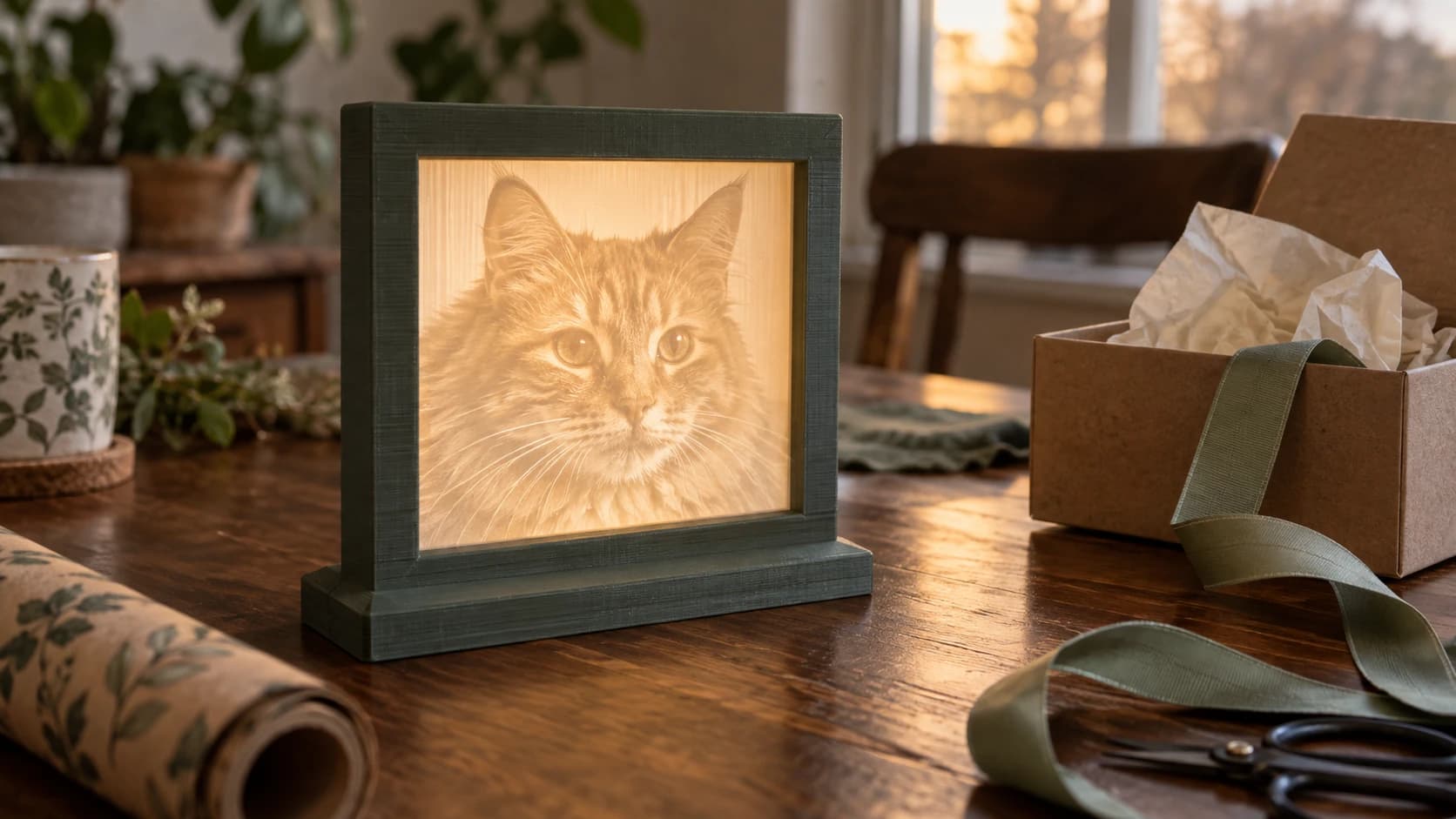
The personalized pick: a lithophane night light or framed panel from a photo of them, their pet, or a trip you took together. Run the photo through ReliefMaker in lithophane mode, print it in plain white PLA, and put a warm LED behind it. Unlit it looks like a textured grey rectangle. Lit, the photo appears inside the plastic, and the reveal moment is half the gift. The lithophane guide covers the printing side in depth, including which photos work and which turn to mud.
For the person whose hobby you know: multicolor art of the thing they love. Their favorite game character, their band's album art, their car. MosaicFlow does the color separation, you merge the palette down to the filaments you own, and the flat saturated result reads as manufactured rather than printed.
Generic but reliable birthday backups:
- A vase-mode planter with a small succulent already in it
- A desk organizer shaped around their actual desk clutter
- Dice towers, deck boxes, or card holders for the board game crowd
- A headphone stand or controller mount for the gamer
Tip
For pet owners, a lithophane of the pet is the closest thing this hobby has to a guaranteed win. High-contrast photos with the animal filling the frame convert best. Preview it in ReliefMaker before printing; a busy background will muddy the depth.
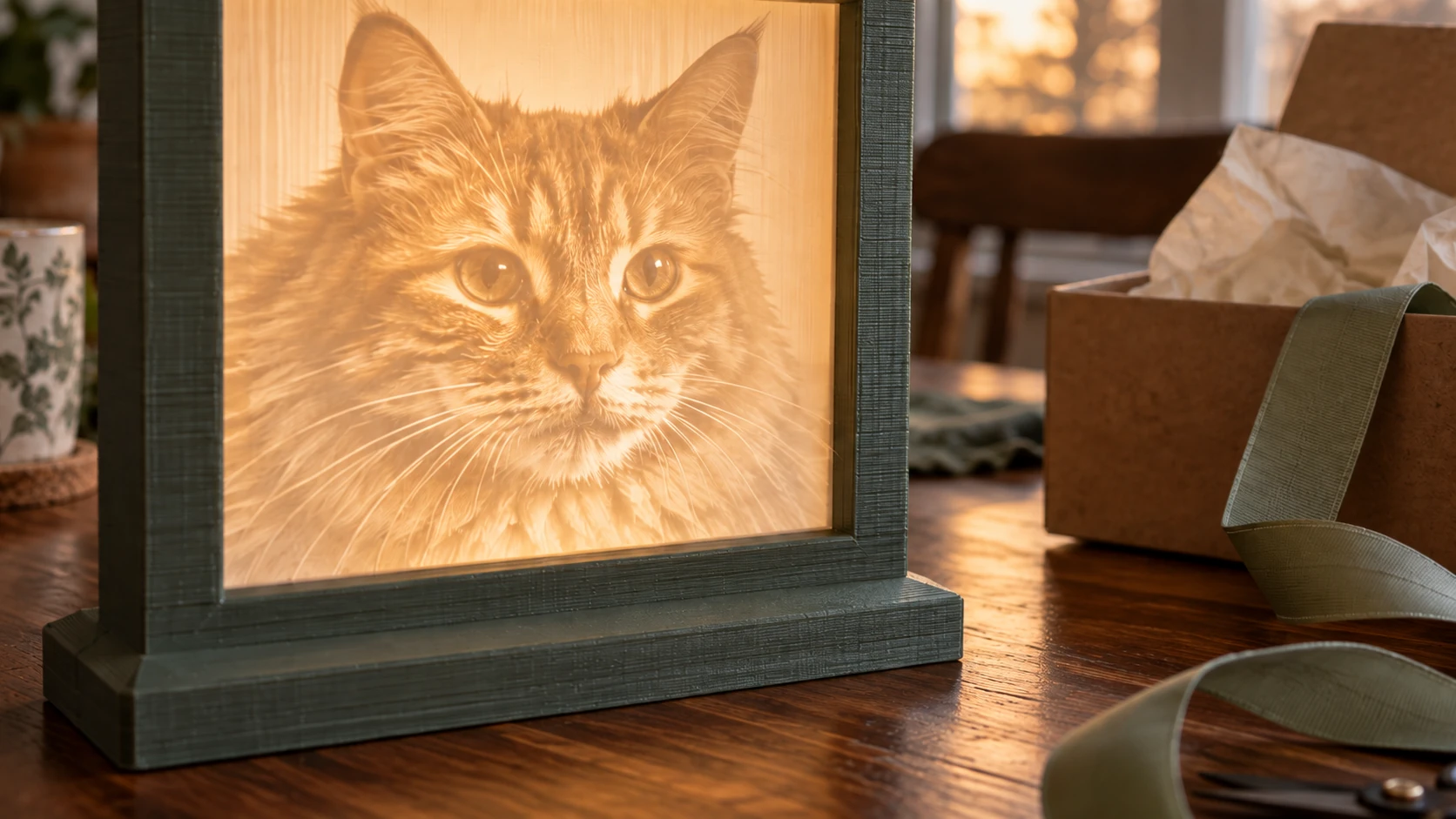
A clear pet portrait gives the light something recognizable to reveal. The printed frame turns a thin panel into a finished display piece.
Weddings and Anniversaries
This is where the stacked look earns its place. A wedding photo or a silhouette of the couple run through StackLab becomes layered wall art with real shadows between the layers. It reads as carved, not printed, and it photographs beautifully next to the registry gifts everyone else brought.
For anniversaries, a deeper cut: take the photo from their wedding day and turn it into an opaque 3D relief panel with ReliefMaker. Pushed deep and printed in a stone-colored filament, a relief looks like something that came off a CNC machine. The photo to 3D relief guide walks through that variant.
Other couple-friendly ideas:
- A ring dish for the bedside table, printed in silk filament
- Cake toppers, if you are close enough to the couple to be trusted with the cake
- Matching coasters from a multicolor design of the place they met
One honest note on wedding gifts: print early. A wedding is the single worst deadline to discover your first layer is not sticking. Give yourself a week of margin and a spare spool.
New Home
Housewarming is the most underrated occasion for printed gifts, because everything in a new house is a blank surface waiting for something on it.
The personalized pick: the house itself. A straight-on photo of the front of the house through StackLab makes a layered portrait of the building, and new homeowners are exactly the audience that will hang it. A skyline or map-style multicolor piece of their new city from MosaicFlow works the same way.
Practical prints that fit the moment:
- Wall-mounted key holders by the door
- Planters, because every new home immediately acquires plants
- Cable organizers and outlet covers for the settling-in phase
- Drawer dividers, the gift nobody requests and everybody uses
If you want more purely functional ideas, the useful things to 3D print list is the deeper well for that.
Kids
Kids do not care about layer lines, dimensional accuracy, or your flow calibration. They care that the thing is theirs. That makes them the easiest audience in this post.
Winners:
- Articulated flexi animals, printed in their favorite color
- A multicolor plaque of their favorite character through MosaicFlow
- Cookie cutters in shapes you cannot buy
- A night light lithophane of the family pet for the kid who does not love the dark
Warning
For very young children, treat prints like any small-parts toy. FDM prints can snap into sharp pieces, and layer gaps trap grime. Skip printed toys for the under-three crowd and keep anything with small or breakable features away from kids who still chew on things.
One more kid-adjacent idea that is really a gift for the parents: their child's drawing as a physical object. A photo of the drawing through MosaicFlow, colors merged down to match the crayons, turns fridge art into shelf art.
Coworkers and Office Gifts
Office gifts have a constraint the other occasions do not: quantity. You may need eight of something by Friday. So the play here is small, fast prints with one personal touch, not one showpiece.
- Desk plant pots, printed in a batch overnight
- Phone stands that angle a phone for video calls
- Headphone hooks that clamp to a desk edge
- Fidget-friendly print-in-place gadgets for the meeting-heavy
To make a batch feel personal without modeling each one, print the same base design in a different color per person. If there is one coworker who deserves more, a small lithophane of their dog does the same work here it does everywhere else.
Holidays
The December problem is scale: many recipients, one printer, finite evenings. Two moves handle it.
First, pick one personalized design per household instead of per person. A family photo lithophane in a backlit frame covers an entire family with a single print, and it lands harder than four separate trinkets.
Second, run ornaments as your batch print. Flat multicolor ornament designs from MosaicFlow print several to a plate, and a stacked snowflake or landscape from StackLab in metallic filament looks far more expensive than it is.
This post stays in the 3D printing lane on purpose. If you also run a laser or CNC, the holiday gift roundup covers gift projects across all the machines.
Which Tool for Which Gift
The three photo-based tools overlap enough to be confusing, so here is the short version:
| You want | Use | Cost | Best occasions |
|---|---|---|---|
| A photo that appears when backlit | ReliefMaker lithophane mode | Free local engine, 1 credit for quality mode | Birthdays, holidays, memorial gifts |
| A carved-looking opaque panel | ReliefMaker relief mode | Free local engine, 1 credit for quality mode | Anniversaries, décor |
| Flat multicolor art from an image | MosaicFlow | Paid plan or current design unlock | Kids, fans of anything, ornaments |
| Layered art with real shadow depth | StackLab | Paid plan or current design unlock | Weddings, new home, wall art |
Previews are free in all three, so you can test a photo before spending anything. If you want the full multicolor workflow explained, the multicolor prints guide goes deep on MosaicFlow specifically.
Filament and Finishing: The Difference Between a Print and a Present
The same model reads completely differently depending on what it is printed in and whether you spent fifteen minutes on it afterward.
Filament choices that punch above their price:
- Plain white PLA for lithophanes. Not translucent, not "natural." White, so light diffuses evenly.
- Silk filament for vases, ring dishes, and ornaments. The sheen reads as ceramic or metal from across a room.
- Matte filament for multicolor art. Flat color hides layer lines and makes the graphic pop.
- Wood-fill or stone-colored filament for reliefs, where the material texture sells the carved look.
Then the finishing pass, which is where most gift prints fall short. Remove the elephant foot from the bottom edge. Clean up any stringing. Sand the faces a hand will touch. If the piece is going on a wall or a shelf, spend the extra five minutes attaching a proper hanger or gluing felt to the base so it does not scratch furniture.
Info
Presentation is part of the gift. A lithophane taped to a bare LED strip is a prototype. The same lithophane in a printed frame with a warm light behind it, handed over in a box, is a finished present. Budget as much care for the last ten percent as the first ninety.
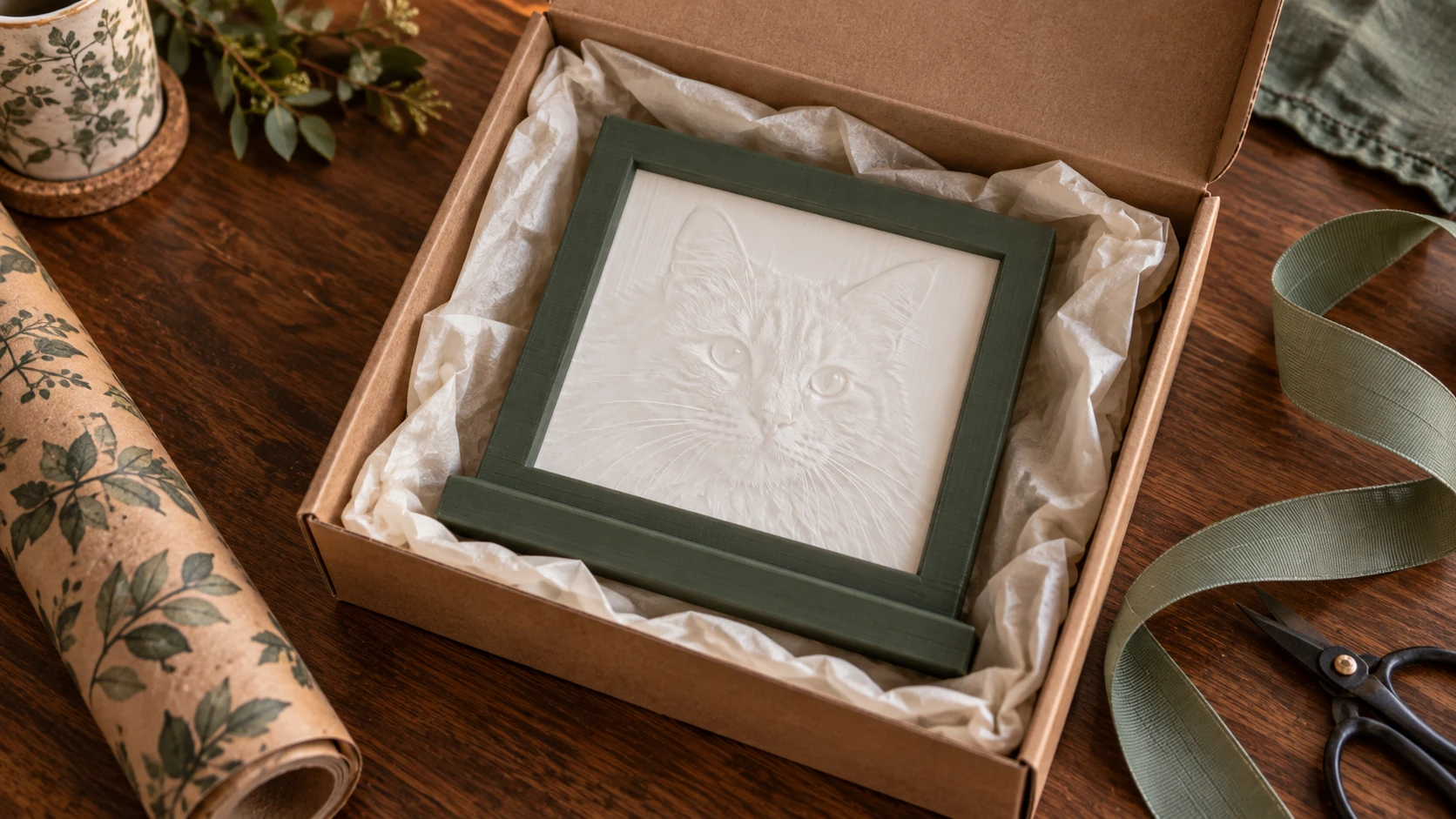
Give the finished object a box that fits and padding that keeps it from moving. With the light off, the cat is a faint relief in white plastic.
Start With the Photo
Every occasion above comes down to the same first step: find the one photo that means something to the person. The rest is software and print time.
Pull that photo up now and try it. Run it through ReliefMaker for a lithophane, MosaicFlow for multicolor art, or StackLab for layered depth. All three show you a free preview after signing in, so you can see whether the photo works before a single credit or gram of filament is spent.
The next gift deadline is closer than it looks. At least this time you know exactly what you're making.
Related Tools
ReliefMaker
Create depth maps from images or AI generation and build relief meshes for carving or printing.
Downloads require a plan or a design unlock
MosaicFlow
Turn uploaded or AI-generated artwork into separate color regions for inlays, with optional 3D exports.
Downloads require a plan or a design unlock
StackLab
Separate uploaded or AI-generated artwork into stacked layers, with adjustable layer order and optional 3D models.
Downloads require a plan or a design unlock
Ready to try these tools?
Sign up free, no credit card required. Free tools available immediately.
Start Free