

Laser Engraving on Tumblers: The Complete Guide
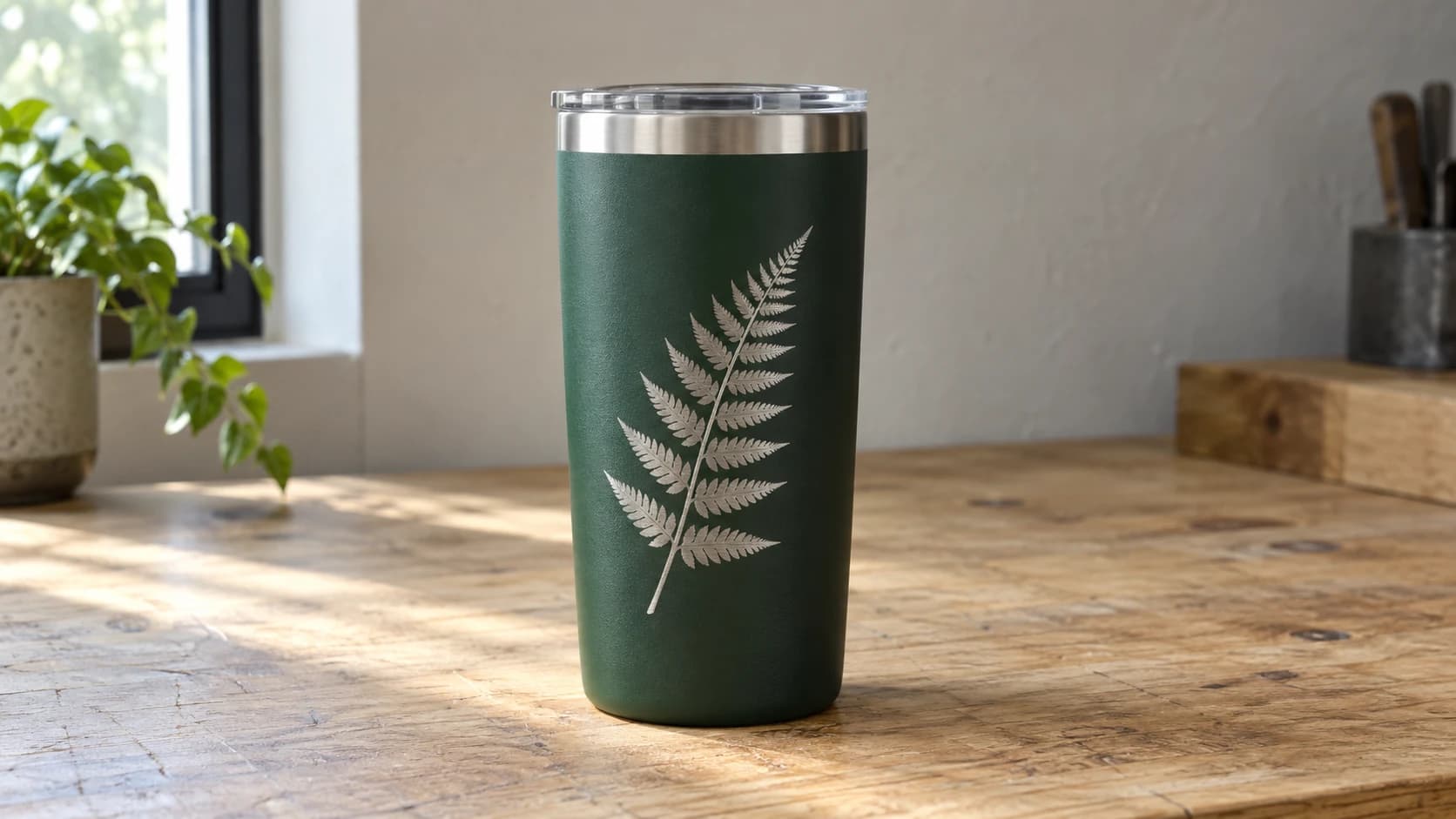
Tumblers are the bread and butter of laser engraving businesses. Walk into any craft fair, scroll through Etsy, or peek into a maker's workshop and you'll find stacks of them waiting for personalization. There's a good reason for that. A $7 tumbler blank becomes a $25-40 personalized gift with about five minutes of work. The margins are excellent, the demand is steady year-round, and people genuinely love getting drinkware with their name on it.
But tumblers come with their own set of challenges. They're round (your laser bed is flat). They come in different coatings (each reacts differently). And getting a clean, professional result requires understanding rotary setups, proper alignment, and material-specific settings that you won't find in your laser's instruction manual.
This guide covers all of it, from your first tumbler to your five hundredth.
Why Tumblers Are a Maker's Best Friend
Let's start with the business case, because understanding why tumblers dominate the laser engraving world helps you approach them strategically.
The demand never stops. Tumblers sell for birthdays, weddings, corporate events, teacher appreciation, bridesmaid proposals, Father's Day, Mother's Day, Christmas, graduation, retirement. There is literally no season where personalized tumblers aren't relevant. Compare that to something like Christmas ornaments (hot for three months, dead the rest of the year) and you'll see why laser businesses build their foundation on drinkware.
The unit economics are great. Generic powder-coated tumblers cost $5-8 in bulk. Name-brand Yeti, RTIC, or Stanley tumblers cost more ($20-35), but customers pay a premium for them. A personalized generic tumbler sells for $20-30. A personalized Yeti sells for $40-60. Either way, you're looking at healthy margins.
Repeat business is built in. The person who orders a bridesmaid tumbler set comes back for baby shower tumblers. Then teacher gifts. Then the office holiday party. Tumbler customers are some of the most loyal repeat buyers in the laser business.
Low skill floor, high skill ceiling. A simple name in a nice font on a tumbler looks great and takes minutes. But you can also do intricate designs, photo engraving, full-wrap artwork, and multi-color effects. You can start simple and grow into more complex work as your skills develop.
If you're new to the laser engraving world entirely, our beginner's guide covers the fundamentals. If you already know your way around a laser but haven't tried tumblers yet, keep reading.
PRINT. CUT. CARVE.
- Multiple formats (SVG, DXF, PNG)
- Machine-tested designs
- Commercial licenses
Sponsored by PrintCutCarve.com
Types of Tumblers and How They Engrave
Not all tumblers are created equal. The type of surface coating (or lack thereof) determines your approach, your settings, and what the finished product looks like. This is the most important concept to understand before you fire up your rotary.
Powder-Coated Stainless Steel
This is the most popular tumbler type for laser engraving by a wide margin. Brands like Yeti, RTIC, Ozark Trail, Stanley, and dozens of generic manufacturers use powder coating over stainless steel as their standard finish.
Powder coating is a thick, durable colored layer applied to the metal surface using an electrostatic process, then baked on. When your laser hits it, the beam vaporizes and removes the powder coating, revealing the shiny stainless steel underneath. You're not engraving the metal itself. You're stripping a coating to create contrast.
The result is silver/metallic text or designs on a colored background. The contrast is striking, especially on darker colors like black, navy, maroon, or forest green. Lighter colors like white or pastel tumblers still work, but the contrast between the exposed steel and a white coating is more subtle.
What to expect: Clean, crisp removal of the coating with a satisfying metallic reveal. The exposed steel area may have a slightly frosted or matte appearance depending on the underlying metal finish and your settings. This is normal and most customers love the look.
Tip
Black and dark-colored tumblers produce the best contrast for laser engraving. If you're just starting out, buy a few cheap black powder-coated blanks to practice on. The high contrast makes it easier to evaluate your settings and alignment.
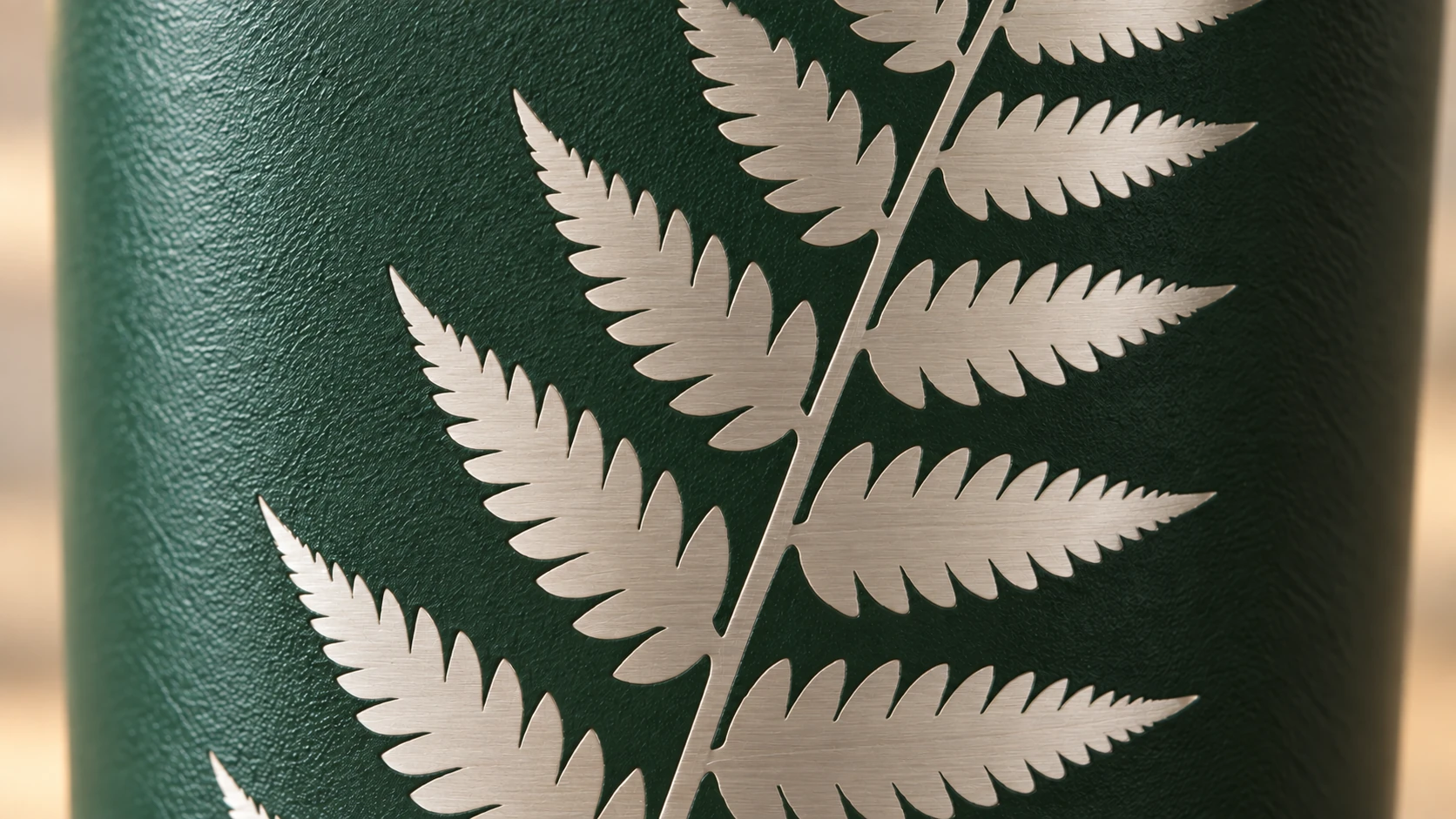
A closer view of the same tumbler shows the steel surface within the fern shapes and the fine texture of the remaining powder coating.
Bare (Uncoated) Stainless Steel
Some tumblers come without any coating. Just raw, shiny stainless steel. These require a completely different approach because, as we covered in the metal engraving guide, hobby lasers can't directly engrave bare metal. The beam just bounces off.
To mark bare stainless tumblers, you need a marking compound like CerMark, LaserBond 100, or Enduramark. You apply the compound to the surface, let it dry, laser over it, and wash off the excess. The laser's heat fuses ceramic particles into the metal where the beam hits, leaving a permanent black mark.
The result is the opposite of powder-coated engraving: you get dark marks on a light metallic surface instead of metallic marks on a dark surface.
What to expect: Dark gray to jet black marks on stainless steel. A correctly applied purpose-made compound can produce a durable, scratch-resistant mark, but dishwasher performance and food-contact suitability depend on the exact compound, tumbler, application, and cleanup process. Follow both manufacturers' instructions, and keep compound off the rim, interior, and other food-contact surfaces unless the product documentation explicitly approves that use.
Anodized Aluminum
Anodized aluminum tumblers have a thin, hard oxide layer that's been dyed with color. When your laser hits this layer, it vaporizes the colored anodizing to reveal bright, silver aluminum underneath.
Diode lasers are actually better than CO2 lasers for anodized aluminum. The shorter wavelength (445nm) is absorbed more efficiently by the anodized layer, producing cleaner results. If you have a diode laser, anodized aluminum tumblers should be one of your go-to products.
What to expect: Bright white/silver marks on a colored background. Very high contrast, very crisp edges. The results look almost screen-printed.
Brand Comparison: Yeti, RTIC, Stanley, and Generics
Customers often request specific brands. Here's how the major names differ from a laser engraving perspective.
Yeti tumblers are the gold standard. Their powder coating is consistent, the underlying steel is high quality, and the results are predictably excellent. The coating removes cleanly and the exposed metal has a nice, even finish. They're also the most expensive blanks, which means you need to nail your settings before committing. Practice on cheap generics first.
RTIC tumblers engrave very similarly to Yeti at about half the blank cost. The powder coating quality is nearly identical, and most customers can't tell the difference in the finished product. RTIC is a popular choice for makers who want brand recognition without the Yeti price tag.
Stanley tumblers (especially the popular Quencher) have become hugely popular. They engrave well, but the larger diameter and handle placement require careful design positioning. The handle area is a no-go zone, so your engravable surface area is more limited than a standard straight-sided tumbler.
Generic/bulk blanks vary in quality. Some are excellent. Some have thin, uneven powder coating that chips during engraving instead of vaporizing cleanly. If you're buying generics, order samples from a few suppliers before committing to a bulk purchase. Good sources include wholesale suppliers on Amazon, direct-from-manufacturer options, and tumbler-specific vendors who cater to the laser community.
Info
When buying tumblers in bulk for your laser business, always order a small sample batch first. Powder coating thickness and quality can vary between manufacturers and even between production runs from the same supplier. A quick test engrave on a sample saves you from discovering problems after you've bought 200 blanks.
Ceramic and Enamel Mugs
Ceramic coffee mugs can be laser engraved, but the process is different. Your laser removes the glaze to expose the unglazed ceramic underneath. The result is a rough, matte mark on a smooth, glossy surface. CO2 lasers work best here. Diode lasers struggle because the ceramic reflects too much of their wavelength.
Enamel camping mugs are another popular option. The laser removes the enamel coating to expose the metal underneath. These engrave similarly to powder-coated tumblers, but the coating is harder and requires more power.
What to expect: Results vary more with ceramic than with metal tumblers. The quality depends heavily on the glaze type, thickness, and the specific ceramic body. Always test on a sample mug before taking customer orders.
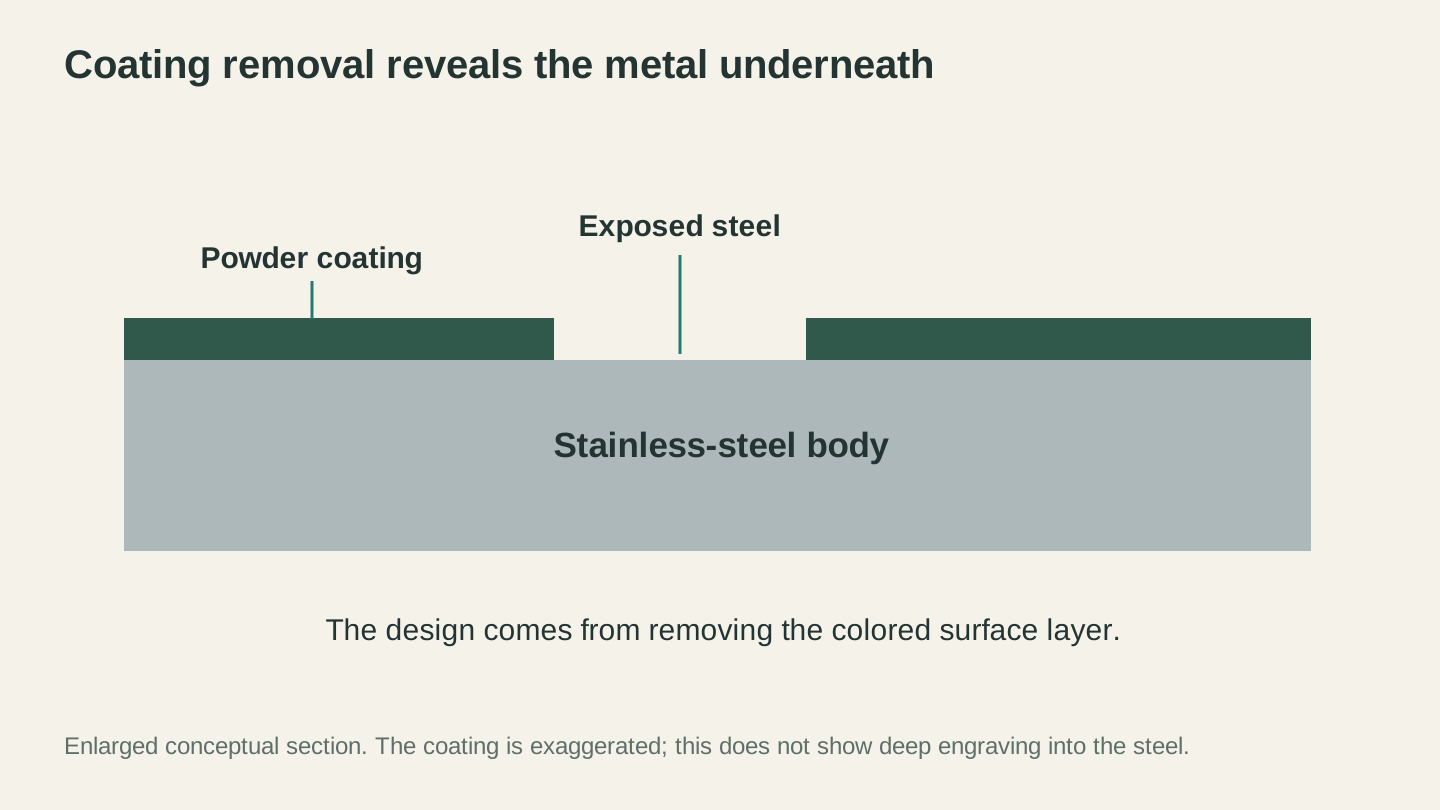
Powder-coat engraving creates contrast by exposing the metal. This enlarged section distinguishes coating removal from cutting deeply into the tumbler wall.
Rotary Attachments Explained
Your laser bed is flat. Tumblers are round. The rotary attachment solves this problem by spinning the tumbler under the laser beam while it fires, effectively "unrolling" the cylindrical surface so the laser can engrave it line by line.
If you don't have a rotary yet, you need one. You cannot engrave tumblers without a rotary attachment (well, you can if you cut the tumbler in half and flatten it, but let's not do that).
Chuck Rotary
A chuck rotary holds the tumbler at one end with a three or four-jaw chuck (like a small lathe). The other end rests on a support bearing or tail stock. The chuck grips the tumbler's rim or base, and a stepper motor spins it precisely as the laser moves along the Y-axis.
Pros:
- Very secure grip. The tumbler doesn't slip.
- Works with tapered items (tumblers that are wider at the top than the bottom).
- Handles heavy items without wobble.
- Better for precision work because there's zero slippage.
Cons:
- Takes longer to set up for each tumbler.
- The chuck jaws can scratch delicate surfaces if overtightened.
- More expensive than roller rotaries.
- You may need different jaw sizes for different tumbler diameters.
Roller Rotary
A roller rotary uses two or more rubber-coated rollers that the tumbler sits on top of. One roller is driven by a stepper motor. The tumbler's weight keeps it in contact with the rollers, and friction drives the rotation.
Pros:
- Faster setup. Just drop the tumbler on the rollers and go.
- Works with a wide range of diameters without adjustment.
- Less expensive than chuck rotaries.
- Won't scratch the tumbler surface.
Cons:
- Can slip if the rollers are dirty, worn, or if the tumbler is too light.
- Struggles with tapered items (the tumbler can walk sideways off the rollers).
- Handles and protrusions can cause bumping and inconsistency.
- Heavier tumblers may cause the rollers to compress unevenly.
Which One Should You Buy?
If you're doing production tumbler work, a chuck rotary is worth the extra investment. The precision and reliability pay for themselves quickly when you're running batches. The slightly longer setup time per tumbler is offset by zero failed engraves due to slippage.
If you engrave a variety of cylindrical objects (tumblers, wine bottles, pint glasses, candles) and want flexibility, a roller rotary is more versatile and faster for mixed jobs.
Many serious tumbler businesses own both and use whichever fits the job.
Setting Up Your Rotary
This is where most beginners get stuck. A rotary attachment needs to communicate with your laser controller so the software knows exactly how much motor rotation equals one full turn of the tumbler. Get this wrong and your design will be stretched, compressed, or overlapped.
Step 1: Install and connect. Most rotary attachments plug into the Y-axis stepper motor port on your laser controller. You'll disconnect the regular Y-axis motor cable and connect the rotary's cable instead. Some machines have a dedicated rotary port, which is more convenient.
Step 2: Set the rotary calibration. Start with the value supplied by the rotary or machine manufacturer, then verify it with your software's rotary test. The exact field and test differ by controller and software. For example, a chuck test rotates the chuck one full revolution, while a roller test rotates the driven roller one full revolution, not the tumbler resting on it. Getting this calibration wrong is a common cause of warped, stretched, or overlapping engraves.
To verify your calibration:
- Select the correct rotary type in your laser software.
- Enter the manufacturer-provided calibration value.
- Use the software's rotary test and watch the driven chuck or roller, not just the tumbler.
- Confirm that the driven part makes one complete revolution and returns to its starting position.
- If it does not, stop and follow the rotary and software manufacturers' calibration procedure before engraving.
Tip
Save the verified rotary calibration in your software. It normally stays fixed for that machine-and-rotary combination. What changes between jobs depends on the rotary type: a chuck workflow generally needs the object's diameter or circumference, while a roller workflow needs the driven roller diameter and may use the object's circumference only for layout. Follow the fields shown by your software and controller.
Step 3: Enter the job dimensions. For a chuck rotary, measure the tumbler at the engraving zone and enter the object diameter or circumference requested by your software. For a roller rotary, measure or confirm the driven roller diameter; the tumbler circumference may still be useful for laying out a full-wrap design even when it does not control output scaling. Measure tapered items at the engraving zone and use your software's taper-correction workflow when required.
Step 4: Center and level. The tumbler needs to spin on a true center axis. If it's tilted, wobbling, or off-center, the engraving will be uneven. For chuck rotaries, make sure the jaws are gripping squarely. For roller rotaries, ensure the rollers are level and the tumbler sits stable without any rocking.
Step 5: Set your focus. Focus your laser on the top center of the tumbler (the highest point of the curve). This is where the laser beam will contact the surface. On curved surfaces, the focus will be slightly off at the edges, but for tumblers with reasonable diameter, this is negligible.
Alignment and Centering
Alignment is everything with rotary work. If your design isn't centered where you want it, you'll know immediately, and so will your customer.
Use the frame function. Before firing, run a frame (most laser software has a "frame" or "preview" button that moves the laser head around the boundary of your design without firing). Watch where the red dot or crosshair traces on the tumbler to confirm the design will land exactly where you want it.
Mark your center. Use a small piece of painter's tape or a dry-erase mark to indicate the center of where you want the design. Align to this mark when positioning the tumbler in the rotary.
Watch for the seam. Most tumblers have a welded seam running vertically along one side. You generally want your design on the opposite side of the seam. Rotate the tumbler so the seam faces down or to the back before starting your engrave.
Design Considerations for Cylindrical Surfaces
Designing for a tumbler isn't quite the same as designing for a flat surface. The cylindrical shape introduces some quirks that you'll want to account for.
Wrapping Flat Designs Around Curves
Your design is flat. The tumbler is curved. When a flat design wraps around a cylinder, it distorts slightly at the edges. Text can appear to narrow or tilt near the left and right edges of the design, and straight horizontal lines can look like they're curving.
For most tumbler designs that cover less than about one-third of the circumference, this distortion is minimal and not noticeable. It only becomes an issue with full-wrap designs (those that go most or all the way around the tumbler).
If you're doing a full wrap:
- Use your laser software's rotary or cylindrical correction feature if available. Some laser software has built-in options for this.
- Alternatively, pre-distort your design in a graphics editor to compensate. This is fiddly and mostly only necessary for very precise geometric patterns.
- For text and logos that are centered on the front of the tumbler, don't worry about it. The curvature effect is invisible.
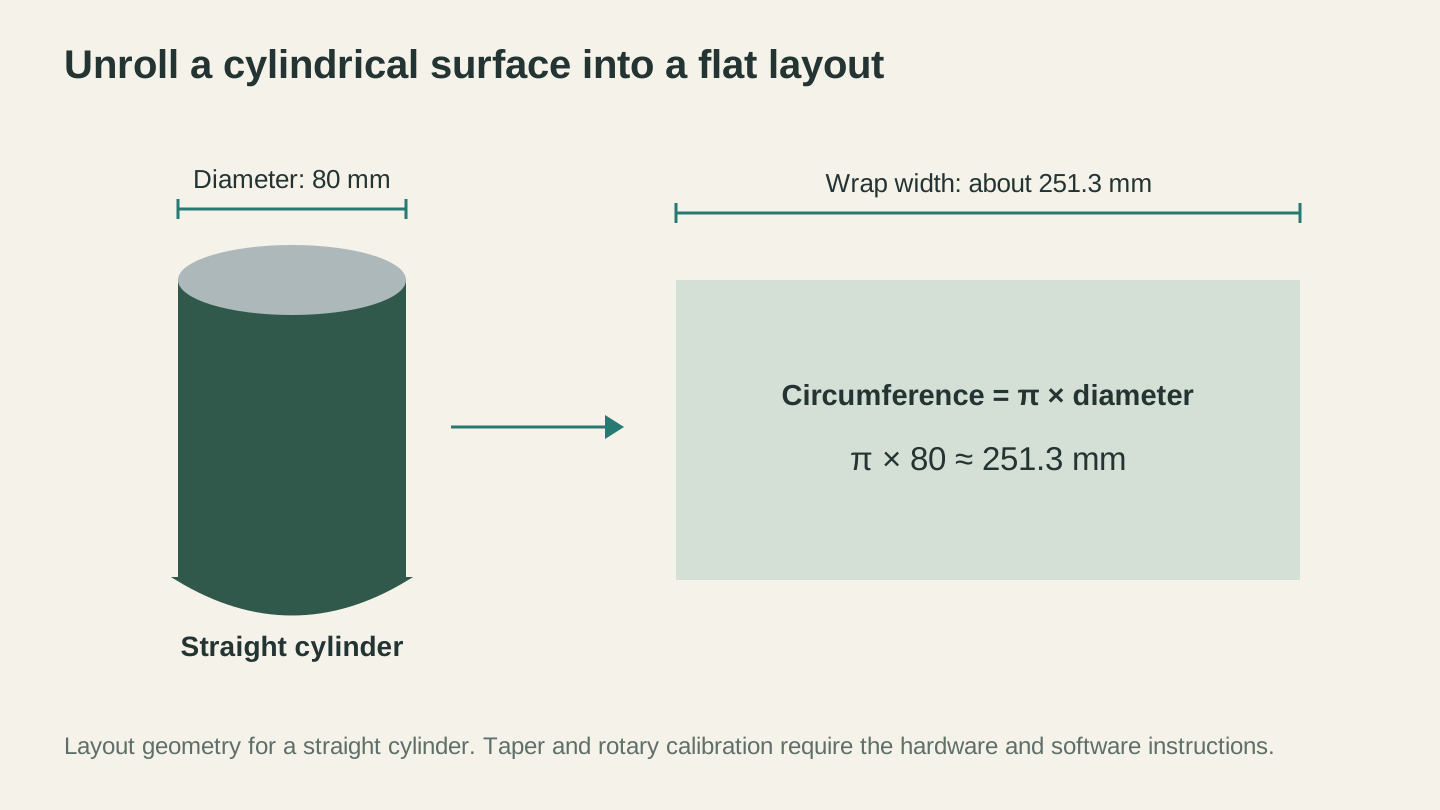
For a straight 80 mm diameter cylinder, one full wrap is about 251.3 mm wide. This is layout geometry; rotary calibration depends on the hardware and software.
Text Distortion on Round Surfaces
Text is the most common design element on tumblers, and it handles the curvature well as long as you keep a few things in mind.
Keep text on the front face. If your text spans less than about 120 degrees of the tumbler's circumference, distortion is negligible. This covers the vast majority of name and monogram designs.
Avoid very long single lines of text. "Happy 50th Birthday to Our Amazing Grandmother Margaret" is going to wrap too far around the tumbler and look distorted at the ends. Break it into multiple centered lines instead.
Font choice matters. Bold, simple fonts hold up better on tumblers than thin, delicate scripts. Thin lines can be inconsistent on curved surfaces because tiny focus variations across the curve affect thin lines more than thick ones. That said, script fonts are extremely popular for tumblers, so don't avoid them entirely. Just choose ones with medium-weight strokes rather than hairline scripts.
Safe Engrave Area
Every tumbler has zones you should avoid.
The seam. Most tumblers have a vertical weld seam. Don't engrave over it. The seam creates a bump that throws off your focus and produces uneven results.
The handle area. On handled tumblers like the Stanley Quencher, you need to position your design to clear the handle completely. The handle creates a physical obstruction for the laser head on most rotary setups.
The taper zone. Many tumblers are tapered, being wider at the top than the bottom. The diameter changes mean your focus distance changes across the height of the design. Keep your design within a zone where the diameter is relatively consistent. For most tumblers, this is the middle two-thirds of the body.
The bottom rim. The very bottom of most tumblers has a thicker rim or rubber pad that the rotary grips. Keep your design well above this area.
Design Sizing and Placement
A standard 20 oz tumbler is about 3.25 inches in diameter and about 7 inches tall. The usable engraving height is roughly 4 to 5 inches (avoiding the top lip and bottom rim). The usable circumference for a front-facing design without visible distortion is about 3 to 4 inches wide.
Here's a quick size reference:
| Tumbler Size | Typical Diameter | Usable Height | Front-Face Width |
|---|---|---|---|
| 12 oz slim | 2.75" (70mm) | 4" (100mm) | 3" (75mm) |
| 20 oz straight | 3.25" (83mm) | 5" (127mm) | 3.5" (89mm) |
| 30 oz tapered | 3.5" top, 2.75" bottom | 5.5" (140mm) | 3.5" (89mm) |
| 40 oz w/ handle | 3.5" (89mm) | 5" (127mm) | 3" (75mm) |
Design files should be vector (SVG or DXF) whenever possible. Vector designs scale cleanly without pixelation. If a customer sends you a JPG logo, convert it to SVG before engraving. Our PNG to SVG converter explains the process and tools for this.
Settings by Tumbler Type
Settings vary by laser type, wattage, optics, tumbler coating, marking compound, and even the production run of a blank. The tables below are broad examples, not ready-to-run presets. Start with the machine, material, and compound manufacturers' guidance, then use a supervised test grid on scrap within the verified-safe operating range. Never copy a setting directly onto a customer's tumbler.
Powder-Coated Tumblers
This is your most common scenario. The goal is to remove the powder coating cleanly without going so deep that you damage the underlying steel.
| Laser Type | Power | Speed | DPI/LPI | Passes | Notes |
|---|---|---|---|---|---|
| Diode 5W | 100% | 600-1000 mm/min | 254 | 1-2 | Slower speed for full removal |
| Diode 10W | 80-100% | 1000-2000 mm/min | 254 | 1 | Sweet spot for most diode users |
| Diode 20W | 60-80% | 2000-3500 mm/min | 300 | 1 | Higher speed keeps heat down |
| CO2 40W | 30-50% | 200-350 mm/s | 300 | 1 | Less power than you'd think |
| CO2 60W | 20-40% | 250-400 mm/s | 300 | 1 | Easy to overpower |
| CO2 80W+ | 15-30% | 300-500 mm/s | 300 | 1 | Very light touch needed |
Warning
Too much power on powder-coated tumblers doesn't just remove the coating. It can discolor the underlying steel, creating a yellowish or bluish heat tint. This is caused by excessive heat oxidizing the stainless steel surface. If you see any discoloration, reduce power or increase speed.
Stainless Steel with Marking Compound
For bare stainless tumblers using CerMark, LaserBond, or similar products. The goal here is the opposite: maximum energy transfer to fuse the compound to the metal.
| Laser Type | Power | Speed | DPI/LPI | Passes | Notes |
|---|---|---|---|---|---|
| Diode 10W | 100% | 200-500 mm/min | 300 | 1-2 | Very slow for full fusion |
| Diode 20W | 100% | 400-800 mm/min | 300 | 1 | Slow and hot |
| CO2 40W | 70-100% | 80-150 mm/s | 300 | 1 | High power, slow speed |
| CO2 60W | 60-90% | 100-200 mm/s | 300 | 1 | Sweet spot for most CO2 |
| CO2 80W+ | 50-80% | 150-250 mm/s | 300 | 1 | Don't rush the compound |
Anodized Aluminum Tumblers
Removing the anodized layer is similar to powder coating but typically requires less energy since the anodized layer is thinner.
| Laser Type | Power | Speed | DPI/LPI | Passes | Notes |
|---|---|---|---|---|---|
| Diode 5W | 80-100% | 800-1500 mm/min | 254 | 1 | Diode excels here |
| Diode 10W | 50-80% | 1000-2500 mm/min | 300 | 1 | Clean, bright reveal |
| CO2 40W | 15-30% | 200-400 mm/s | 300 | 1 | Go light on power |
| CO2 60W | 12-25% | 250-400 mm/s | 300 | 1 | Very easy to overpower |
For more detail on metal-specific settings and techniques, check our comprehensive metal engraving guide.
Ceramic Mugs
| Laser Type | Power | Speed | DPI/LPI | Passes | Notes |
|---|---|---|---|---|---|
| CO2 40W | 50-70% | 150-250 mm/s | 254 | 1-2 | Results vary by glaze |
| CO2 60W | 40-60% | 200-300 mm/s | 254 | 1 | Test on the bottom first |
Info
Diode lasers generally don't work well on ceramic mugs. The glaze reflects too much of the 445nm wavelength. If ceramic mugs are important to your product line, you'll want a CO2 laser.
Step-by-Step Workflow: From Design to Finished Tumbler
Here's the complete process for engraving a standard powder-coated tumbler. Once you've done this a dozen times, the whole thing takes about 10 minutes per tumbler including setup.
Step 1: Create or Prepare Your Design
Start with a vector design (SVG is ideal). For simple name and date personalization, create your design directly in your laser software. For more complex work, use a design tool first.
For text-based designs:
- Choose a font that complements the tumbler style. Script fonts for weddings and feminine gifts, bold serifs for masculine items, clean sans-serifs for corporate/modern looks.
- Size the text to fit within the tumbler's safe engraving area (see the sizing table above).
- Convert text to paths/outlines so font compatibility isn't an issue when opening the file on a different machine.
For graphic designs:
- Use vector files (SVG, DXF) whenever possible.
- If working from a customer's logo in PNG or JPG format, vectorize it first. You can do this with tools like MonoTrace for simple graphics.
- Ensure line weights are appropriate. Very thin lines (under 0.5pt) may not engrave cleanly on curved surfaces.
Step 2: Set Up the Rotary
- Power off your laser (some machines require this when swapping the Y-axis connection).
- Connect the rotary attachment to the Y-axis port.
- Place the rotary on the laser bed. Make sure it's positioned so the tumbler will be at the correct focus height. You may need to lower the bed or raise the rotary on a platform.
- Enable rotary mode in your laser software.
- Enter the calibration and job dimensions required for your rotary type (for example, object circumference for a chuck or driven roller diameter for a roller).
Step 3: Load and Position the Tumbler
- Secure the tumbler in the rotary. For a chuck rotary, tighten the jaws gently but firmly around the base. For a roller rotary, place the tumbler centered on the rollers.
- Rotate the tumbler so the design area faces up (directly under the laser head). Position the seam facing away from the design area.
- Set your focus on the top-center of the tumbler (the highest point).
Step 4: Position the Design
- Import your design into the laser software.
- Position it so the center of the design aligns with the center of the tumbler below the laser head.
- Run a frame preview to verify placement. Watch the laser head or red dot trace the design boundary on the tumbler surface.
- Adjust position if needed and re-frame until it's exactly where you want it.
Step 5: Set Your Parameters
- Choose your power, speed, and DPI settings based on the tumbler type (refer to the settings tables above).
- Set the scan angle. For tumbler work, a 0-degree scan angle is standard. This means the laser fires while the rotary spins the tumbler (Y-axis movement), and the laser head steps along the X-axis between passes.
- Disable any bi-directional engraving if your machine supports it. Bi-directional scanning can cause slight alignment offset on rotary setups and produce ghosting artifacts. Uni-directional takes longer but is safer for quality.
Step 6: Test and Engrave
- If this is a new type of tumbler or new settings, test on a sample tumbler first.
- Start the job. Stay with the machine. Tumblers can slip in rotary attachments, and catching a problem early saves the tumbler.
- Watch the first few lines to make sure the rotary is spinning smoothly and the engraving looks correct.
- Let it finish. Resist the urge to stop it halfway to check. Pausing and restarting can cause alignment shifts on some machines.
Step 7: Clean and Inspect
- Remove the tumbler from the rotary.
- Clean the engraved area. For powder-coated tumblers, wipe with a damp cloth or rubbing alcohol to remove any residue. For marking compound work, wash off the excess compound with water.
- Inspect the result. Check for completeness (no missed spots), consistency (even depth across the design), and accuracy (no stretching, compression, or overlap).
Using Marking Compounds on Tumblers
Marking compounds deserve their own section because the process on tumblers is trickier than on flat metal. The curved surface and the need for even coverage make application more challenging.
Choosing Your Compound
CerMark LMM-6000 spray is the most popular choice for tumblers. The spray format makes it easier to get even coverage on a curved surface than brush-on products. It costs more per application than liquid products, but the convenience and consistency are worth it for most tumbler work.
LaserBond 100 is the cost-effective alternative. It comes as a liquid that you brush on. On flat surfaces, brushing is fine. On tumblers, it's harder to get streak-free coverage. Some makers thin LaserBond slightly and use a small HVLP spray gun or airbrush for application on tumblers. This works well but adds setup and cleanup time.
Do not substitute a general-purpose dry moly lubricant spray. Hardware-store lubricants are not automatically approved as laser marking compounds, and aerosol versions may be extremely flammable and carry significant inhalation, skin, eye, or reproductive-hazard warnings. Use only a product whose manufacturer explicitly documents laser marking as an intended use, and follow its label and safety data sheet.
Warning
Apply marking compounds with the ventilation, personal protective equipment, ignition controls, and cleanup specified by the product's safety data sheet. Keep aerosols and solvent vapors away from the laser, let the coating dry fully before processing, and never apply compound to the rim or inside of drinkware unless the product and tumbler manufacturers explicitly approve that use.
Application on Tumblers
Getting an even coat on a cylinder takes some practice.
-
Clean the surface first. Use the cleaner approved by the compound and tumbler manufacturers, and follow its safety data sheet. Let the surface dry fully. Oils, fingerprints, or residue can prevent the compound from adhering evenly.
-
Use a turntable or lazy Susan. Place the tumbler on a rotating surface so you can spin it while spraying. This gives you much more even coverage than trying to spray one side, rotate, spray the other.
-
Apply the specified coating. Follow the product label for distance, thickness, number of coats, dilution, and application method. Aim for the thin, even coverage the manufacturer specifies; extra material can reduce detail and require more laser energy.
-
Let it dry completely. Use the label-specified drying conditions and time in a ventilated, ignition-free area. Never laser a wet or tacky coating, and move the aerosol can, solvents, and application supplies away from the machine before processing.
-
Cover only the area you need. You don't need to coat the entire tumbler. Use painter's tape to mask off the area above and below your design zone. This saves compound (which isn't cheap) and reduces cleanup.
Post-Processing
After engraving:
- Let the tumbler cool for a minute. The laser area will be warm.
- Remove excess compound using the method specified by its manufacturer, commonly water and a soft cloth for purpose-made products.
- Use alcohol, acetone, or another solvent only when both the compound and tumbler manufacturers permit it. Follow the solvent safety data sheet and keep it off coatings and food-contact surfaces unless explicitly approved.
- Dry thoroughly and inspect. The fused marking should be dark and consistent. If spots are light or patchy, the compound was too thin in those areas or the laser didn't deliver enough energy.
Tip
Save your scrap tumblers and failed engraves. They make perfect test pieces for dialing in marking compound settings. You can apply compound and re-engrave the same tumbler multiple times since the marking compound goes over the top of everything.
Photo Engraving on Tumblers
Photo engraving on tumblers is possible, and the results can be stunning. It's also one of the most challenging things you can do with a laser. If regular text engraving on tumblers is learning to drive, photo engraving on tumblers is parallel parking on a hill in the rain.
Why It's Harder on Tumblers
On flat materials, photo engraving is already tricky (our photo engraving guide covers the full process). On tumblers, you add these complications:
The curved surface changes focus. A photo engrave needs consistent, precise power delivery across the entire image. On a curved surface, the focus point is only perfect at the top center of the tumbler. The further from center, the slightly more defocused the beam becomes. This affects fine detail in photos more than it affects bold text and graphics.
Rotary mechanics introduce micro-variations. Any tiny slip, vibration, or speed inconsistency in the rotary shows up as visible artifacts in photo engraves. Text and line art are forgiving of minor mechanical imperfections. Photos are not.
Coating removal doesn't do gradients. On powder-coated tumblers, you either remove the coating or you don't. There's no "half remove" for creating smooth tonal transitions. This limits your options for dithered photo engraving.
Best Approach for Tumbler Photos
Line art conversion is your friend. Converting photos to pen-and-ink style line art using Photo Converter produces the most reliable results on tumblers. The clean black-and-white lines engrave consistently on curved surfaces, and you don't need to worry about gradients or half-tones.
If you want true photo engraving (with tones), use a dithered approach on bare stainless steel with marking compound. The compound fuses more or less densely based on laser power, which gives you some tonal range. Jarvis dithering tends to work better than ordered dithering on tumblers because it creates a more organic, less gridded pattern.
Keep the image size modest. A full-wrap photo engrave is asking for trouble. Keep photo engraves to about 2 to 3 inches wide and tall for best results. This keeps the entire image within the well-focused zone on the tumbler's surface.
Run at higher DPI. For photo work on tumblers, 300 to 500 DPI produces better tonal rendering. This makes the job slower, but the quality improvement is significant.
Info
If a customer specifically wants a photo engraved on a tumbler, show them examples of the line art approach alongside the dithered approach. Most customers actually prefer the line art look once they see both options side by side. It has an elegant, illustrated quality that looks intentional rather than like a degraded photograph.
Common Problems and Fixes
Tumbler engraving has its own set of issues that don't come up with flat work. If you're familiar with general laser engraving mistakes, these are the tumbler-specific additions to that list.
Uneven Engraving (Light on One Side, Dark on the Other)
What it looks like: The left side of the design is cleanly engraved, but the right side is lighter or incomplete. Or the top is fine but the bottom fades.
Why it happens: The tumbler isn't centered in the rotary. If the tumbler's axis of rotation doesn't align with the laser's focal plane, one side is closer to the laser (and in focus) while the other side is further away (and out of focus). This is more common with roller rotaries where the tumbler can shift slightly during setup.
How to fix it: Re-level your rotary. Make sure the tumbler is sitting true and centered. For chuck rotaries, check that the jaws are gripping evenly. For roller rotaries, make sure the rollers are the same height and the tumbler sits level. Re-focus your laser on the exact top center of the tumbler.
Stretched or Compressed Design
What it looks like: Circles appear as ovals. Text looks squished or pulled. The design seems like it's been horizontally distorted.
Why it happens: One of the rotary values is wrong. Depending on the hardware and software, that may be the rotary calibration, the chuck object's diameter or circumference, or the driven roller diameter. Slippage can cause similar distortion.
How to fix it: Re-run the software's rotary test and confirm the driven chuck or roller makes one complete revolution. Then verify the dimension required for your rotary type and check for slippage. Use a scrap piece and a measured test shape before running the customer job; do not compensate for a wrong object or roller dimension by repeatedly changing a correct machine-and-rotary calibration.
Ghosting (Double Image)
What it looks like: Every line appears twice, slightly offset. The design looks blurry or like you're seeing double.
Why it happens: This is almost always caused by bi-directional scanning on a rotary setup. When the laser engraves left-to-right and then right-to-left on alternating passes, slight mechanical play in the rotary causes the two directions to not align perfectly.
How to fix it: Switch to uni-directional scanning in your laser software. This means the laser only fires while moving in one direction and returns to the start position for each line without firing. It doubles the engrave time but eliminates ghosting. If your software has a "scanning offset" or "line shift" adjustment, you can try tuning that to correct the bi-directional alignment instead.
Skipped Lines
What it looks like: Horizontal gaps in the engraving where entire lines are missing. The design looks stripy.
Why it happens: The tumbler slipped in the rotary during the engrave. Roller rotaries are the usual culprit, especially with smooth-bodied tumblers or ones that are lightweight. Even a tiny slip causes the rotary to lose its position, and subsequent lines don't land where they should.
How to fix it:
- Clean your rollers. Smooth, dusty rollers lose grip. Wipe them with rubbing alcohol.
- Add grip material. A strip of non-slip shelf liner or rubber band wrapped around the rollers increases friction.
- Reduce speed. Slower engraving puts less rotational force on the tumbler, reducing the chance of slippage.
- Switch to a chuck rotary for problematic tumblers. The mechanical grip eliminates slippage entirely.
Incomplete Coating Removal
What it looks like: The powder coating is partially removed, leaving patchy, blotchy areas where some coating remains.
Why it happens: Not enough energy is reaching the surface. Either the power is too low, the speed is too high, or the focus is off.
How to fix it: First verify focus, cleanliness, coating consistency, line interval, and the manufacturer's recommended range. Then run a supervised material test on scrap and change one variable at a time in small increments within the verified-safe limits for the machine and material. Do not blindly raise power on the finished tumbler; excess heat can damage the coating, discolor the steel, or create a fire risk.
Smoke Residue on the Tumbler
What it looks like: A hazy, sticky film on the tumbler surface around the engraved area. On light-colored tumblers, it looks like a brownish stain.
Why it happens: Vaporized coating particles settle back onto the tumbler surface and bake on from the surrounding heat. This is worse without air assist and on slower engraving speeds.
How to fix it: Use air assist if your machine supports it. Clean the tumbler immediately after engraving while the residue is still soft, using rubbing alcohol and a microfiber cloth. For stubborn residue, a magic eraser (melamine sponge) works well on powder-coated surfaces without damaging the remaining coating.
Selling Engraved Tumblers
If you're engraving tumblers as a business (or want to start), this section covers the practical side of making money with drinkware.
Pricing Strategy
Pricing engraved tumblers is straightforward once you understand your costs.
Cost calculation:
- Tumbler blank: $5-8 (generic) or $20-35 (Yeti/RTIC)
- Marking compound per tumbler (if applicable): $0.50-2.00
- Electricity and machine wear: ~$0.25 per tumbler
- Packaging: $1-3 (gift box or tumbler bag)
- Your time: 10-15 minutes per tumbler (including design, setup, engrave, clean, pack)
Retail pricing:
| Tumbler Type | Typical Retail Price | Your Cost | Margin |
|---|---|---|---|
| Generic 20oz, text only | $20-25 | $7-10 | $10-18 |
| Generic 20oz, complex design | $25-35 | $7-10 | $15-28 |
| RTIC 20oz, personalized | $30-40 | $15-20 | $15-25 |
| Yeti 20oz, personalized | $45-60 | $30-40 | $15-25 |
| 30oz+ or specialty shape | $35-65 | $10-40 | $20-30 |
The sweet spot for most small laser businesses is selling generic or RTIC tumblers in the $25-40 range. You get great margins without the overhead of stocking expensive Yeti blanks (and the stress of potentially ruining a $35 blank).
Some makers let customers provide their own tumblers and charge $15-25 for the engraving service only. This eliminates your inventory risk entirely but limits your volume.
Popular Designs That Sell
Based on what consistently moves in the laser engraving community:
Weddings and events: Bridesmaid proposal tumblers, groomsmen gifts, wedding favor tumblers with the couple's names and date. These come in bulk orders (4-12 at a time) which is great for production efficiency.
Corporate and team: Company logos, employee appreciation gifts, team names. Corporate orders tend to be larger (10-50+ units) and repeating. Build relationships with local businesses and HR departments.
Personalized names: Simple, elegant name tumblers with a nice font. Never underestimate the appeal of someone's own name on a nice tumbler. This is the single most ordered design.
Funny quotes and slogans: "Mama Bear," "Dad Fuel," "Teacher's Survival Kit," "Not Today, Monday." Pre-made designs that you can sell without customization speed up production dramatically.
Monograms and initials: Classic single or three-letter monograms in decorative frames. These look upscale and are quick to produce.
Pet-related: Dog mom, cat dad, pet name tumblers. The pet market is surprisingly large and enthusiastic.
For help creating optimized product listings, our guide on personalized gifts covers the full process from design to Etsy listing.
Selling Channels
Etsy is the dominant marketplace for personalized tumblers. The platform's audience is actively searching for custom drinkware, and the search algorithm rewards shops that offer personalization. Competition is heavy, but the market is huge.
Local craft fairs and markets. Tumblers are one of the best craft fair products because people can see and hold the quality. Bring samples in different styles and take custom orders on the spot. Most craft fair tumbler sellers report doing $300-1,000+ per event.
Social media direct sales. Instagram and Facebook are powerful for tumbler businesses. Post your work, build a following, take orders via DMs or a simple order form. Many successful tumbler businesses run primarily through social media without any marketplace listing at all.
Local businesses. Approach restaurants, gyms, real estate offices, and other local businesses about branded tumblers. A coffee shop that orders 100 branded tumblers is a single order worth $2,000-3,000.
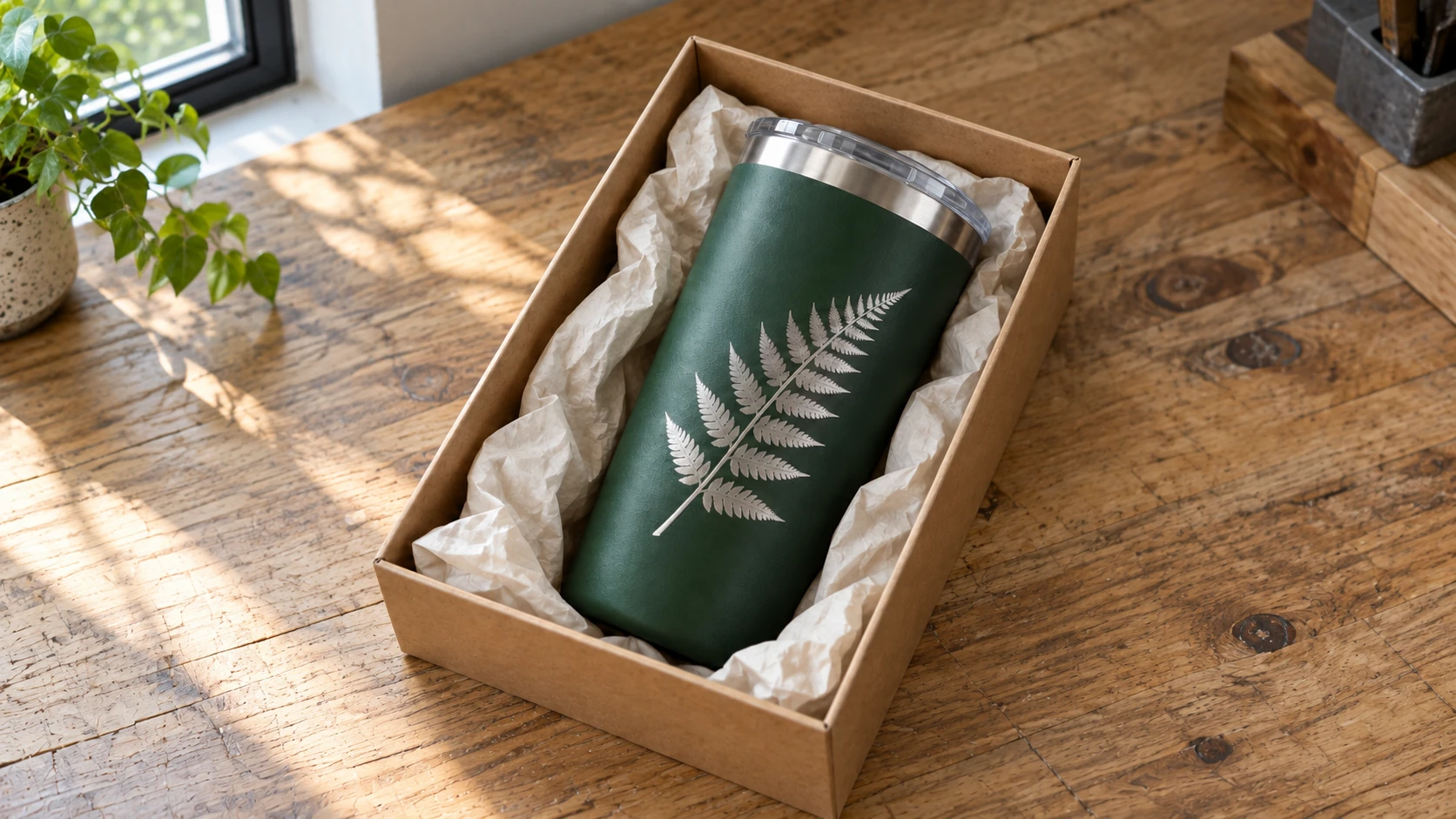
The same finished tumbler in a gift box. Plan the presentation and packing materials alongside the design when costing a repeat order.
Bulk Orders and Production Efficiency
When orders scale up, efficiency matters. Here are some things that help:
Batch similar orders. If you have five orders for the same tumbler color with different names, set up once and run them all in sequence. Changing the name text between tumblers takes seconds. Changing the entire rotary setup takes minutes.
Create templates. Build design templates in your laser software with placeholder text positioned and sized correctly for each tumbler size you offer. When an order comes in, swap the name and you're ready to engrave in under a minute.
Pre-position your rotary. If tumblers are your primary product, leave the rotary set up permanently. Switching between flatbed and rotary mode for every job wastes significant time.
Invest in quality blanks. Cheap tumblers with inconsistent coating cost you more in the long run through failed engraves and rework. Find a reliable supplier and stick with them. Consistency in your blanks means consistency in your settings, which means fewer test runs and wasted materials.
Tips for Consistency in Production Runs
When you're doing multiples of the same design, consistency is what separates hobbyist work from professional products. Your customer ordered a set of eight bridesmaid tumblers, and they better all look identical.
Keep a Settings Journal
Document your settings for every tumbler type, brand, and color you engrave. Include:
- Tumbler brand and color
- Laser power and speed
- DPI
- Focus method and distance
- Steps per rotation
- Any notes about that specific tumbler (thinner coating, requires extra cleaning, etc.)
Digital notes work, but a physical notebook at your laser station is faster to reference during production. You'll be surprised how quickly you accumulate tumbler-specific knowledge that you'll forget if you don't write it down.
Use Consistent Blanks
The single biggest variable in tumbler consistency is the blanks themselves. Different manufacturers, different production batches, even different colors from the same manufacturer can engrave differently. The black powder coating on Brand X may be thicker than the black powder coating on Brand Y, requiring different settings.
Find a blank supplier that gives you consistent results and order in bulk. When you get a batch that works well, buy more of it before they change suppliers or manufacturing processes. This sounds paranoid, but experienced tumbler makers will all tell you the same thing.
Control Your Environment
Temperature and humidity affect powder coating behavior under a laser. If your workshop is 40 degrees in winter and 90 degrees in summer, you may notice subtle differences in engrave quality. The coating is slightly harder when cold and slightly softer when warm, which can change how cleanly it vaporizes.
Air assist consistency matters too. If your air compressor cycles on and off during a long engrave, the pressure variation can affect the engrave quality. A regulator and a large enough tank to sustain consistent pressure through the entire job helps.
Quality Check Every Piece
It takes five seconds to inspect a tumbler after engraving. Do it before packing. Check for:
- Complete coating removal (no patchy spots)
- Even depth and brightness across the entire design
- Clean edges on text and graphics
- No smoke residue or discoloration
- Correct spelling (yes, this happens more than you'd think)
Catch problems before they leave your workshop. A $7 blank is cheaper than a refund, a replacement, and a negative review.
Clean as You Go
Smoke residue builds up on your laser lens, your rotary rollers, and the tumblers themselves during production runs. Clean your lens every 20-30 tumblers (or more frequently if you notice declining engrave quality). Wipe your rollers between tumblers if you're using a roller rotary. Clean each tumbler before packaging.
This maintenance sounds tedious, but it prevents the slow drift in quality that ruins the last few tumblers in a long run. The first tumbler and the fiftieth tumbler should look identical.
Wrapping Up
Tumblers are one of those rare products where the skills are accessible, the materials are affordable, the demand is strong, and the profit margins are healthy. That's true for a single gift tumbler and for a full production operation alike. The fundamentals are the same: understand your coating type, nail your rotary setup, dial in your settings, and be consistent.
Start with a cheap powder-coated tumbler and a simple name design. Get that right. Then branch into marking compounds on bare steel. Then try photo work. Each step builds on the last, and before long, tumblers will be the backbone of your laser business.
If you're looking for more laser resources, check out our guides on wood engraving settings, metal engraving techniques, and common laser engraving mistakes to round out your knowledge.
Ready to prep your next design? Turn a customer's photo into clean, engravable line art with Photo Converter, or vectorize a logo with MonoTrace before you load up the rotary.
Happy engraving. May your rotary never slip.
Related Tools
Ready to try these tools?
Sign up free, no credit card required. Free tools available immediately.
Start Free