

Best Wood for CNC Routing: A Species-by-Species Guide
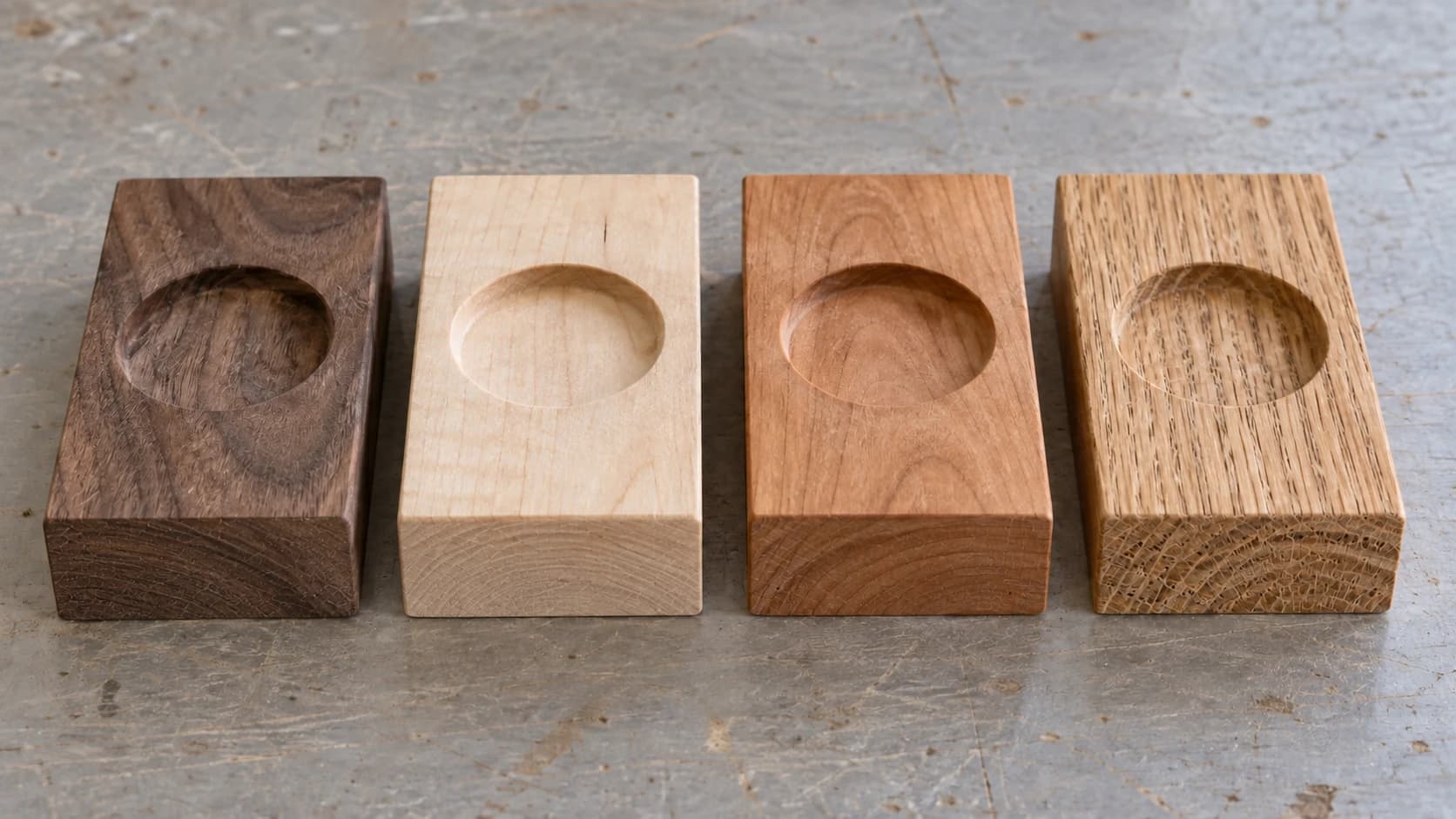
Pick the wrong wood for a laser engraver and you get ugly results. Pick the wrong wood for a CNC router and you get ugly results, a broken bit, and a workpiece that just launched itself off the table. The stakes are higher when you're mechanically removing material with a spinning carbide cutter.
With laser engraving, the main concerns are contrast, charring, and smell. (We covered those in our wood species guide for laser engraving.) CNC routing is a different game entirely. You're fighting grain direction, hardness, tearout, chip evacuation, and the very real possibility that a knot in a board of pine will deflect your bit and ruin an hour of cutting time.
This guide covers every common wood species and engineered material you'll encounter on a CNC router, with practical recommendations for bits, feeds, speeds, and which projects each species handles best.
Why Wood Choice Matters More for CNC
A laser beam doesn't care about grain direction. It vaporizes material equally in every direction. A spinning router bit is a completely different tool. It has physical cutting edges that interact with the wood's cellular structure, and that interaction changes dramatically depending on the species.
Three things make CNC wood selection more critical than laser wood selection:
Mechanical forces. A CNC bit pushes sideways into the material. Soft spots, knots, end grain, and inconsistent density all affect how those forces play out. A board that looks beautiful can route terribly if the grain is wild or the moisture content is off.
Tearout and chip formation. Different woods form chips differently. Some produce clean curls that evacuate nicely. Others splinter into fuzzy fragments that clog the flutes, generate heat, and leave a rough surface. The way a species tears (or doesn't) determines your surface finish more than any other factor.
Tool wear. Hard, dense woods and abrasive species eat through carbide faster. If you're doing production runs, your bit choice and replacement schedule depend directly on what species you're cutting.
If you're new to CNC routing in general, start with our CNC beginner's guide to get the fundamentals down. This post assumes you know the basics and want to optimize your material choice.
PRINT. CUT. CARVE.
- Multiple formats (SVG, DXF, PNG)
- Machine-tested designs
- Commercial licenses
Sponsored by PrintCutCarve.com
Understanding Wood Properties for CNC
Before we get into specific species, let's cover the properties that actually matter when a spinning bit meets wood.
Hardness (Janka Scale)
The Janka hardness test measures the force required to press a steel ball halfway into a piece of wood. It's the standard measure of how resistant a species is to denting and wear, and it correlates directly with how much your CNC has to work.
Higher Janka numbers mean:
- More force on the bit and machine
- Slower feed rates
- Shallower depths of cut
- Better surface finish (usually)
- Faster tool wear
Lower Janka numbers mean:
- Less force required
- Higher feed rates possible
- Deeper passes are practical
- More risk of fuzzing and tearout
- Bits last longer
Here's a rough tier system for CNC routing:
| Janka Rating | Range (lbf) | Examples | CNC Behavior |
|---|---|---|---|
| Very Soft | Under 500 | Basswood, Cedar, Pine | Cuts like butter, high tearout risk |
| Soft | 500-800 | Poplar, Alder, Butternut | Easy cutting, moderate tearout |
| Medium | 800-1200 | Walnut, Cherry, Mahogany | The sweet spot for most CNC work |
| Hard | 1200-1800 | Maple, Oak, Ash, Birch | Clean cuts, requires good rigidity |
| Very Hard | 1800+ | Hickory, Ipe, Jatoba | Doable but demanding on hobby machines |
Tip
If you're on a hobby-grade CNC (3018, Shapeoko, X-Carve, or similar belt-driven machine), stick to species under 1400 Janka. You can cut harder woods, but you'll need much shallower passes, slower feed rates, and more patience than a rigid steel-frame machine requires.
Grain Structure
Wood grain isn't just cosmetic. It affects CNC routing in two major ways:
Open grain vs. closed grain. Open-grain woods (oak, ash, mahogany) have visible pores that can catch the bit's cutting edges, causing micro-tearout and a textured surface. Closed-grain woods (maple, cherry, poplar) cut more uniformly because the cellular structure is consistent.
Straight grain vs. figured/interlocked grain. Straight, predictable grain routes cleanly because the bit encounters the same resistance throughout the cut. Figured woods (curly maple, bird's eye, quilted) look spectacular but the grain direction changes constantly, which means tearout can happen in unpredictable spots. Interlocked grain (common in some tropical species) is even trickier because fibers literally cross each other.
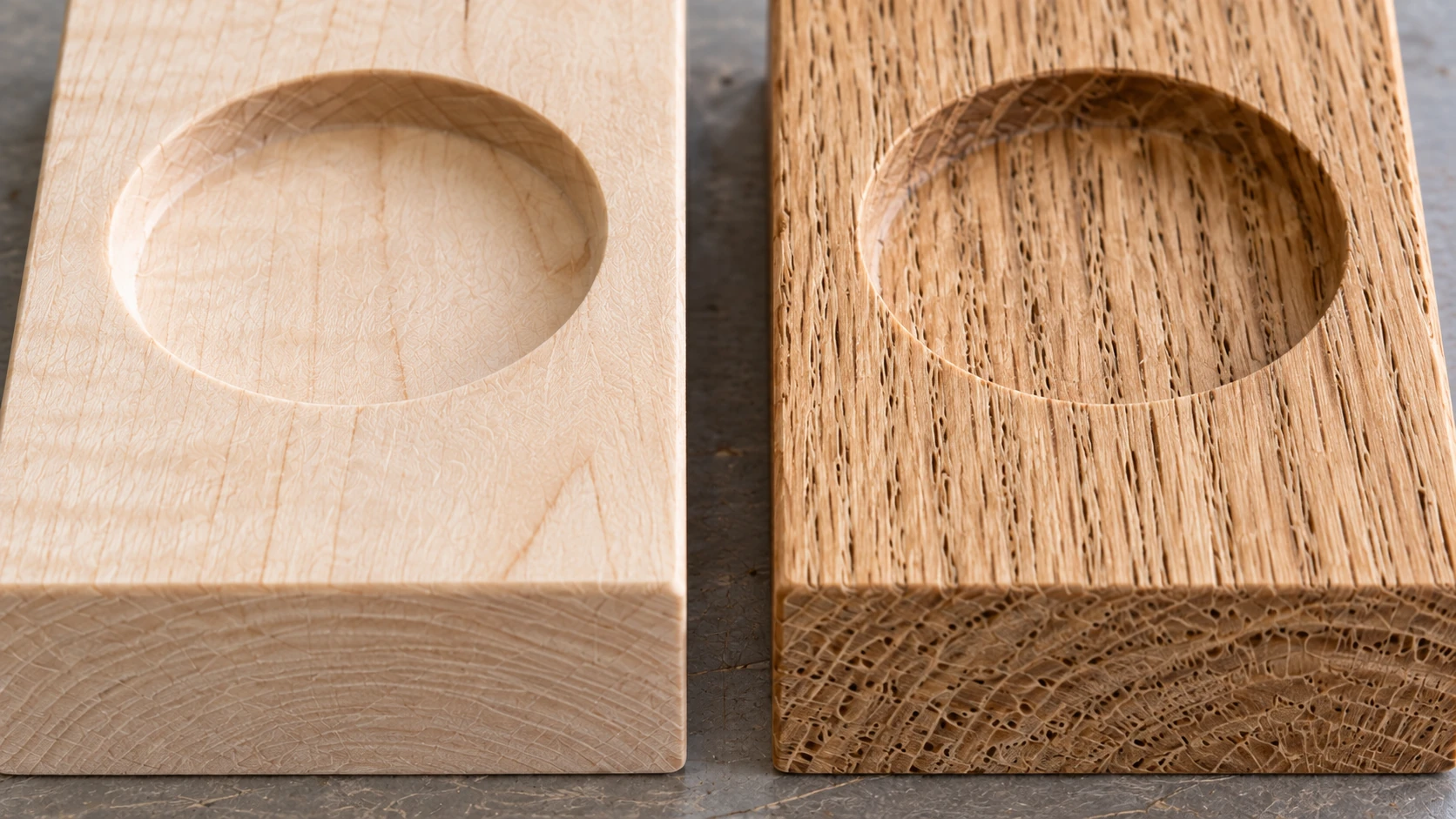
The same maple and oak samples at closer range. Grain and pores remain visible on the machined surfaces as well as on the uncut faces.
Moisture Content
Target 6-8% moisture content for CNC routing. Wood that's too wet cuts poorly (fibers bend instead of shearing cleanly) and the finished piece will warp as it dries. Wood that's too dry can be brittle and prone to chipping.
Use a pin-type moisture meter. They cost $25-40 and save you from ruining expensive boards. Check in multiple spots since moisture can vary across a single board.
Warning
Never CNC route freshly milled or air-dried lumber that hasn't been kiln-dried. The moisture content is typically 15-30%, and the results will be terrible. The wood fibers will bend and fuzz instead of cutting cleanly, and the finished piece will move and crack as it reaches equilibrium moisture content.
Dimensional Stability
Some species move a lot with humidity changes. Others barely budge. For precision CNC work (inlays, joinery, anything with tight tolerances), choose stable species. Walnut, cherry, and mahogany are stable. Red oak and soft maple are not.
This matters less for signs and decorative pieces, but if you're cutting interlocking parts that need to fit together, dimensional stability is critical. For multicolor inlay projects, it's especially important that your pieces don't shrink or swell after assembly.
Hardwood Species Guide
Walnut (Janka 1010)
Walnut is the CNC community's darling, and for good reason. It occupies the perfect middle ground: hard enough to cut cleanly, soft enough that hobby machines handle it comfortably. The grain is generally straight and cooperative, the color is gorgeous, and the surface finish off the bit is consistently good.
CNC behavior: Walnut produces clean, well-formed chips that evacuate easily. The cutting forces are moderate. The grain is forgiving enough that slight variations in feed rate don't punish you with tearout. If there's one wood that makes you feel like you know what you're doing on a CNC, it's walnut.
Surface finish: Excellent. Walnut's medium-density, straight grain leaves a smooth surface that requires minimal sanding. V-carve details come out sharp and clean. Pockets have smooth floors.
Common issues: The sapwood (the lighter-colored outer portion of the board) is significantly softer than the heartwood (the dark center). If your board includes both, the bit encounters different densities, which can cause inconsistent surface finish at the boundary. Either select all-heartwood boards or adjust for the contrast.
Recommended bits:
- Upcut spiral for pocketing (clean chip evacuation)
- Downcut spiral for surface cuts and lettering (clean top edge)
- V-bits work beautifully for detailed carving
Starting parameters (1/4" 2-flute upcut):
| Parameter | Value |
|---|---|
| RPM | 18,000 |
| Feed Rate | 1500 mm/min (60 IPM) |
| Plunge Rate | 500 mm/min (20 IPM) |
| Depth per Pass | 2-3mm |
| Stepover | 40% |
Best for: Signs, decorative carvings, V-carve projects, furniture parts, inlays (as the dark contrasting wood), cutting boards, gift items. Walnut is the premium choice for anything that will be seen and appreciated.
Cost: Expensive. Expect $8-14 per board foot for 4/4 lumber. Worth it for finished pieces, but grab something cheaper for test cuts.
Cherry (Janka 950)
Cherry is beautiful, reasonably easy to route, and ages into one of the most stunning colors in woodworking. The catch? It burns. Cherry is notorious for developing dark burn marks when the bit generates even slightly too much heat. Get your feeds and speeds wrong and you'll spend more time sanding away burns than you spent cutting.
CNC behavior: Cherry cuts cleanly when everything is dialed in. The grain is fine and closed, which means smooth surfaces and sharp details. But the wood contains natural compounds that darken dramatically with heat. Any rubbing (bit dwelling, slow feed rate, dull bit) leaves scorch marks.
Surface finish: Excellent when cut properly. The closed grain takes a beautiful finish. Burns aside, the surface quality off the bit is among the best of any domestic hardwood.
Common issues: Burning. It's the number one issue with cherry on CNC. It happens most often during plunge moves (the bit sits in one spot), in corners where the bit decelerates, and during climb cuts on hobby machines with backlash. Cherry also darkens significantly with UV exposure over time, so a fresh-cut piece will look noticeably different in six months.
How to avoid burning:
- Use sharp bits (replace sooner than you think you need to)
- Keep feed rates up. Don't let the bit rub.
- Reduce RPM slightly (16,000-18,000 rather than 20,000+)
- Use climb milling on the finish pass if your machine is rigid enough
- Don't dwell in plunge moves. Use ramping or helical entry instead of straight plunges.
Recommended bits:
- 2-flute upcut spiral for most operations
- Compression bit for through-cuts on thin stock
- Avoid straight-flute bits (they rub more than cut)
Starting parameters (1/4" 2-flute upcut):
| Parameter | Value |
|---|---|
| RPM | 16,000 |
| Feed Rate | 1800 mm/min (70 IPM) |
| Plunge Rate | 600 mm/min (24 IPM) |
| Depth per Pass | 2-3mm |
| Stepover | 40% |
Tip
Notice the lower RPM and higher feed rate compared to walnut. That's deliberate. With cherry, you want each flute taking a bigger chip (more material removed per revolution) so the bit is cutting, not rubbing. Rubbing generates heat, and heat means burn marks.
Best for: Decorative pieces, furniture components, kitchen items (cutting boards, serving boards), gift items, anything where the warm reddish-brown color adds value. Cherry and walnut together in multicolor inlays create stunning contrast.
Cost: Moderate to expensive. $7-12 per board foot for 4/4 lumber. Slightly less available than walnut at big-box stores but common at hardwood dealers.
Maple (Hard Maple, Janka 1450)
Maple is the precision wood. It's hard, dense, and closed-grain, which means it produces incredibly sharp, clean details and smooth surfaces. V-carve text in maple looks like it was engraved by machine rather than routed. The downside is that all that density makes your CNC work harder, and hobby machines may struggle with aggressive cuts.
CNC behavior: Maple cuts cleanly but demands respect. The hardness means higher cutting forces, more heat generation, and faster tool wear. You need sharp bits, moderate feed rates, and shallow depths of cut compared to softer species. On a rigid machine, maple is a joy. On a flexible hobby machine, it can chatter and deflect.
Surface finish: Among the best of any species. The tight, closed grain produces surfaces that feel polished right off the bit. Sanding is minimal. Details are crisp. Small text stays sharp and legible.
Common issues: Chattering on underpowered or flexible machines. Maple is hard enough to push back against the bit, and if your machine can't maintain position, the bit bounces between the wood and the ideal toolpath. This creates a rippled surface and an unpleasant noise. The fix is shallower passes and slower feed rates, not more RPM.
Maple also burns, though not as readily as cherry. Dull bits and slow feed rates still cause scorching. The light color makes burn marks very visible.
Recommended bits:
- 2-flute spiral for general routing
- Single-flute for detailed carving on hobby machines (lower cutting forces)
- V-bits for text and decorative carving (maple produces the sharpest V-carve results)
Starting parameters (1/4" 2-flute upcut):
| Parameter | Value |
|---|---|
| RPM | 18,000 |
| Feed Rate | 1200 mm/min (48 IPM) |
| Plunge Rate | 400 mm/min (16 IPM) |
| Depth per Pass | 1.5-2.5mm |
| Stepover | 35% |
Best for: V-carve projects where detail matters, cutting boards (hard maple is food-safe and durable), precision parts, jigs and fixtures, anything where surface quality is the top priority. The light color also makes it the go-to choice for the background wood in inlay projects.
Cost: Moderate. $5-9 per board foot. Widely available at both big-box stores and hardwood dealers. Soft maple (Janka 950) is cheaper and easier to route, but less desirable for finished pieces.
Red Oak (Janka 1290)
Oak is everywhere. It's strong, relatively affordable, widely available, and the grain pattern is dramatic and recognizable. But CNC routing oak is a mixed experience. The open grain structure means the bit encounters alternating hard and soft zones within each growth ring, and that inconsistency shows up in the finish.
CNC behavior: Red oak routes adequately but not gracefully. The large, open pores create a textured surface that's impossible to eliminate without filler. Tearout along the grain is common, especially across the wide ray flecks. The earlywood (the softer, lighter-colored portion of each ring) cuts more easily than the dense latewood, which creates an uneven surface.
Surface finish: Rough compared to closed-grain woods. The open pores leave a visibly textured surface. V-carve details can be fuzzy because the pores break up clean edges. Shallow engraving detail gets lost in the grain texture. Deep carving fares better because the bold grain becomes part of the aesthetic.
Common issues: Tearout is the big one, especially when routing across the grain. Oak's long fibers want to pull out in chunks rather than shear cleanly. This is worse with upcut bits, which lift fibers before cutting them. Splintering along the top edge of through-cuts is also common.
Recommended bits:
- Downcut spiral for surface work (pushes fibers down instead of pulling them up)
- Compression bit for through-cuts (clean both faces)
- V-bits work for deep carving but shallow detail gets lost in the pores
Starting parameters (1/4" 2-flute upcut):
| Parameter | Value |
|---|---|
| RPM | 18,000 |
| Feed Rate | 1400 mm/min (55 IPM) |
| Plunge Rate | 500 mm/min (20 IPM) |
| Depth per Pass | 2-3mm |
| Stepover | 40% |
Best for: Deep relief carving where the bold grain adds character, rustic signs, structural furniture parts. Less ideal for fine detail work, small text, or precision inlays. If you want the oak look with better CNC behavior, consider white oak instead (it's slightly harder at Janka 1360 but has smaller pores and a tighter grain pattern).
Cost: Inexpensive. $4-7 per board foot. Available everywhere, including big-box lumber aisles.
White Oak (Janka 1360)
The more refined sibling of red oak. White oak has a tighter grain pattern with smaller pores, which translates to better surface finish on the CNC. It's also more dimensionally stable and naturally resistant to moisture, making it the better choice for outdoor projects or anything that might get wet.
CNC behavior: Noticeably better than red oak. The smaller pores and denser ray structure create a more consistent surface. Tearout is still possible but less dramatic. The wood is harder (more cutting force required), but the improved finish quality is worth it.
Surface finish: Good. Not as smooth as maple or walnut, but significantly better than red oak. V-carve details hold their edges better. The grain adds visual interest without overwhelming fine details.
Common issues: Tannin content. White oak is high in tannins, which react with steel hardware, water-based finishes, and iron-containing stains, causing dark discoloration. This doesn't affect CNC cutting, but it affects finishing. Use a compatible finish and avoid bare steel clamps on the visible faces.
Starting parameters (1/4" 2-flute upcut):
| Parameter | Value |
|---|---|
| RPM | 18,000 |
| Feed Rate | 1300 mm/min (50 IPM) |
| Plunge Rate | 450 mm/min (18 IPM) |
| Depth per Pass | 2mm |
| Stepover | 35% |
Best for: Outdoor signs, furniture where you want the oak grain aesthetic but with better CNC results, whiskey barrel-themed projects, structural parts that need moisture resistance.
Cost: Moderate. $6-10 per board foot. More expensive than red oak but worth the upgrade for CNC work.
Mahogany (Genuine/African, Janka 800-1100)
Mahogany is the forgiveness champion. It's medium-density, straight-grained, and cuts like a dream on virtually any CNC machine. The grain is moderately open but consistent, and the wood holds detail well without demanding precision in your feed rates.
CNC behavior: Mahogany is one of the most forgiving hardwoods to route. The density is low enough that hobby machines handle it easily, but high enough that the surface finish is clean. Chip formation is excellent. The wood rarely tears out and tolerates a wide range of feed rates without burning or fuzzing.
Surface finish: Very good. The slightly open grain creates a warm, natural texture, but it's fine enough that details remain sharp. Sanding requirements are minimal. The reddish-brown color deepens with finishing and aging.
Common issues: "Mahogany" is an overloaded term. Genuine Honduran mahogany (Swietenia macrophylla) is expensive and increasingly hard to source sustainably. African mahogany (Khaya spp.) is more available and routes similarly but can have interlocked grain that causes occasional tearout. Sapele (often sold as African mahogany) is harder and more prone to grain reversal issues. Make sure you know what species you're actually buying.
Recommended bits:
- Standard 2-flute spirals work well for everything
- V-bits produce clean, detailed carving
- Less picky about bit type than harder species
Starting parameters (1/4" 2-flute upcut):
| Parameter | Value |
|---|---|
| RPM | 18,000 |
| Feed Rate | 1800 mm/min (70 IPM) |
| Plunge Rate | 600 mm/min (24 IPM) |
| Depth per Pass | 3mm |
| Stepover | 45% |
Best for: Signs, decorative carvings, furniture parts, practice pieces when you want real hardwood results without the stress. A great "confidence builder" species for CNC beginners moving up from softwood.
Cost: Moderate. $6-10 per board foot depending on the specific species. African mahogany and sapele are more affordable than genuine Honduran mahogany.
Ash (Janka 1320)
Ash is strong, lightweight for its hardness, and has a distinctive, open-grain pattern that looks great in rustic and contemporary designs. On the CNC, it behaves similarly to oak but with a few key advantages.
CNC behavior: Ash routes reasonably well. It's hard enough to produce clean edges but flexible enough to absorb some vibration without chattering. The open grain means a textured surface (similar to oak), but the grain pattern is more consistent and predictable than oak's.
Surface finish: Moderate. The open grain creates texture, and fine details get lost in the pores just like oak. Deep carving looks excellent. Shallow engraving needs grain filler for a polished result.
Common issues: Ash is a ring-porous wood, meaning there's a significant density difference between earlywood and latewood within each growth ring. This can cause the bit to wander slightly as it transitions between zones. Also, emerald ash borer has devastated ash populations in many regions, making availability spotty and prices volatile.
Starting parameters (1/4" 2-flute upcut):
| Parameter | Value |
|---|---|
| RPM | 18,000 |
| Feed Rate | 1400 mm/min (55 IPM) |
| Plunge Rate | 500 mm/min (20 IPM) |
| Depth per Pass | 2mm |
| Stepover | 40% |
Best for: Tool handles, furniture components, rustic signs, baseball bats (if your CNC is long enough), projects where the bold grain pattern is desirable.
Cost: Variable. $5-9 per board foot where available. Scarcity in some regions has pushed prices up.
Poplar (Janka 540)
Poplar is the practice wood. It's cheap, widely available, easy to cut, and perfectly adequate for test runs, prototypes, and painted projects. Nobody buys poplar for its beauty (the greenish-brown color and occasionally purple streaks aren't winning any awards), but for getting your toolpaths right before committing to walnut, it's invaluable.
CNC behavior: Poplar cuts very easily. The low hardness means minimal cutting forces, which is great for lightweight hobby machines. Chip formation is good, though the chips tend to be slightly fuzzy rather than clean curls. Feed rates can be aggressive without stressing the machine.
Surface finish: Fair. Poplar is soft enough that fibers can fuzz rather than shearing cleanly, especially with dull bits or slow feed rates. The finish requires more sanding than harder woods. V-carve details are adequate but not crisp.
Common issues: Fuzzing is the main issue. Poplar's soft fibers sometimes bend instead of cutting, leaving a fuzzy surface that needs sanding. Sharp bits and adequate feed rates minimize this. The wood also tends to dent easily during handling and clamping.
Recommended bits:
- Sharp upcut spirals with clean edges
- Downcut for cleaner top surface
- Avoid dull bits (they cause more fuzzing in poplar than in harder woods)
Starting parameters (1/4" 2-flute upcut):
| Parameter | Value |
|---|---|
| RPM | 18,000 |
| Feed Rate | 2000 mm/min (80 IPM) |
| Plunge Rate | 700 mm/min (28 IPM) |
| Depth per Pass | 3-4mm |
| Stepover | 45% |
Best for: Test cuts, prototypes, painted projects (poplar takes paint well), practice runs before cutting expensive wood, jigs and fixtures, anything that won't be seen in its natural state.
Cost: Cheap. $3-5 per board foot. Available at every lumber yard and big-box store.
Info
Before committing any expensive hardwood to a CNC job, run the toolpath on a piece of poplar first. It cuts easily, shows you exactly what the finished geometry looks like, and costs almost nothing. Many experienced CNC users keep a stack of poplar specifically for test runs.
Alder (Janka 590)
Alder deserves a mention because it's gaining popularity in the CNC community. It's a light, fine-grained hardwood that machines easily and takes stain well. It's softer than most hardwoods but has a tight, consistent grain that produces a smooth finish.
CNC behavior: Very cooperative. Alder routes almost as easily as poplar but with a finer, more consistent grain structure. Tearout is rare. Feed rates can be aggressive. The surface finish off the bit is smooth enough that minimal sanding is needed.
Surface finish: Good for its price point. The tight grain gives a clean surface. It stains evenly, which is a big advantage if you're making pieces that will be finished to look like cherry or walnut.
Starting parameters (1/4" 2-flute upcut):
| Parameter | Value |
|---|---|
| RPM | 18,000 |
| Feed Rate | 1800 mm/min (70 IPM) |
| Plunge Rate | 600 mm/min (24 IPM) |
| Depth per Pass | 3mm |
| Stepover | 45% |
Best for: Stained projects, painted pieces, cabinet components, practice material that's a step above poplar in quality. Popular in guitar building and furniture where it gets stained to match more expensive species.
Cost: Inexpensive. $4-6 per board foot. More common in western North America and the Pacific Northwest.
Softwood Species Guide
Pine (Various, Janka 380-870)
Pine is the wood everyone starts with because it's everywhere and it's cheap. It's also one of the trickier species to route well. The dramatic density difference between soft earlywood and hard latewood (the light and dark bands in the grain) means the bit encounters constantly changing resistance. Add in knots, pitch pockets, and resinous sap, and you've got a species that looks simple but cuts unpredictably.
CNC behavior: Inconsistent. The soft earlywood cuts easily, sometimes too easily. The bit can grab and pull through the soft zones. The hard latewood resists more, causing the bit to deflect slightly. This alternating pattern creates an uneven surface. Knots are extremely hard and dense compared to the surrounding wood, and they can deflect the bit or cause it to grab and stall.
Surface finish: Poor to fair. Expect a textured surface with visible transitions between earlywood and latewood. Tearout is common, especially across the grain. V-carve details are fuzzy in the soft zones and sharp in the hard zones, which looks inconsistent.
Common issues: Resin buildup on bits. Pine's natural sap is sticky and accumulates on the cutting edges, which reduces cutting efficiency and causes burning. Clean your bits with a resin remover after every pine session. Also, construction-grade pine (SPF lumber from a hardware store) is often not flat, not dry, and full of knots. Choose clear (knot-free) pine boards specifically rated for woodworking.
Recommended bits:
- Downcut spiral for cleaner top surface
- Single-flute to reduce heat buildup
- Keep bits clean and sharp (resin dulls them faster)
Starting parameters (1/4" 2-flute upcut):
| Parameter | Value |
|---|---|
| RPM | 16,000 |
| Feed Rate | 2000 mm/min (80 IPM) |
| Plunge Rate | 700 mm/min (28 IPM) |
| Depth per Pass | 3-4mm |
| Stepover | 45% |
Tip
If you're determined to make pine look good on the CNC, choose white pine (Eastern white pine, Janka 380) over yellow pine (Janka 690-870). White pine has less density variation between earlywood and latewood, which means more consistent cutting. It's softer overall, but the evenness makes up for it.
Best for: Rustic signs where the grain character adds to the look, painted projects, test cuts, practice, structural parts that won't be seen. Not ideal for fine detail work or precision pieces.
Cost: Very cheap. $2-4 per board foot. Clear (knot-free) pine costs more but is worth it for CNC work.
Cedar (Western Red Cedar, Janka 350)
Cedar smells fantastic and looks warm, but on the CNC it's fragile and temperamental. It's one of the softest woods you'll encounter, and that softness means the fibers bend and tear instead of shearing cleanly. Fine details are difficult to achieve, and the wood splits easily along the grain.
CNC behavior: Cedar is very soft and brittle. The fibers split rather than cut, especially along the grain. Cross-grain routing produces the worst tearout of any common species. The aromatic oils can gum up bits (similar to pine resin, but less sticky). The wood is so soft that even mild clamping pressure can dent the surface.
Surface finish: Poor for fine work. Acceptable for large, bold designs where tearout isn't a concern. Deep V-carving works reasonably well because the scale of the carving masks the rough edges. Shallow detail carving is not recommended.
Common issues: Splitting along the grain. Cedar's long, straight fibers make it a pleasure to split by hand (great for shingles and fenceposts) and a nightmare for cross-grain CNC routing. The wood also varies significantly in density between heartwood (the darker, aromatic center) and sapwood (the lighter, outer portion).
Starting parameters (1/4" 2-flute upcut):
| Parameter | Value |
|---|---|
| RPM | 14,000 |
| Feed Rate | 2200 mm/min (85 IPM) |
| Plunge Rate | 700 mm/min (28 IPM) |
| Depth per Pass | 3-4mm |
| Stepover | 40% |
Best for: Outdoor signs (cedar is naturally rot-resistant), large bold designs, projects where the smell and weather resistance matter more than fine detail. Cedar plaques and address signs are popular CNC projects.
Cost: Moderate for clear grades. $5-8 per board foot. Readily available at lumber yards and big-box stores, though most of the stock is intended for decking and fencing (rough-sawn, not surfaced).
Basswood / Linden (Janka 410)
Basswood is the carver's wood. Hand carvers have loved it for centuries because it cuts in any direction with minimal resistance. For CNC work, those same properties make it the easiest species to route. Clean details, smooth surfaces, and virtually no tearout. The trade-off is that it's very soft, dents easily, and has almost no visual grain character.
CNC behavior: Excellent. Basswood cuts cleanly in every direction, including across the grain where most other species tear out. The wood has an extremely fine, uniform grain with no significant density variation. Chip formation is clean. Bits stay sharp for a long time. Even small, lightweight CNC machines produce good results in basswood.
Surface finish: Very smooth. Basswood produces the cleanest surface finish of any common species. V-carve details are sharp and crisp. Small text is legible at sizes that would be fuzzy in most other woods. Sanding requirements are minimal.
Common issues: Softness. Basswood dents if you look at it wrong. Clamping requires padding or distributed-pressure methods (vacuum tables work great). The finished piece needs a protective finish or it will accumulate dents and scratches in use. Basswood is also visually bland. The pale, featureless surface doesn't have the character that walnut or cherry brings to a finished piece.
Recommended bits:
- Any spiral bit works well
- V-bits produce outstanding detail
- Even inexpensive bits give good results because the wood is so forgiving
Starting parameters (1/4" 2-flute upcut):
| Parameter | Value |
|---|---|
| RPM | 16,000 |
| Feed Rate | 2500 mm/min (100 IPM) |
| Plunge Rate | 800 mm/min (32 IPM) |
| Depth per Pass | 4-5mm |
| Stepover | 50% |
Best for: Detailed carvings, relief carvings, 3D models, practice pieces, anything where detail precision matters more than visual grain character. Also the traditional choice for chip carving and whittling blanks.
Cost: Moderate. $5-8 per board foot. Not always stocked at big-box stores, but easy to order online. Hobby-sized blanks are widely available.
Engineered Materials
Baltic Birch Plywood
If you could only stock one material for your CNC, Baltic birch plywood would be the smart choice. It's consistent, affordable, cuts cleanly, and is available in precisely milled thicknesses. The void-free multi-ply construction means you never hit a surprise cavity in the middle of a cut. For anything that involves through-cutting shapes, Baltic birch is the default.
CNC behavior: Excellent and predictable. Every sheet cuts the same way, which means your proven feeds and speeds work every time. The thin birch veneers and adhesive layers create a uniform, consistent material that machines predictably. No knots, no grain surprises, no density variation.
Surface finish: Good on the faces, distinctive on the edges. The face veneer engraves and routes cleanly. The edges show the alternating birch/adhesive layers, which has become a design feature rather than a flaw. Many CNC makers intentionally leave Baltic birch edges visible or emphasize them with finish.
Common issues: Delamination with dull bits. If your bit is worn, the adhesive layers can separate from the veneer layers, causing fuzzy, ragged edges. This is your signal to change the bit. Also, the face veneer is thin (typically 1-1.5mm), so deep V-carving can punch through the face veneer into the adhesive layer, which has a different color and texture.
Recommended bits:
- Compression bit for through-cuts (clean both faces)
- Downcut spiral for surface work (clean top face)
- Single-flute for thinner sheets (less chip load, less delamination risk)
Starting parameters (1/4" 2-flute compression):
| Parameter | Value |
|---|---|
| RPM | 18,000 |
| Feed Rate | 1800 mm/min (70 IPM) |
| Plunge Rate | 600 mm/min (24 IPM) |
| Depth per Pass | Full depth for thin stock (3mm), 3mm passes for thicker |
| Stepover | 40% |
Info
Baltic birch plywood thickness is metric. What's sold as "1/4 inch" is actually 6mm (slightly thinner than true 1/4"). What's sold as "1/2 inch" is actually 12mm. This matters for joinery and inlay work. Measure the actual thickness with calipers before designing parts that need to fit together.
Available thicknesses: 3mm (1/8"), 6mm (1/4"), 9mm (3/8"), 12mm (1/2"), 18mm (3/4")
Best for: Cut-out shapes, ornaments, signs, boxes, mechanical assemblies, stacked layer art, jigs, anything that involves profile cutting. Baltic birch is the workhorse of CNC shops.
Cost: Inexpensive. A 5 × 5-foot sheet of 1/4" (6mm) Baltic birch runs $30-50 depending on grade and region. Smaller pre-cut pieces are available at craft supply stores.
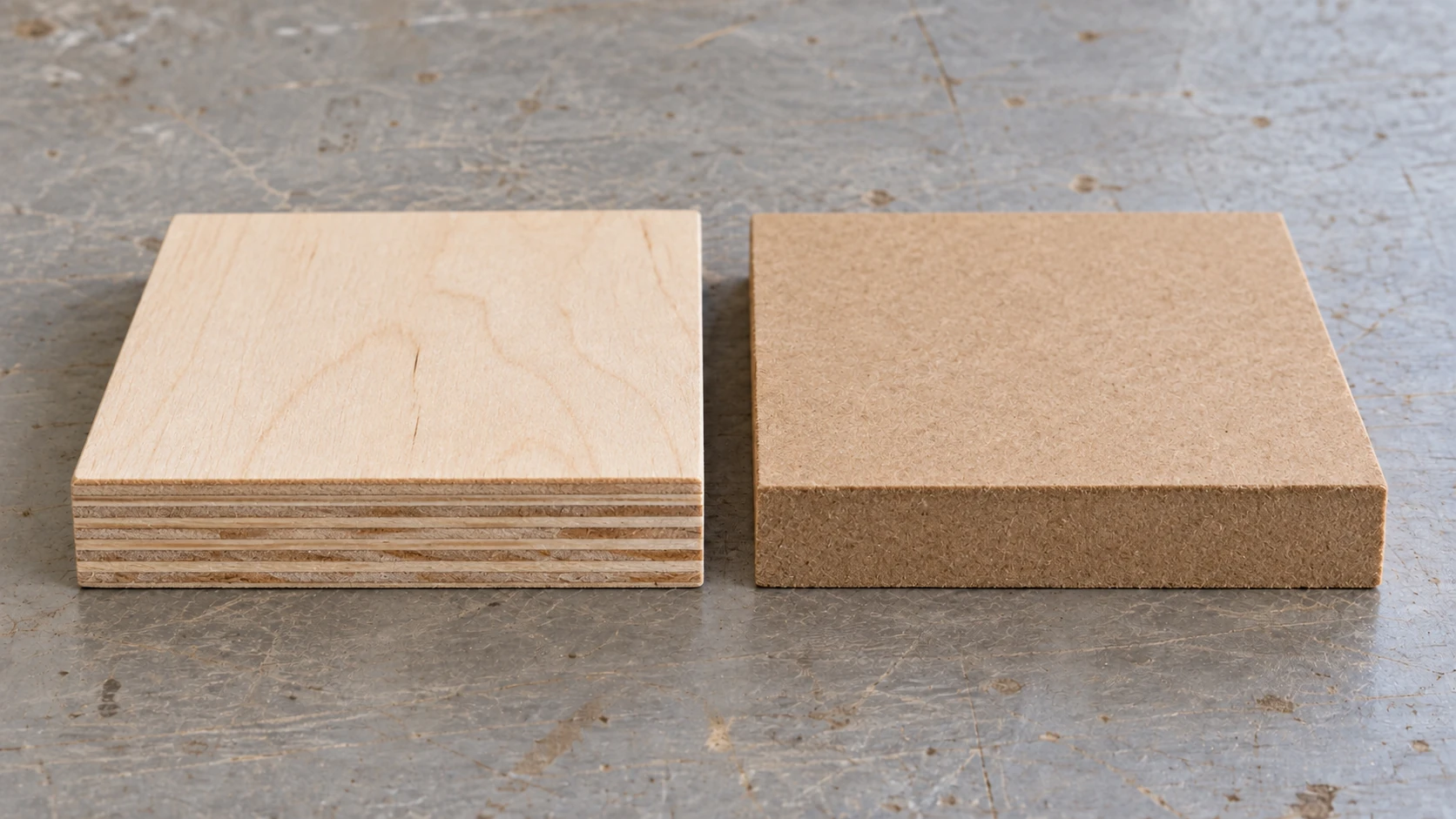
Separate sheet-material samples make the construction visible: plywood has veneer layers, while MDF has a compressed fiber core.
MDF (Medium Density Fiberboard, No Janka Rating)
MDF is engineered sawdust. Wood fibers are mixed with resin and compressed into flat, uniform sheets. The result is a material that has absolutely no grain, no knots, no voids, and no personality. It cuts like a dream and produces a cloud of fine dust that will infiltrate every corner of your shop.
CNC behavior: Outstanding consistency. MDF has the same density in every direction, which means the bit encounters the same resistance regardless of toolpath direction. No tearout. No grain-following. The surface is perfectly flat and uniform. It's the most predictable material you can put on a CNC.
Surface finish: Smooth and featureless. MDF produces clean edges and flat surfaces. V-carve details are sharp and consistent. The lack of grain means there's nothing to interfere with fine details. After priming and painting, MDF looks like a professionally manufactured product.
Common issues: The dust. MDF dust is extremely fine, gets everywhere, and is a respiratory hazard. The formaldehyde-based resins in some MDF products make the dust even more concerning. Always use a dust collection system and wear a proper respirator (not a paper dust mask, a fitted respirator with particulate cartridges) when routing MDF.
MDF also doesn't handle moisture well. Any water exposure causes the material to swell and degrade. Finished pieces need to be sealed on all surfaces, including edges and the back, or they'll absorb atmospheric moisture over time.
Recommended bits:
- Standard 2-flute spirals work perfectly
- Upcut for chip evacuation (the dust packs into cuts otherwise)
- Avoid O-flute and single-flute bits (not enough chip evacuation)
Starting parameters (1/4" 2-flute upcut):
| Parameter | Value |
|---|---|
| RPM | 18,000 |
| Feed Rate | 2000 mm/min (80 IPM) |
| Plunge Rate | 700 mm/min (28 IPM) |
| Depth per Pass | 3-4mm |
| Stepover | 45% |
Warning
MDF dust is a serious health hazard. The fine particles can cause respiratory issues, and the formaldehyde resins are a known carcinogen. Never route MDF without proper dust collection AND a fitted respirator. A shop vacuum with a fine-particle filter is minimum. A dedicated dust collector with a cyclone separator is better. Your lungs are worth more than any project.
Best for: Painted signs, prototypes, templates, jigs, anything that will be painted or covered. Also excellent for test cuts because it's cheap and consistent. MDF is the material of choice when you want predictable cutting and the finished surface will be painted.
Cost: Very cheap. A 4 × 8-foot sheet of 3/4" MDF is $30-45. Smaller project panels are available at big-box stores.
HDF (High Density Fiberboard)
HDF is MDF's denser cousin. It's made the same way (compressed wood fibers and resin) but at higher pressure, resulting in a thinner, harder, denser panel. You'll recognize it as the backing material in laminate flooring.
CNC behavior: Excellent. Even more consistent than MDF, with a harder surface that holds fine details slightly better. Cuts cleanly with minimal dust (though still significantly dusty). The higher density means slightly more cutting force required, but any CNC machine handles it without issue.
Surface finish: Very good. Sharper edges than MDF due to the higher density. Takes paint and laminate beautifully. The surface is smoother than MDF out of the box.
Common issues: Same moisture sensitivity as MDF. Same dust hazards. Available in fewer thicknesses (typically 3mm and 6mm). Harder to find at retail stores compared to MDF.
Best for: Thin templates, router guides, painted signs on thin stock, backing panels. When you need MDF-like consistency but in a thinner, harder panel.
Cost: Inexpensive. Slightly more per square foot than MDF of equivalent thickness.
Bamboo Plywood
Bamboo isn't actually wood (it's a grass), but it's sold as plywood panels and routed on CNC machines, so it belongs in this guide. Bamboo plywood is hard, dense, and has a distinctive striped appearance. It's environmentally sustainable, which appeals to eco-conscious makers and customers.
CNC behavior: Bamboo is hard. Treat it like hard maple in terms of feeds and speeds. The fiber structure is different from wood (long, parallel fibers rather than a growth-ring pattern), which means tearout behaves differently. Cross-grain cuts can produce splintering because the fibers are so long and strong. The adhesive layers in bamboo plywood are tough on bits.
Surface finish: Good. The surface is smooth and the striped pattern is consistent. Details hold well. The hardness ensures clean edges.
Common issues: Dust is silica-rich and abrasive. Bamboo dust wears bits faster than most woods. The fibers can splinter into long, sharp slivers during routing. Workholding needs to be secure because the material is heavy.
Starting parameters (1/4" 2-flute upcut):
| Parameter | Value |
|---|---|
| RPM | 18,000 |
| Feed Rate | 1200 mm/min (48 IPM) |
| Plunge Rate | 400 mm/min (16 IPM) |
| Depth per Pass | 1.5-2mm |
| Stepover | 35% |
Best for: Cutting boards, kitchen items, decorative panels, projects where the distinctive bamboo aesthetic is desired. The sustainability angle makes it popular for retail products.
Cost: Moderate to expensive. $8-14 per square foot for 3/4" panels.
Bit Selection by Wood Type
The right bit matters as much as the right wood. Here's a practical guide to matching bits with species. If you've read our common CNC mistakes post, you know that wrong bit choice is one of the most frequent problems.
Upcut Spiral
What it does: Pulls chips upward and out of the cut. Excellent chip evacuation. Leaves a clean bottom edge but a rough, fuzzy top edge.
Best for: Pocketing in any species. Through-cuts where the bottom face is the show face. MDF and plywood pocketing where chip evacuation matters.
Avoid for: Through-cuts on plywood where the top face matters. Surface carving where top-edge quality is visible.
Downcut Spiral
What it does: Pushes chips downward into the cut. Clean, smooth top edge. Bottom edge can be rough. Chips pack into the cut, which generates heat.
Best for: V-carving and surface carving in any species. Through-cuts where the top face is the show face. Hardwoods prone to tearout (oak, ash) where you want clean top edges.
Avoid for: Deep pocketing (chips pack in and cause heat buildup). Thick material through-cuts (bottom edge suffers). Resiny woods (pine, cedar) where trapped chips compound the gumming problem.
Compression Bit
What it does: Upcut geometry on the lower portion, downcut on the upper. Clean edges on both faces of a through-cut. The gold standard for plywood.
Best for: Through-cutting plywood, MDF, and any sheet goods. Cutting thin hardwood stock where both faces matter.
Not useful for: Pocketing (the compression geometry only works at full material depth). V-carving.
Single Flute
What it does: One cutting edge instead of two. Lower cutting forces, better chip evacuation, less heat. Removes material at half the rate of a two-flute at the same RPM and feed.
Best for: Softwoods (pine, cedar, basswood) where heat buildup causes burning. Hobby machines with limited rigidity. Plastics. Any situation where you need to reduce cutting forces.
V-Bits
What it does: Pointed bit that creates angled grooves. The depth of cut determines the width of the groove. Available in 30, 60, and 90-degree angles.
Best for wood species:
- 60-degree in maple, walnut, cherry for fine text and details
- 90-degree in softer woods (basswood, poplar) for wider, bolder text
- 30-degree for extremely fine detail in hard, closed-grain woods
| Wood Type | Recommended Bit Types |
|---|---|
| Hard, closed grain (maple, cherry) | 2-flute upcut for pockets, downcut for surface, V-bit for detail |
| Medium, straight grain (walnut, mahogany) | 2-flute upcut or downcut, very flexible |
| Open grain (oak, ash) | Downcut to reduce tearout, compression for through-cuts |
| Softwood (pine, cedar) | Single-flute or 2-flute downcut, keep sharp |
| Very soft (basswood) | Anything works, even cheap bits |
| Plywood | Compression for through-cuts, downcut for surface |
| MDF | 2-flute upcut for chip evacuation |
Master Feeds and Speeds Table
Here's a consolidated reference table with starting parameters for every species and material covered in this guide. These are for a 1/4" (6.35mm) 2-flute spiral bit on a mid-range hobby CNC (Shapeoko, Onefinity, or similar). Adjust based on your machine's rigidity. If you're on a lighter machine (3018, etc.), reduce feed rate and depth per pass by 30-50%.
For a deeper understanding of how these numbers work together, see our feeds and speeds guide.
| Species | Janka | RPM | Feed (mm/min) | Feed (IPM) | Plunge (mm/min) | DOC (mm) | Stepover |
|---|---|---|---|---|---|---|---|
| Walnut | 1010 | 18,000 | 1500 | 60 | 500 | 2-3 | 40% |
| Cherry | 950 | 16,000 | 1800 | 70 | 600 | 2-3 | 40% |
| Maple (Hard) | 1450 | 18,000 | 1200 | 48 | 400 | 1.5-2.5 | 35% |
| Red Oak | 1290 | 18,000 | 1400 | 55 | 500 | 2-3 | 40% |
| White Oak | 1360 | 18,000 | 1300 | 50 | 450 | 2 | 35% |
| Mahogany | 800-1100 | 18,000 | 1800 | 70 | 600 | 3 | 45% |
| Ash | 1320 | 18,000 | 1400 | 55 | 500 | 2 | 40% |
| Poplar | 540 | 18,000 | 2000 | 80 | 700 | 3-4 | 45% |
| Alder | 590 | 18,000 | 1800 | 70 | 600 | 3 | 45% |
| Pine (White) | 380 | 16,000 | 2000 | 80 | 700 | 3-4 | 45% |
| Cedar | 350 | 14,000 | 2200 | 85 | 700 | 3-4 | 40% |
| Basswood | 410 | 16,000 | 2500 | 100 | 800 | 4-5 | 50% |
| Baltic Birch Ply | N/A | 18,000 | 1800 | 70 | 600 | 3 | 40% |
| MDF | N/A | 18,000 | 2000 | 80 | 700 | 3-4 | 45% |
| Bamboo | N/A | 18,000 | 1200 | 48 | 400 | 1.5-2 | 35% |
Info
These are starting points, not gospel. Your specific machine, bit brand, bit sharpness, and material batch all affect the ideal settings. Start with these numbers, listen to the cut, and adjust. If the cut sounds smooth and consistent, the chips look like small curls or flakes, and the surface finish is clean, you're in the right zone. See our feeds and speeds guide for the chip load math behind these numbers.
Grain Direction and Workholding
Routing With vs. Against the Grain
Most CNC work involves toolpaths that go in every direction, so you can't avoid cross-grain cutting entirely. But understanding how grain direction affects the cut helps you predict problems and position your workpiece strategically.
Along the grain (with the fiber direction): Cleanest cuts. The bit shears fibers at their weakest point. Lowest risk of tearout.
Across the grain (perpendicular to fibers): More resistance. The bit has to sever fibers, which takes more force. Higher tearout risk, especially in open-grain species. Cross-grain cuts on oak and ash are where you'll see the most splintering.
End grain: The hardest direction to cut. The bit encounters the end of every fiber simultaneously, which requires significantly more force. Feed rates should be reduced 30-50% for end grain cuts. Surface finish is often rough and may require extra sanding.
For rectangular workpieces, orient the piece so the primary toolpath direction aligns with the grain whenever possible. For V-carve text, this isn't always practical (letters go in every direction), but being aware of which letters or strokes will cross the grain helps you predict where cleanup might be needed.
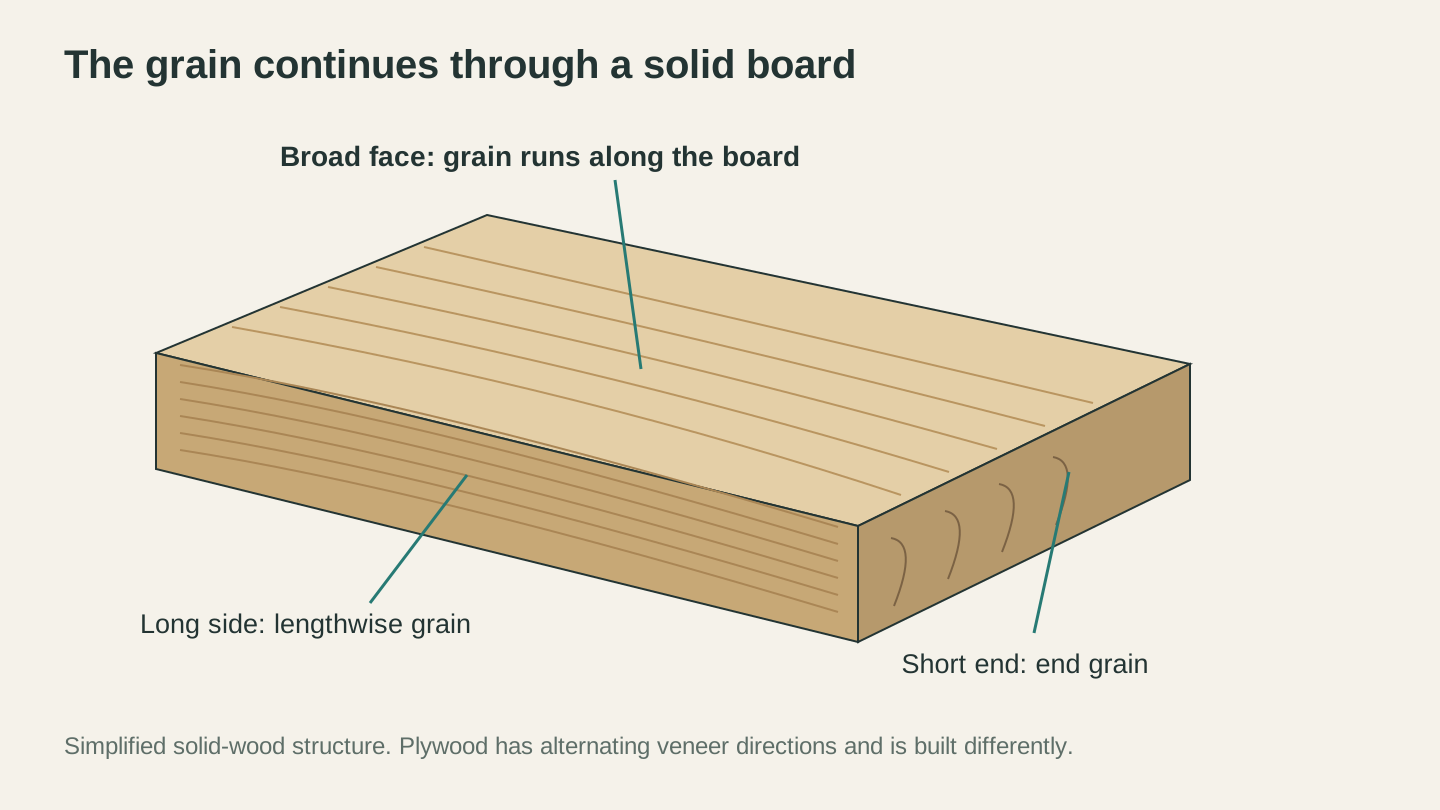
A solid board has lengthwise grain on its broad face and long side, with the ends of those fibers exposed at the short end.
Workholding by Material Type
Different materials need different hold-down strategies. This is a common source of problems, and we covered it in detail in our CNC mistakes guide, but here's a species-specific take:
Hardwoods (walnut, maple, cherry, oak): Mechanical clamps work well. The wood is hard enough to resist clamp marks with reasonable pressure. Screw-through tabs for non-visible surfaces. Double-sided tape for thin stock.
Softwoods (pine, cedar, basswood): Be gentle with clamping pressure. These species dent easily. Use distributed-pressure methods: vacuum tables, wide-jaw clamps with padding, or the painter's tape and CA glue method. Basswood in particular will show every clamp mark.
Plywood and sheet goods: The large, flat format works well with vacuum tables, distributed clamps along the edges, or screw-through mounting. For small pieces cut from a larger sheet, use tabs in the toolpath to keep cut-out parts from moving.
MDF: Screw-through mounting is fine (you can fill the holes with filler). Vacuum tables work well on sealed MDF. Clamps along the edges for larger panels. MDF is heavy, which helps it stay put, but the fine dust can reduce vacuum table effectiveness.
Common Problems by Species
Every species has its quirks. Here's a quick-reference troubleshooting chart so you know what to expect and how to fix it.
| Problem | Species Most Affected | Cause | Fix |
|---|---|---|---|
| Burning/scorch marks | Cherry, maple, pine | Bit rubbing, too slow, dull bit | Increase feed rate, reduce RPM, replace bit |
| Tearout (top surface) | Oak, ash, pine, cedar | Upcut bit pulling fibers, cross-grain cut | Use downcut or compression bit |
| Tearout (bottom surface) | Plywood, thin hardwood | Unsupported exit of bit | Use compression bit, add sacrificial spoilboard |
| Fuzzing / furry surface | Poplar, basswood, pine | Fibers bending instead of cutting, dull bit | Sharpen/replace bit, increase feed rate |
| Chipping edges | MDF, bamboo, oak | Brittle material, aggressive cut | Reduce depth per pass, use climb milling finish pass |
| Resin buildup on bit | Pine, cedar | Natural wood resins | Clean bit with resin remover, reduce RPM |
| Chattering / vibration | Maple, oak, bamboo | Too much cutting force for machine rigidity | Reduce depth per pass, reduce feed, check bit runout |
| Delamination | Plywood | Dull bit, wrong bit type | Replace bit, use compression bit |
| Inconsistent depth | Pine, cedar | Density variation (earlywood/latewood) | Accept it, or choose a more uniform species |
| Dark discoloration | White oak | Tannin reaction with iron/steel | Avoid steel clamps on visible faces |
Best Species for Specific Projects
Not sure which wood to grab for your next project? Here's a project-focused recommendation list.
Signs (Indoor)
Top choice: Walnut. Beautiful grain, clean cutting, impressive finished look.
Budget choice: Poplar (if painting) or alder (if staining). Both cut easily and take finish well.
Detail-heavy signs: Maple. When the text is small or the design is intricate, maple's tight grain holds the sharpest details.
Signs (Outdoor)
Top choice: White oak or cedar. Both are naturally moisture-resistant.
Budget choice: Pressure-treated pine, though it routes poorly. Better to use cedar and seal it well.
Always apply a UV-resistant outdoor finish. See our finishing guide for specific product recommendations.
Cutting Boards
Top choice: Hard maple. The standard for a reason. It's hard, food-safe, and durable.
Accent woods: Walnut (dark contrast), cherry (warm mid-tone), purpleheart (if you want drama).
Avoid: Open-grain species (oak, ash) because bacteria can harbor in the pores. Also avoid softwoods, which score and gouge too easily.
Multicolor Inlays
Top choice for base: Maple (light background) or walnut (dark background).
Contrast pieces: Cherry, walnut, purpleheart, yellowheart, padauk, maple. The more color variety, the more interesting the inlay.
Material: Baltic birch plywood for puzzle-style inlays. It's consistent thickness and easy to cut.
Check out our complete guide to multicolor inlays for the full workflow from image to assembled piece.
Furniture Components
Top choice: Walnut, cherry, or white oak depending on style (modern, traditional, or farmhouse respectively).
Practical choice: Poplar for painted furniture. It machines easily and takes paint well. Many professional furniture makers use poplar for painted work.
Relief Carvings and 3D Carving
Top choice: Basswood. Nothing else comes close for detailed relief carving. The fine, uniform grain lets the design speak without grain interference.
Hardwood option: Walnut for relief carvings where you want the grain to add character to the piece.
Boxes and Small Projects
Top choice: Baltic birch plywood for box joints and finger joints. The layered edge becomes a design element.
Solid wood option: Cherry or walnut for jewelry boxes and keepsake boxes. These species add perceived value.
Jigs, Fixtures, and Templates
Top choice: MDF for templates (perfectly flat, consistent, cheap). Baltic birch plywood for jigs that need strength.
Avoid: Solid wood for templates. It moves with humidity, and your template dimensions will change seasonally.
Where to Buy Quality Wood for CNC
Where you source your wood matters almost as much as what species you choose. A beautiful walnut board from a quality hardwood dealer will route differently than a discount bin special.
Hardwood Dealers
Your best source for quality hardwood lumber. They sell rough-sawn boards that need to be jointed and planed (or they'll do it for you for a fee). Wood from a hardwood dealer is typically kiln-dried, graded, and consistent. You can hand-pick boards for grain pattern, color, and straightness.
Big-Box Stores (Home Depot, Lowes)
Good for: Poplar, red oak, pine, cedar, and pre-surfaced common boards. Also the easiest source for Baltic birch plywood (often sold in 2 × 4-foot or 2 × 2-foot sheets) and MDF.
Not great for: Premium hardwoods. The selection is limited, the quality is inconsistent, and prices per board foot are higher than hardwood dealers for comparable species.
Online Lumber Retailers
Good for exotic and specialty species, small quantities of high-quality domestic hardwoods, and pre-dimensioned blanks sized for CNC projects. You pay more per board foot plus shipping, but the quality is usually excellent and the selection is vast.
Local Sawmills
If you have one nearby, a local sawmill can be the cheapest source of hardwood lumber. The catch is that the wood may not be kiln-dried, requiring you to either air-dry it yourself (months to years) or find someone with a kiln. Always check moisture content before routing mill-direct lumber.
Craft-Sized Plywood
Several online retailers specialize in pre-cut plywood sheets sized for CNC and laser machines. These come in 12"x20", 12"x24", and other convenient sizes. The premium is significant compared to buying full sheets, but the convenience is worth it if you don't have a way to break down 5 × 5-foot panels.
Tip
When buying from any source, bring a moisture meter and a straight edge. Check that the boards are under 8% moisture content and are flat (not cupped, twisted, or bowed). A crooked board that routes fine will produce a crooked project. If the board isn't flat, joint and plane it first, or skip it.
Quick Decision Flowchart
Still not sure? Start here:
"I'm a beginner and want to practice." Get poplar. It's cheap, available everywhere, and forgiving. Move to walnut or maple when you're confident.
"I want the best-looking finished piece." Walnut for dark, cherry for warm, maple for light. All three cut well and finish beautifully.
"I'm cutting shapes out of sheet material." Baltic birch plywood. It's consistent, affordable, and both faces look good.
"I'm making something painted." MDF for flat panels, poplar for dimensional pieces. Save the expensive hardwood for projects that show natural wood.
"I'm making a cutting board." Hard maple. Accept no substitutes for the primary wood. Add walnut and cherry for accent stripes.
"My machine is lightweight and I'm worried about rigidity." Basswood, poplar, or mahogany. All three are soft enough that even a budget machine produces clean results.
"I want maximum detail in V-carving." Hard maple. Nothing holds V-carve detail better. Walnut is a close second.
Final Thoughts
The best wood for your CNC project depends on three things: what you're making, what your machine can handle, and what you're willing to spend. There's no single "best" species. Walnut is premium and forgiving. Maple is precise and detailed. Baltic birch is consistent and economical. MDF is predictable and cheap. Each one is the right choice in the right context.
If you take one thing from this guide, let it be this: run a test cut on scrap before committing your good wood. Every board is slightly different, every bit wears over time, and every machine has its own personality. A two-minute test cut on a scrap piece tells you more than any chart or calculator.
Get your feeds and speeds dialed in with our feeds and speeds guide, avoid the common mistakes, and then apply a proper finish to make your project shine. The wood is only the beginning.
Ready to try these tools?
Sign up free, no credit card required. Free tools available immediately.
Start Free