

Laser Cutter vs CNC Router: Which Should You Buy?
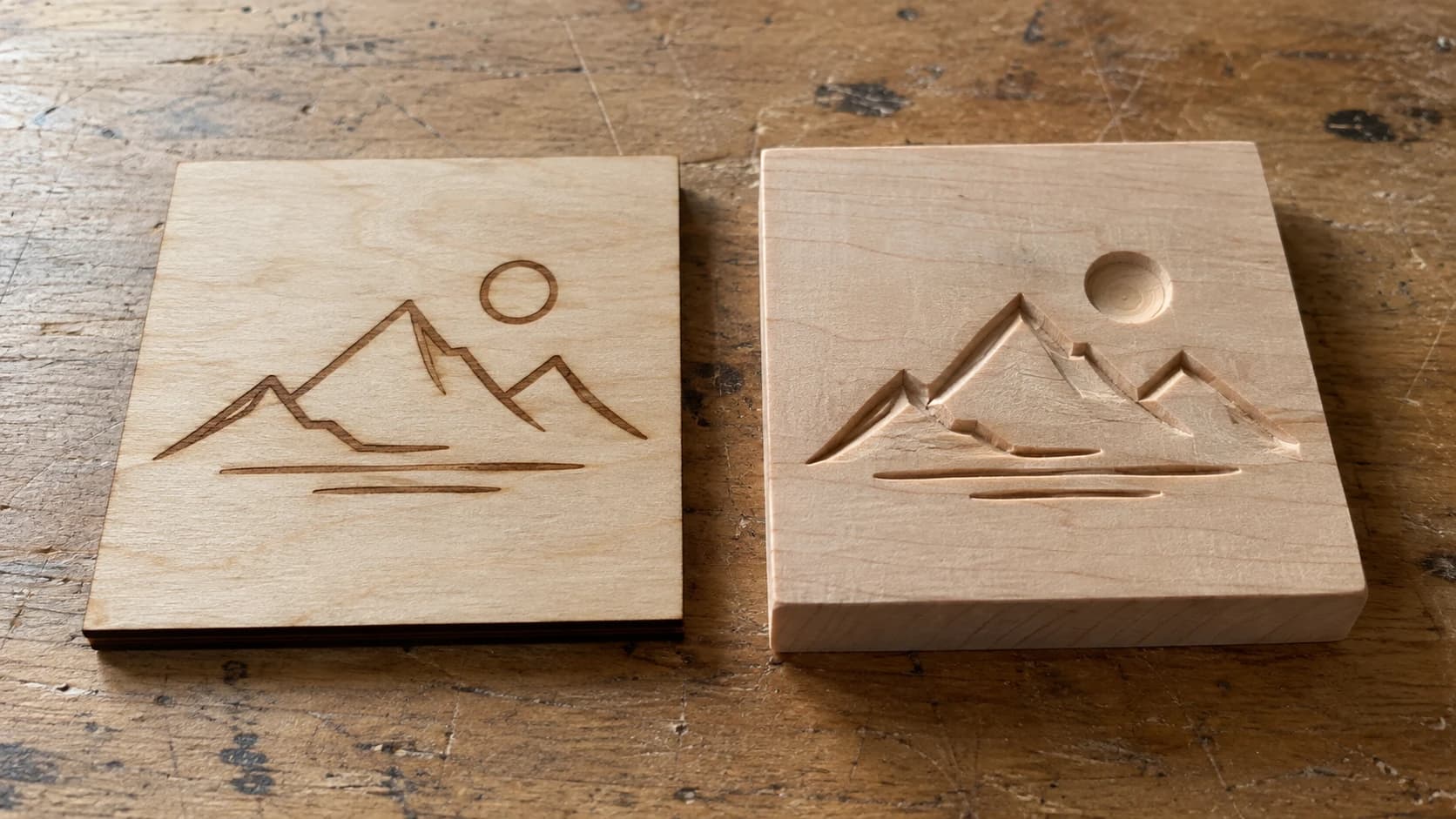
This is the question that keeps makers up at night. You've been scrolling YouTube videos of laser engravers making gorgeous photo engravings on wood, then you stumble onto a CNC router carving a 3D relief of a mountain range, and suddenly you can't decide. Both machines look incredible. Both can do things the other can't. And both cost enough money that buying the wrong one first is going to sting.
Here's the thing. There isn't a universally better machine. There's only the better machine for you, right now, based on what you actually want to make. And that's what this guide is about. Not spec-sheet comparisons. Not brand loyalty arguments. Just an honest, practical breakdown of what each machine does, what it costs, and which one deserves the first spot in your workshop.
If you've already committed to one side and just want to learn the basics, we have dedicated guides for getting started with laser engraving and getting started with CNC routing. But if you're still on the fence, keep reading.
The Real Question: What Do You Want to Make?
Before you compare specs, answer this: what project is sitting in your head right now? The one that made you start shopping for machines in the first place?
If you're picturing personalized cutting boards, engraved leather wallets, photo engravings on slate, or custom acrylic keychains, you're leaning laser. If you're imagining carved wooden signs, 3D relief art, custom furniture joinery, or aluminum parts, you're leaning CNC.
Most people have a specific project (or a category of projects) in mind. That first project matters more than any feature comparison, because it determines whether your expensive new machine collects dust or becomes the center of your creative life.
Here's a quick gut check:
You probably want a laser cutter if:
- Your projects are mostly flat or surface-level (engraving, cutting thin sheets)
- You love the look of burned/engraved wood, leather, or acrylic
- Speed matters to you (batching out products for sale)
- You want to work with fabric, paper, or leather
- You're drawn to photo engraving or detailed line art
You probably want a CNC router if:
- You want to carve into material, not just cut through it
- You need 3D dimensional projects (reliefs, bowls, topographic maps)
- You're working with thick hardwood regularly
- You want to cut aluminum or other soft metals
- You need precision joinery or mechanical parts
Don't overthink it. If you read both lists and one made you nod more, that's your answer. But if you're genuinely torn, the next eight thousand words will help you sort it out.
PRINT. CUT. CARVE.
- Multiple formats (SVG, DXF, PNG)
- Machine-tested designs
- Commercial licenses
Sponsored by PrintCutCarve.com
What Each Machine Actually Does
Let's be clear about the fundamentals before we compare.
How a Laser Cutter Works
A laser cutter focuses a beam of light (either from a CO2 tube or a semiconductor diode) onto a tiny point on your material. That concentrated energy either vaporizes the material (cutting) or discolors/ablates the surface (engraving). The beam never physically touches the material. There's no clamping, no holding force, no contact.
The two main types:
Diode lasers (5W to 20W optical power): The popular entry-level option. Brands like xTool, Atomstack, Sculpfun, and Ortur dominate here. They handle wood engraving, thin wood cutting, leather, and dark acrylic. They struggle with clear acrylic and anything thick.
CO2 lasers (40W to 100W+): More powerful, more versatile. Brands like OMTech, Monport, Glowforge, and Boss. They cut acrylic beautifully, handle thicker wood, engrave faster, and can work with glass and stone. They cost more and take up more space.
There's also fiber lasers for marking metal, but those are a different category entirely. If you want to know more about laser engraving on metal, check our metal engraving guide.
How a CNC Router Works
A CNC router uses a spinning cutting bit (like a very precise drill bit) to physically remove material. It plunges into the workpiece and carves away chips, layer by layer, following toolpaths generated by CAM software. The bit is in direct contact with the material, which means workholding (clamping the material down) is critical.
The two main categories:
Desktop CNCs (like the 3018 Pro or Genmitsu series): Small, affordable, limited. Good for learning the workflow and cutting soft materials like pine, MDF, and PCB blanks. Don't expect miracles from these.
Mid-size CNCs (like Shapeoko, X-Carve, Onefinity, Avid, LongMill): This is where most serious hobbyists end up. Work areas from 16x16 inches to 4x4 feet. They handle hardwoods, plywood, acrylic, HDPE, and aluminum. Powered by trim routers or proper spindles, these machines can actually produce professional-quality work.
The biggest conceptual difference: a laser removes material in 2D (the beam cuts all the way through or engraves the surface). A CNC removes material in 2.5D or 3D (it can carve at varying depths, creating pockets, profiles, and dimensional relief).
Head-to-Head Comparison
Here's the overview. We'll dig deeper into each category below.
| Category | Laser Cutter | CNC Router |
|---|---|---|
| Precision | Extremely high (0.1mm beam) | High (depends on bit size, typically 0.4mm+) |
| Speed | Fast for engraving and thin cuts | Slower, but removes more material per pass |
| Materials | Wood, acrylic, leather, paper, fabric, some metals (engrave only) | Wood, acrylic, HDPE, foam, aluminum, brass, hardwoods |
| Maximum thickness | 6-20mm (depends on power) | Limited only by bit length and Z travel (typically 50-75mm) |
| 3D capability | No (surface only) | Yes (2.5D pockets, 3D relief carving) |
| Noise level | Quiet (fan noise only) | Loud (router/spindle + dust collection) |
| Dust/mess | Fumes and smoke (needs ventilation) | Chips and dust (needs dust collection) |
| Clamping needed | No (material sits flat, held by gravity or pins) | Yes (clamps, screws, or tape) |
| Entry cost | $200-500 (diode), $400-2,000 (CO2) | $200-400 (desktop), $1,000-4,000 (mid-size) |
| Learning curve | Moderate | Steep |
| Software | Dedicated laser control software | CAM software (2D, 2.5D, and 3D toolpaths) |
| Maintenance | Low (clean lens, replace tube every 2-5 years for CO2) | Moderate (replace bits, belt tension, lubrication) |
Materials: What Can You Actually Work With?
This is where the decision gets real. The material you want to use most often should drive your choice.
Wood
Both machines work with wood, but they do completely different things to it.
Laser: Engraves beautifully. Burns images, text, and patterns into the surface with incredible detail. Cuts thin stock (3mm to 12mm depending on power). Leaves a dark, charred edge on cuts that some people love and others sand off. Can't carve into wood with any meaningful depth. For deep exploration of wood and laser settings, see our best wood for laser engraving guide.
CNC: Carves into wood at any depth. Creates pockets, profiles, V-carved lettering, and 3D relief sculptures. Handles thick hardwood stock with ease. Can cut full-size sheet goods on larger machines. Doesn't create the same burned aesthetic that lasers produce. Leaves tooling marks that need sanding for a clean finish.
Verdict: If you want surface decoration on wood (engraving photos, detailed patterns), get a laser. If you want dimensional carving, joinery, or to work with thick stock, get a CNC. If you want signs with carved lettering, either works, but a CNC with a V-bit produces deeper, more traditional-looking results.
Acrylic
This is one of the most popular materials for both machines, but they handle it very differently.
Laser: CO2 lasers cut acrylic like a dream. The edges come out flame-polished and crystal clear. It's genuinely one of the most satisfying things you can do with a laser. Diode lasers, however, struggle with clear acrylic (the beam passes right through it). If acrylic is your main material, you want a CO2 laser. Our acrylic cutting guide covers the details.
CNC: Cuts acrylic well, but the edges are matte and require polishing for a clear finish. Can do things lasers can't, like creating pocketed acrylic enclosures or milling thick acrylic blocks. No fumes from cutting (just chips), which is a safety advantage.
Verdict: For acrylic cutting with beautiful edges, CO2 laser wins hands down. For thick acrylic machining or pocketed designs, CNC is the only option.
Metal
Neither machine is a metalworking powerhouse, but they each have their niche.
Laser: Diode lasers can mark anodized aluminum, painted metals, and stainless steel with marking compounds like CerMark. They can't cut metal. CO2 lasers can't do much with metal at all. Fiber lasers are the real metal markers, but they're a separate (expensive) category. We cover the options in our laser engraving metal guide.
CNC: Mid-size CNC routers can cut aluminum and brass with the right feeds, speeds, and tooling. It's slower than cutting wood and requires more careful setup, but the results are real functional metal parts. Desktop CNCs can technically cut aluminum, but it's a frustrating experience. Our feeds and speeds guide covers the specifics.
Verdict: If you need to cut metal parts, CNC router (for aluminum and brass). If you need to mark metal surfaces, laser with the right setup. Neither replaces a mill for serious metalwork.
Leather
Laser: Excellent. Laser engraving on leather produces beautiful results with incredible detail. You can engrave patterns, logos, text, and photos. Cutting leather with a laser gives clean, sealed edges that don't fray. One of the top materials for laser-based businesses. Check out our leather engraving guide for settings and tips.
CNC: Not really a thing. You can technically cut leather with a drag knife attachment on some CNC machines, but it's not what they're designed for. Engraving leather on a CNC doesn't work well since the bit tears the material rather than burning a clean mark.
Verdict: Laser wins completely for leather work.
Fabric and Paper
Laser: Perfect for cutting fabric and paper. Clean cuts, sealed edges (on synthetics), no fraying, incredible precision. Quilters, cosplayers, and paper crafters love laser cutters for this reason.
CNC: A drag knife on a CNC can cut fabric and paper, but a dedicated cutting machine (Cricut or Silhouette) does this better and cheaper. A CNC router with a spinning bit would shred fabric.
Verdict: Laser for precision cutting and engraving. If you only need to cut fabric and paper, a cutting machine is more practical than either option. See our cutting machine beginner's guide for that route.
Foam (EVA, XPS, EPS)
Laser: Can cut EVA foam (popular for cosplay armor), but it melts more than cuts. XPS and EPS foam cut reasonably well. The fumes from cutting foam can be problematic.
CNC: Excellent for foam carving. Large CNC routers are the tool of choice for making molds, patterns, and dimensional signs from high-density foam. Cosplay props, architectural models, and packaging inserts are all CNC-from-foam territory.
Verdict: CNC router is better for foam work, especially anything dimensional. Laser works for thin flat foam cutting.
Stone, Tile, and Glass
Laser: CO2 lasers can engrave stone, tile, and glass surfaces. The laser fractures the surface to create a frosted mark. It can't cut these materials. Results on natural stone vary widely depending on the stone type. We cover this in our glass and stone engraving guide.
CNC: With diamond-tipped bits and water cooling, CNC machines can cut and engrave stone and tile. It's a specialized setup, and it's messy (think water and stone dust everywhere), but it produces results a laser can't match for depth and precision.
Verdict: Laser for surface engraving on stone and glass. CNC for cutting stone and tile (with specialized tooling).
2D vs 2.5D vs 3D: The Dimension Gap
This is one of the most important differences between the two machines, and it doesn't get talked about enough.
What a Laser Can Do (2D)
A laser works in two dimensions. It can move in X and Y across the surface of a material, and it controls the intensity of the beam (power and speed), but it doesn't control depth in a meaningful way. When you engrave, you're removing or discoloring a thin surface layer. When you cut, you're going all the way through.
This means a laser excels at:
- Cutting flat shapes from sheet material
- Surface engraving (text, images, patterns)
- Photo engraving (varying the burn intensity to create grayscale images)
- Scoring fold lines
And it fundamentally cannot:
- Carve a pocket to a specific depth
- Create a bowl shape
- Mill a 3D relief
- Cut joinery (tenons, dovetails, box joints)
- Make parts with varying thicknesses
What a CNC Router Can Do (2.5D and 3D)
A CNC router works in three axes: X, Y, and Z. The Z-axis controls how deep the bit plunges into the material. This opens up an entirely different category of projects.
2.5D operations (most common for hobbyists):
- V-carving: The V-shaped bit plunges deeper in wide areas and shallower in narrow areas, creating beautiful lettering and designs with natural depth variation
- Pocketing: Removing a defined area to a specific depth (like carving a recess for an inlay)
- Profiling: Cutting all the way through material along a path
- Chamfering and beveling: Cutting angled edges
Full 3D operations (advanced but incredible):
- Relief carving: Translating a 3D model (like a topographic map or a portrait) into carved wood using a ball-nose bit that follows the contours
- Mold making: Cutting negative molds for casting resin, concrete, or plaster
- Sculptural work: Carving figurines, decorative panels, and dimensional art
If you're interested in 3D relief work, Craftgineer's ReliefMaker can convert photos to depth maps that work with CNC carving software. It takes the hardest part (creating the 3D model) and handles it with AI.
Info
A laser works like a printer: it creates images and cuts outlines on flat surfaces. A CNC router works like a sculptor: it carves away material to create depth and dimension. Neither approach is superior. They solve different problems.
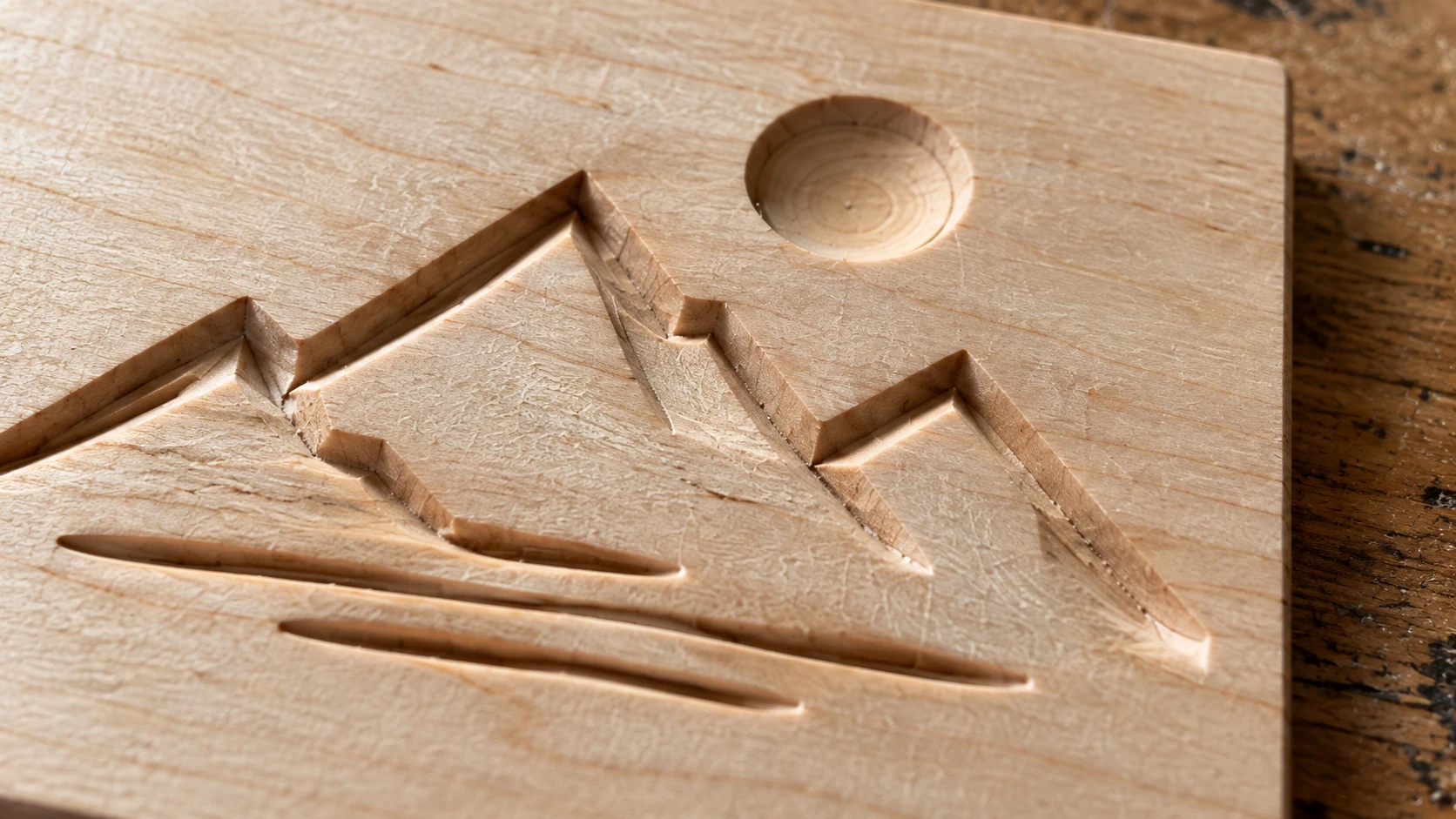
The same maple plaque up close shows the recessed geometry and surface texture. It illustrates a carved result; it is not a measured comparison of machine speed or accuracy.
The "Good Enough" Factor
Here's something experienced makers know: you can often approximate 3D effects with a laser using layered cutouts. Cut multiple layers of material, stack and glue them, and you get a quasi-3D result. It's not the same as a carved relief, but for certain projects (topographic maps, layered wall art, stacked signs) it looks great and is much faster.
Craftgineer's StackLab is built specifically for this. It takes an image and separates it into stacking layers, where each layer builds on the ones above it. You cut flat pieces and stack them for a dimensional effect. It bridges the gap between laser and CNC when you want depth but don't want to (or can't) carve.
For true inlay work where different colors of material fit together in a single plane, MosaicFlow handles the color separation. Read more about that workflow in our multicolor wood inlay guide.
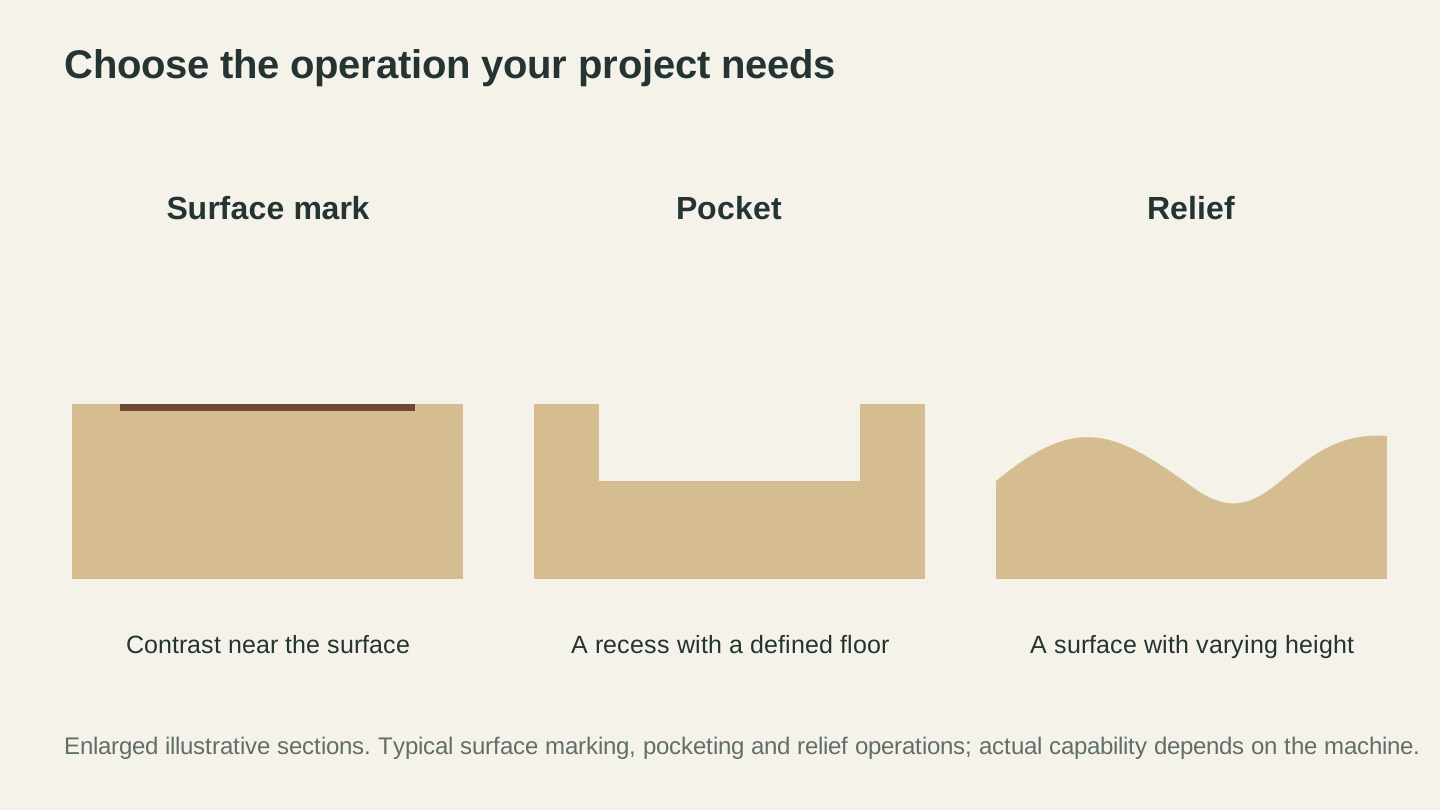
Start with the operation the project needs. These sections make the difference in geometry visible without treating every laser or router as having identical capabilities.
Speed and Throughput
If you're making products to sell, speed matters. If you're making things for fun, it matters less. But either way, understanding how each machine uses time helps set expectations.
Laser Speed
Lasers are fast. Really fast. A typical photo engraving on a 5x7 inch piece of wood takes 15 to 30 minutes on a diode laser and 5 to 15 minutes on a CO2 laser. Cutting a simple shape from 3mm plywood takes seconds. A batch of 20 keychains might take 30 minutes including engraving and cutting.
The speed scales well for production. Because there's no clamping, you can lay out a sheet of material, fill it with designs, and let the laser run. When it's done, you pull off the parts and load another sheet. Some makers run their lasers for hours on production days, batching out hundreds of pieces.
Engraving speed depends on the resolution and area. A high-resolution photo engrave takes longer than a simple logo because the laser makes more passes. But even detailed work is measured in minutes, not hours.
CNC Speed
CNC routing is slower per piece, and there's no getting around it. The bit physically removes material chip by chip, pass by pass. A V-carved wooden sign that takes 30 seconds to engrave on a laser might take 20 to 40 minutes on a CNC. A 3D relief carve can run for 2 to 6 hours.
But there's a tradeoff: each CNC piece has more depth and dimension, which often translates to higher perceived value (and higher prices if you're selling). A laser-engraved sign is flat. A CNC-carved sign has real depth you can feel with your fingers. Customers notice the difference.
CNC setup time is also significant. You need to clamp your workpiece, set your zero point, load the toolpath, and often do a test cut. With a laser, you drop material on the bed and go. That setup overhead means CNC is less efficient for small batches but comparable for large runs once everything is dialed in.
Tip
For production work, many makers use both machines together. The laser handles fast, repetitive tasks like keychains and coasters. The CNC handles premium, high-value items like carved signs and 3D art. This combination maximizes throughput and revenue per hour.
Realistic Time Estimates
| Project | Laser Time | CNC Time |
|---|---|---|
| Engraved keychain (both sides) | 2-5 minutes | N/A (would use V-carve, 10-15 min) |
| Cut acrylic earring pair | 30 seconds | 3-5 minutes |
| 12x18" carved wooden sign | 15-30 min (engrave only) | 45-90 min (V-carve with depth) |
| Photo on 8x10" wood plaque | 20-40 min | N/A (laser is the right tool here) |
| 3D relief mountain scene 12x12" | N/A (can't do 3D relief) | 2-5 hours |
| Batch of 50 coasters | 60-90 min | 3-4 hours |
| Custom cutting board (inlay) | Cut pieces: 20 min | Cut pockets + pieces: 60-90 min |
Safety and Workspace Requirements
Both machines need dedicated space and safety planning. If you haven't set up your workshop yet, our workshop setup guide covers the full picture. Here's the machine-specific safety comparison.
Laser Safety
Primary hazards: Eye damage from the beam, fire from flammable materials, toxic fumes from certain materials.
Eye protection: Essential. Laser safety glasses matched to your wavelength. A diode laser at 445nm is visible blue light and can cause instant, permanent blindness. CO2 lasers at 10,600nm are invisible, which is arguably scarier. Most CO2 lasers are enclosed, which helps. Most diode lasers are open-frame, which means discipline with glasses is critical.
Fire risk: Real and ever-present. Certain materials (particularly thin wood, paper, and fabric) can flame up during cutting. Never leave a running laser unattended. Keep a fire extinguisher within arm's reach. A CO2 laser with an enclosed bed is safer than an open-frame diode laser for fire containment, but neither is fire-proof.
Ventilation: Non-negotiable. Laser cutting and engraving produce smoke, particulates, and VOCs. Even "safe" materials like wood produce carbon monoxide and fine particulates. You need active ventilation pulling fumes away from you and out of the building. An inline fan, ductwork, and ideally a carbon filter for odor control. Read about common ventilation mistakes in our laser engraving mistakes guide.
Warning
Never laser PVC, vinyl, or ABS plastic. They release chlorine gas (from PVC/vinyl) or hydrogen cyanide (from ABS), which are toxic to you and corrosive to your machine. If you don't know what a material is made of, don't laser it.
Space requirements: A diode laser on a table needs about 3x3 feet of dedicated space plus room for the exhaust setup. A CO2 laser like a Glowforge or OMTech needs 3x4 feet minimum. Add 2 to 3 feet around the machine for access.
CNC Safety
Primary hazards: Projectiles (broken bits, thrown workpieces), loud noise, dust inhalation, entanglement.
Eye protection: Safety glasses rated for impact. Bits break. Wood chips fly. End mills can shatter and send fragments across the room. This isn't theoretical. It happens.
Hearing protection: CNC routers are loud. A trim router spindle runs at 10,000 to 30,000 RPM and sounds like a dentist's drill with a megaphone. Sustained exposure causes hearing damage. Wear earplugs or over-ear muffs every time. If you live with other people, plan for noise isolation.
Dust collection: Mandatory. CNC routing produces enormous amounts of dust and chips. Hardwood dust is a respiratory irritant. MDF dust contains formaldehyde and is a known carcinogen with repeated exposure. At minimum, use a shop vac with a dust shoe attached to the spindle. Ideally, a proper dust collector with a cyclone separator. Even with collection running, wear an N95 mask. Common CNC routing mistakes include skipping dust collection.
Workholding: The workpiece must be securely fastened. Unlike a laser where material just sits on the bed, a CNC bit exerts lateral force on the workpiece. If it comes loose mid-cut, it becomes a projectile. Clamps, screws into a wasteboard, or strong double-sided tape are your options. Each has tradeoffs.
Space requirements: A desktop CNC needs 3x3 feet of table space. A Shapeoko-class machine needs 3x4 feet minimum, plus clearance on all sides for access and material loading. And you need somewhere for the dust collector, which is roughly the size of a trash can.
Safety Comparison Summary
| Safety Factor | Laser Cutter | CNC Router |
|---|---|---|
| Eye risk | High (laser blindness) | Moderate (flying debris) |
| Fire risk | High (open flame possible) | Low |
| Respiratory risk | Moderate (fumes, ventilation solves it) | High (fine dust, ongoing) |
| Noise | Low (fan noise) | High (spindle + vacuum) |
| Entanglement risk | None | Moderate (spinning bit, loose clothing) |
| Material projectile risk | None | Moderate (workpiece can come loose) |
| PPE required | Laser glasses, ventilation | Safety glasses, hearing protection, dust mask |
Software and Learning Curve
This is where CNC routers have a reputation problem. The learning curve is real, and it scares people away. Lasers are more approachable, but they have their own complexities once you move beyond basics.
Laser Software Workflow
The laser workflow is relatively linear: create or import a design, set your power and speed, hit start.
Design phase: Import or create an SVG (for cutting) or a PNG/JPG (for engraving). Any vector editor, free or paid, works. For quick vector designs, Craftgineer's Vector Studio lets you describe a design in words and get a machine-ready SVG. For converting photos to laser-ready art, Photo Converter handles the transformation.
Machine control: Dedicated laser control software (paid options run around $60, with free alternatives for GRBL-based machines) handles design import, layer assignment (cut vs engrave), power/speed settings, and sending to the machine. If you need one, Beam Bench is a free option. Glowforge uses its own cloud-based app.
Learning curve: Moderate. The biggest learning challenge is dialing in power and speed settings for different materials. This is mostly trial and error with some guidance from material libraries. Within a weekend, most people can produce decent engravings. Within a month, most people feel comfortable with their machine.
CNC Software Workflow
CNC has an extra step that lasers don't: CAM (Computer-Aided Manufacturing). This is where you tell the software how to cut your design, including which bits to use, how deep to cut, how fast, and in what order.
Design phase (CAD): Same as laser. Create or import vector designs. For 3D work, you need a 3D model (STL or similar). Several free CAD/CAM packages (free for personal use) handle both 2D and 3D design.
Toolpath phase (CAM): This is the extra step. You select your bit, define the cut type (pocket, profile, V-carve, 3D roughing, 3D finishing), set feeds and speeds, and generate toolpaths. Each operation becomes a set of instructions telling the machine exactly how to move. Our feeds and speeds guide helps demystify this step.
CAM software generally falls into a few tiers:
- Free, beginner-focused options: Clean and simple, often built for a specific desktop machine but usable more broadly. A great starting point.
- Free, web-based options: Very beginner-friendly but limited for advanced work.
- Paid desktop software ($350-$700): The hobbyist standard. Handles 2D, 2.5D, and V-carving beautifully.
- Combined CAD/CAM packages (free for personal use): Full 3D design and toolpath generation in one package. Steep learning curve, but incredibly capable.
- Subscription options (~$15/month): Strong 3D relief toolpath generation.
Machine control: Most machines use a dedicated controller application. This receives the G-code file from your CAM software and runs the machine.
Learning curve: Steep. There's no sugarcoating this. Understanding bit selection, feeds and speeds, workholding, toolpath strategies, and G-code takes time. The first month with a CNC involves more learning than making. By month three, most people hit their stride. By month six, they wonder why they were ever intimidated.
Info
The CNC learning curve is front-loaded. It's steep at the start, but once you understand feeds, speeds, and toolpaths, the knowledge transfers to every project. With a laser, the learning curve is shallower but more gradual. You keep discovering new material quirks and optimization tricks over time.
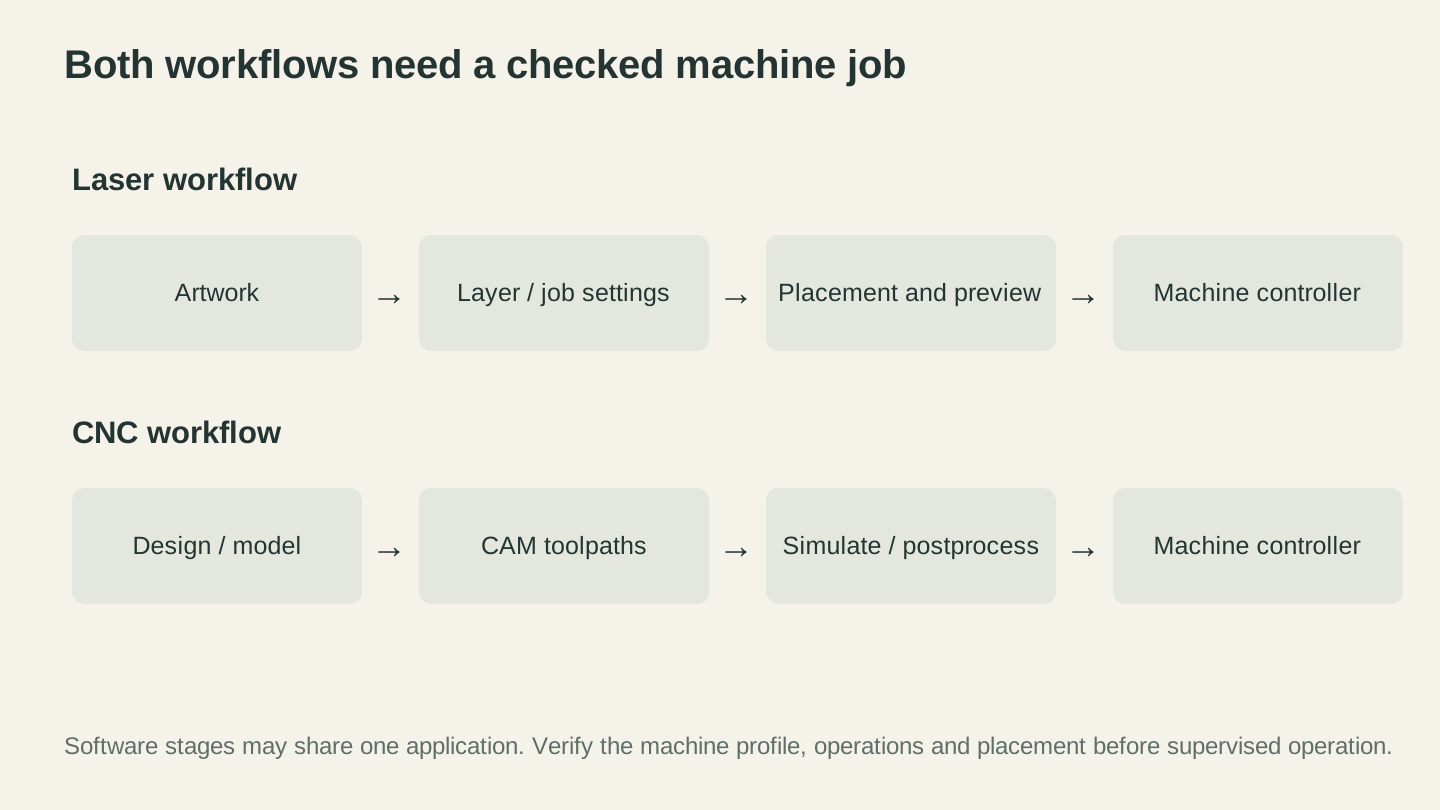
Both routes need a checked machine job. CNC adds toolpath and postprocessor choices; the individual stages may be handled within one application.
File Formats
Both machines work with standard file formats, but there are some differences worth knowing. Our file format guide for makers covers this in depth. The short version:
| Format | Laser Use | CNC Use |
|---|---|---|
| SVG | Primary for cut lines and vector engraving | Design import for 2D/2.5D toolpaths |
| DXF | Some controllers prefer this over SVG | Common for CAM import |
| PNG/JPG | Photo engraving (raster) | Limited use (3D relief from heightmaps) |
| STL | Not used | 3D relief carving models |
| G-code | Machine control (generated by software) | Machine control (generated by CAM) |
If you need to convert between formats, Craftgineer's File Converter handles SVG to DXF, image format conversions, and 3D model conversions. Read more about that in our SVG to DXF conversion guide.
Cost Comparison
Let's talk money. Not just the sticker price, but the real total cost of getting into each hobby.
Machine Cost
| Category | Laser Cutter | CNC Router |
|---|---|---|
| Entry level | $200-500 (diode laser) | $200-400 (3018-style desktop) |
| Capable hobbyist | $400-1,000 (40W CO2 or 20W diode) | $1,000-2,500 (Shapeoko, X-Carve, LongMill) |
| Serious maker | $1,000-3,000 (60W+ CO2) | $2,500-5,000 (Onefinity, Avid, Shapeoko 5 Pro) |
| Pro/small business | $3,000-10,000 (large format CO2) | $5,000-15,000+ (full 4x8 with spindle) |
Lasers generally have a lower entry point for a capable machine. A $500 diode laser or a $400 OMTech 40W CO2 can produce real, sellable work. Getting a CNC router that's rigid enough for good results typically means spending $1,000+.
Accessories and Upgrades
This is where the hidden costs live.
Laser accessories:
- Rotary attachment for tumblers/cups: $80-200
- Air assist (may be included): $30-80
- Honeycomb bed: $40-100
- Exhaust fan and ductwork: $50-150
- Spare lens set: $10-30
- Replacement CO2 tube (every 2-5 years): $80-200
CNC accessories:
- Bit set (starter kit): $40-100
- Dust shoe: $30-80 (may be included)
- Shop vac or dust collector: $80-300
- Wasteboard and clamps: $50-100
- Touch probe for zeroing: $40-80
- Upgraded spindle (from trim router): $200-600
- Surfacing bit: $20-50
Both machines benefit from accessories, but CNC tends to have higher accessory costs. The dust collection system alone can cost as much as a decent diode laser.
Consumables and Ongoing Costs
Laser consumables:
- Materials (wood, acrylic, leather): Variable
- CO2 tube replacement: $80-200 every 2,000-8,000 hours
- Lens cleaning supplies: $10/year
- Diode module replacement (eventually): $100-300
CNC consumables:
- Materials (wood, acrylic, foam): Variable
- End mills (they wear out and break): $5-30 each, budget $100-200/year for active use
- V-bits (last longer than end mills): $10-40 each
- Wasteboard material: $20-50/year
- Belts and bearings (occasional): $20-50
The big ongoing cost difference: CNC bits wear out and break. If you're cutting hardwood regularly, you'll go through a few end mills per month. Laser consumables are minimal by comparison. CO2 tubes last years, and diode modules last even longer.
Total First-Year Cost Estimates
| Level | Laser First Year | CNC First Year |
|---|---|---|
| Budget hobbyist | $300-600 | $400-700 |
| Capable setup | $700-1,400 | $1,500-3,000 |
| Serious maker | $1,500-3,500 | $3,000-6,000 |
Tip
Don't buy the cheapest machine you can find. The frustration of a machine that can't hold accuracy or power through a cut will cost you more in wasted material, time, and motivation than the savings on the purchase price. Buy the best machine you can reasonably afford in your target category.
Noise and Mess: Living with Your Machine
This matters more than people think, especially if your workshop shares walls with living space.
Noise
Laser cutter: Quiet. The loudest component is the exhaust fan, which sounds like a bathroom vent fan on steroids. A CO2 laser's water pump adds a low hum. During operation, you might hear a faint crackling from the material being cut. Your family can sleep through a laser engraving session if the fan isn't too loud. Total noise level: 40-60 dB, roughly equivalent to a conversation or a dishwasher.
CNC router: Loud. A trim router spindle at cutting speed produces 80-95 dB. That's somewhere between a food blender and a motorcycle. Add the shop vac for dust collection and you're in "I can't hear you even if you're standing next to me" territory. Your neighbors will know you're cutting. If you're in an apartment or townhouse, this might be a dealbreaker. Proper spindles (as opposed to trim routers) are quieter (65-75 dB), but they cost $300-600 more.
Mess
Laser cutter: The mess is invisible but present. Smoke, particulates, and a persistent smell. With proper ventilation, you won't see or smell anything in your workspace. Without it, everything in the room gets a thin film of smoky residue. The laser bed accumulates debris (soot, small cut-offs) that needs periodic cleaning. Overall, it's a clean operation if your ventilation is set up properly.
CNC router: The mess is very visible and very everywhere. Wood chips, sawdust, and fine powder. Even with a dust shoe and shop vac, some dust escapes. After a cutting session, there's a cleanup required. MDF is the worst offender, producing a fine powder that gets into everything. Hardwood produces nice chips that are easier to collect. If you're running a CNC in a garage, expect sawdust on your car.
| Factor | Laser | CNC |
|---|---|---|
| Noise during operation | 40-60 dB (quiet) | 80-95 dB (loud) |
| Dust/debris | Smoke and soot (ventilated away) | Chips and fine dust (everywhere) |
| Smell | Burning material (ventilated away) | Sawdust (pleasant, actually) |
| Cleanup time | 5 min (wipe down bed) | 15-30 min (vacuuming workspace) |
| Can you run it at night? | Yes, with proper ventilation | Not without angering everyone nearby |
| Indoor-friendly? | Yes, with exhaust venting outside | Possible, but dust collection is critical |
Business Potential: Which Makes More Money?
If you're thinking about selling what you make, both machines can generate income. But they serve different markets and price points.
Laser Cutter Business Potential
Best-selling laser products:
- Personalized gifts (cutting boards, ornaments, keychains)
- Wedding items (invitations, cake toppers, table numbers)
- Custom leather goods (wallets, journal covers, patches)
- Acrylic products (earrings, keychains, signs, cake toppers)
- Custom tumblers (with rotary attachment)
- Photo engravings on wood or slate
Price range: Most laser products sell for $10-60. Premium items (large signs, leather goods) can reach $100+.
Production speed advantage: Lasers excel at batch production. You can engrave and cut dozens of keychains in under an hour. For high-volume, lower-priced items, the speed is a massive advantage.
Platform fit: Laser products dominate Etsy. The personalization trend (names, dates, custom text) is perfectly suited to laser work because changing text between cuts takes seconds. If you're interested in selling on Etsy, our Etsy selling guide covers the business side, and ListingLab can generate optimized product listings.
CNC Router Business Potential
Best-selling CNC products:
- Carved wooden signs (address signs, welcome signs, business signs)
- 3D wall art (topographic maps, city maps, mountain scenes)
- Custom cutting boards with juice grooves and inlays
- Furniture components and custom joinery
- Epoxy river tables and serving boards
- CNC-carved plaques and awards
- Architectural elements (corbels, rosettes, moldings)
Price range: CNC products typically sell for $50-500+. Large carved signs and 3D art can sell for $200-1,000+.
Premium pricing advantage: The dimensional quality of CNC work commands higher prices. A laser-engraved sign might sell for $30. A V-carved wooden sign with the same design might sell for $100-200. Customers pay more for depth and perceived craftsmanship.
Market position: CNC products compete less on volume and more on value. You're making fewer pieces at higher margins. This works well for makers who prefer quality over quantity.
Revenue Comparison
| Factor | Laser Business | CNC Business |
|---|---|---|
| Average product price | $15-60 | $75-300 |
| Production time per item | 5-30 minutes | 30 minutes to 4 hours |
| Batch efficiency | Excellent | Moderate |
| Revenue per hour (established) | $30-80/hr | $30-100/hr |
| Startup investment | Lower | Higher |
| Personalization ease | Very easy (change text, run again) | Moderate (re-generate toolpath) |
| Competition level | High (many sellers) | Moderate (higher barrier to entry) |
| Customer repeat rate | Moderate | High (custom/one-off orders) |
The surprising takeaway: revenue per hour is similar for both machines once you're established. Lasers make it up in volume. CNCs make it up in per-item margin. The best strategy depends on whether you prefer making many things quickly or fewer things at higher value.
For tips on pricing your products regardless of which machine you use, check our pricing guide for handmade products.
Can You Use Both? The Two-Machine Workshop
Here's the dirty secret of the laser vs. CNC debate: the answer, eventually, is both. Talk to makers who've been at it for a few years and most of them own (or want) both machines. They complement each other beautifully.
How They Work Together
CNC carves, laser details. Carve a wooden sign on the CNC with deep V-carved lettering, then engrave a detailed logo or photo in the center with the laser. The depth of the carving plus the precision of the engraving creates something neither machine could do alone.
CNC shapes, laser marks. Cut a custom wooden box on the CNC (with joinery that actually fits), then engrave a personalized design on the lid with the laser.
Laser cuts, CNC carves. Laser-cut thin acrylic or wood pieces for a layered project, then CNC-carve a frame or base with dimensional detail.
Separate production lanes. Run your CNC on a long carve while you batch out laser-engraved keychains on the laser. Two machines means two income streams running simultaneously.
Practical Considerations
If you're planning a two-machine workshop:
Space: You need room for both machines plus their respective support equipment (ventilation for the laser, dust collection for the CNC). A minimum of 10x12 feet for a comfortable two-machine setup. Our workshop setup guide has detailed layout recommendations.
Power: Both machines can run on standard 15-20 amp household circuits, but not usually on the same circuit. The CNC's router/spindle plus dust collector draws significant current. Plan for two separate circuits.
Budget: If you're buying both, consider starting with the one that matches your most immediate projects and adding the second 6-12 months later. This spreads the cost and gives you time to learn one machine before adding the complexity of another.
Which first? If you're planning to get both eventually, start with the laser. Here's why: the learning curve is shorter, the initial investment is lower, and you can start producing sellable items faster. Once you're comfortable (and earning some money to offset costs), add the CNC. You'll approach the CNC with better spatial reasoning and design skills from your laser experience.
Tip
Many successful maker businesses run a laser for high-volume personalized items (the bread and butter) and a CNC for premium custom pieces (the high-margin specials). The laser pays the bills while the CNC handles the exciting custom work.
Decision Framework: Pick Based on Your Projects
Let's make this concrete. Here's a decision table based on what you want to make. Find the row that matches your primary interest.
| What You Want to Make | Best Machine | Why |
|---|---|---|
| Personalized gifts (keychains, ornaments, etc.) | Laser | Fast production, easy text customization |
| Photo engravings on wood | Laser | Only option for photographic detail |
| Acrylic earrings and jewelry | Laser (CO2) | Clean flame-polished edges |
| Leather goods (wallets, patches, journal covers) | Laser | Clean engraving and cutting, sealed edges |
| Wooden signs with deep carved lettering | CNC | V-carving creates real depth |
| 3D relief art (topographic maps, portraits) | CNC | Only option for dimensional carving |
| Cutting boards with juice grooves | CNC | Requires pocketing and profiling |
| Furniture and joinery | CNC | Only option for structural joinery |
| Aluminum parts | CNC | Only option for cutting metal |
| Custom tumblers and drinkware | Laser (with rotary) | Surface engraving on cylinders |
| Fabric cutting (cosplay, quilting) | Laser | Clean cuts, sealed edges on synthetics |
| Etsy business (volume products) | Laser | Faster production, lower entry cost |
| Custom high-end commissions | CNC | Higher per-item value, dimensional work |
| Inlays (multicolor designs) | Either (both work) | Laser cuts inlay pieces; CNC cuts pockets |
| Stacked layer art | Laser | Cuts thin layers for stacking |
| Signs for businesses | CNC | Clients expect dimensional carved signs |
| Molds (for resin, concrete) | CNC | Requires 3D pocketing |
| PCB prototyping | CNC (desktop) | Isolation routing on copper-clad board |
| Decorative scrollwork | Laser | Fast, intricate pattern cutting and engraving |
The Flowchart Version
Still undecided? Walk through these questions:
-
Do you need to carve into material (not just through it)? If yes, get a CNC. Lasers can't create depth.
-
Is acrylic a primary material? If yes, get a CO2 laser. The edge quality is unmatched.
-
Do you want to engrave photos on wood/leather/stone? If yes, get a laser. Photo engraving is a laser-exclusive skill.
-
Do you need to cut aluminum or other metals? If yes, get a CNC router. Lasers can't cut metal (without fiber).
-
Is production speed critical? If yes and your products are flat/surface-level, get a laser. If your products require depth, a CNC is your only option regardless of speed preference.
-
Do you have noise restrictions? If yes, get a laser. CNCs are loud.
-
Is your budget under $500 for the machine? If yes, a diode laser gives you the most capability per dollar in that range. Desktop CNCs at that price are very limited.
-
Do you plan to sell products? Both work. Laser for volume. CNC for premium. See the business section above.
If you answered "yes" to questions 1 or 4 and "no" to 2, 3, 5, and 6, you want a CNC. If the opposite, you want a laser. If you answered "yes" to a mix from both sides, you want both (and you should buy the laser first).
Recommendations by Use Case
Let's get specific. Here are concrete recommendations based on common starting points.
"I want to make personalized gifts to sell on Etsy"
Get a laser cutter. Specifically, a 10-20W diode laser in the $300-600 range (xTool D1 Pro, Atomstack X30 Pro) or a 40-60W CO2 laser in the $400-1,000 range (OMTech 40W, Monport 60W) if you also want clean acrylic cutting.
Why: Personalized gifts are volume products. You need to produce them fast and change text between runs. A laser does this better than anything else. Start with wood and leather, add acrylic once you're comfortable. Use Vector Studio to generate designs quickly and MonoTrace to convert images to clean vectors.
"I want to make carved signs and 3D art"
Get a CNC router. A Shapeoko, X-Carve, or LongMill in the $1,000-2,500 range. Make sure it has enough work area for the sign sizes you want (most sign customers want at least 12x24 inches).
Why: The dimensional quality of V-carved and 3D-carved signs is what customers pay premium prices for. This can't be replicated on a laser. Learn V-carving first (it's the most forgiving CNC operation), then work up to 3D relief carving. For 3D relief projects, ReliefMaker can generate depth maps from photos.
"I want to make custom cutting boards"
Get a CNC router. Cutting boards need juice grooves (routed channels), precise profiling, and sometimes inlay pockets. These are CNC operations.
Why: While you could laser-engrave a design on a cutting board (and many people do), the real value in custom cutting boards comes from the woodworking: end-grain patterns, juice grooves, and inlaid designs. A CNC handles all of this. Add a laser later for surface personalization.
"I'm into cosplay and prop making"
Get a laser cutter. Cutting EVA foam, leather, and fabric for costume pieces is laser territory.
Why: Cosplay involves a lot of flat pattern cutting from flexible materials. Lasers cut fabric and thin foam cleanly. A CNC can help with rigid prop components (carved wood or foam), but most cosplayers get more mileage from a laser.
"I want to do a little of everything"
Get a laser cutter first. You'll be able to engrave, cut thin materials, and start selling products faster. Add a CNC 6-12 months later when you know what dimensional projects you want to tackle.
Why: The laser's shorter learning curve and broader material compatibility (especially with soft/flexible materials) makes it the better first machine. Once you understand design workflow, material behavior, and file preparation on the laser, transitioning to CNC is easier because the fundamental concepts overlap.
"I have a generous budget and want the best setup"
Get both. A 60W+ CO2 laser and a mid-size CNC router with a proper spindle. Set them up in separate zones in your workshop with dedicated ventilation and dust collection. Run them simultaneously when production demands it.
Why: The two-machine combo is the endgame for most serious makers. The laser handles speed and detail. The CNC handles depth and dimension. Together, they cover virtually every project type.
Software That Works for Both
Regardless of which machine you choose, you'll need design files. Craftgineer's tools work with both laser cutters and CNC routers:
- Vector Studio: Describe a design in words, get a machine-ready SVG. Works for both laser cutting/engraving and CNC V-carving.
- MosaicFlow: Turn any image into color-separated SVG layers for inlay projects on either machine.
- StackLab: Create stacking layer designs from images. Cut the layers on a laser, stack them for a 3D effect.
- MonoTrace: Convert photos and graphics to clean vector SVGs. Free, no credits needed.
- Photo Converter: Transform photos into line art for laser engraving.
- ReliefMaker: Convert photos to 3D relief depth maps for CNC carving.
- DecoFill: Fill shapes with decorative scrollwork patterns. Read about scrollwork design in our scrollwork patterns guide.
- File Converter: Convert between SVG, DXF, PNG, STL, and other formats.
For a comprehensive overview of free design software options (beyond Craftgineer), check our free design software guide.
Common Myths, Debunked
Let's clear up some misconceptions that show up in every forum thread comparing these machines.
"Lasers are just for engraving." Wrong. CO2 lasers are exceptional cutting machines. They cut acrylic, wood, leather, fabric, paper, and foam with precision and speed. Cutting is arguably the more valuable capability for many businesses.
"CNC routers are too hard to learn." The learning curve is steeper, yes. But it's not insurmountable. People with no technical background learn CNC routing every day. The first month is the hardest. Beginner-friendly CAM software has made CNC much more approachable than it was five years ago.
"You need a huge workshop for a CNC." A Shapeoko 3 fits on a sturdy table in a 3x4 foot space. Desktop CNCs are even smaller. You don't need a full garage to get started. You need a full garage to run a 4x8 foot CNC, but most hobbyists never need one that large.
"Lasers can't do 3D." They can't carve 3D, but layered laser cuts create convincing dimensional effects. Stacked wood maps, layered acrylic art, and assembled 3D puzzles are all laser-compatible 3D-ish projects.
"CNC routers are only for wood." They cut acrylic, HDPE, Delrin, aluminum, brass, foam, MDF, plywood, solid surface material (Corian), and more. Wood is the most popular material, but it's far from the only option.
"You can't make money with a hobby machine." Some of the highest-grossing Etsy sellers in the personalized gifts category use $400 diode lasers. Some CNC sign makers running $2,000 Shapeokos are grossing six figures a year. The machine matters less than the business skills behind it.
Final Thoughts
If you've read this far, you probably already know which machine you want. The comparison just confirmed what your gut was telling you.
For most makers starting out, a laser cutter offers the fastest path from "new machine" to "making cool stuff." Lower cost, shorter learning curve, faster production, broader material range for surface work. It's the more approachable starting point.
For makers who know they want dimensional, carved, or structural work, a CNC router is the only real option. The learning investment pays off in capabilities that no other hobby machine can match. The ability to carve a 3D relief from a photograph or cut precise aluminum parts is worth the steeper climb.
And for makers who are ready to go all-in, both machines together create a workshop that can handle virtually any project that walks through the door.
Whatever you choose, the best machine is the one you actually use. Buy it, learn it, make things, break things, figure it out. That's the maker way.
Not sure where to start on designs? Craftgineer's Vector Studio turns a text description into a machine-ready SVG that works for laser cutting and CNC V-carving alike, so you can start designing before your machine even shows up.
Welcome to the shop.
Related Tools
Ready to try these tools?
Sign up free, no credit card required. Free tools available immediately.
Start Free